 By
By OpenDots Architecture: Personal Agent Workspace Engineering
Key Takeaways
OpenDots delivers a self-hosted personal AI agent workspace built on the CopilotKit stack, uniting autonomous multi-agent task execution, collaborative document editing, and sandboxed computer interaction. The system models specialized agent personas-termed Specialist Dots-viaDotAgent, which extendsAbstractAgentfrom@ag-ui/client. Key subsystem implementations include OpenBot containerized desktop automation secured with HMAC-signed supervisor tokens, public web research via the Parallel MCP service, and tenant-restricted Slack channel integrations.
Why single-purpose autonomous assistants hit productivity ceilings
Most autonomous developer agents operate as standalone command-line utilities or isolated chat panels. While effective at targeted code generation or file inspection, these tools suffer from fragmented execution context:
- Disjointed Knowledge Context: Notes, technical specifications, and project documentation typically reside in external applications, forcing users to repeatedly copy and paste background requirements into agent prompts.
- Uncontrolled Computer Privileges: Autonomous assistants running with unrestricted host shell privileges introduce significant operational risk, whereas strictly sandboxed chat assistants cannot interact with desktop browsers or local test servers.
- Fragile Research Loops: Relying on full-page browser DOM scraping for routine factual queries consumes excessive local compute, introduces layout parsing failures, and risks leaking session or tracking tokens.
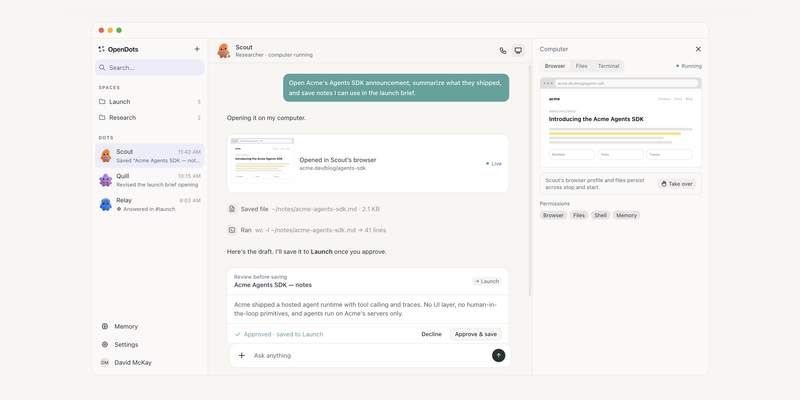
OpenDots addresses this fragmentation by organizing personal productivity around Spaces, Specialist Dots, and integrated Tiptap document pages. Distributed under the MIT License, the application pairs a Node.js Hono backend with a Vite React frontend.
| System Layer | Traditional CLI Agents | OpenDots Workspace Architecture |
|---|---|---|
| Persona Isolation | Monolithic global prompt | Specialist Dots with scoped role prompts and persistent memory |
| Document Context | External Markdown files | Embedded Tiptap pages with real-time agent read/write access |
| Computer Interaction | Unrestricted host shell | OpenBot container supervisor with explicit human takeover |
| Web Research | Local Chromium DOM scraping | Parallel MCP service returning up to 5 verified sources |
| Workplace Messaging | Custom webhook scripts | CopilotKit Channels with strict Slack tenant and user allowlists |
Subsystem mechanics: DotAgent runtime and OpenBot supervision
The core orchestration engine in OpenDots governs autonomous turn lifecycles, sandboxed container isolation, and external tool execution.
The DotAgent execution engine
Each specialized assistant persona in OpenDots is instantiated through the DotAgent class. Implemented in src/server/dot-agent.ts L28-L55, DotAgent extends AbstractAgent from @ag-ui/client, bridging the agent directly into CopilotKit runtime workflows.
To prevent runaway execution loops during multi-step tool invocations, the engine enforces a strict per-turn timeout constant:
const TURN_TIME_LIMIT_MS = 90_000;If an agent turn exceeds 90 seconds, an AbortController terminates the active run. Tool execution is coordinated through @tanstack/ai and @copilotkit/runtime/v2, binding workspace page-access tools, OpenBot computer actions, and learned skills directly into the active model context.
OpenBot computer control and HMAC token authorization
To execute desktop tasks-such as running interactive browser workflows, inspecting rendered UI components, and testing terminal commands-OpenDots integrates with OpenBot.
Rather than granting the agent direct access to the host operating system, all desktop interactions route through ComputerService (src/server/computer-service.ts L15-L42). Key architectural safeguards include:
- Container Isolation: Each Dot communicates with an isolated container supervisor assigned to an unprivileged port between
1024and65535. - Cryptographic Token Binding: Requests from OpenDots to the container supervisor require an
HMAC-SHA256signature derived from the master computer token (COMPUTER_TOKEN) and the specific Dot identifier. - Explicit Human Takeover: The supervision control schema tracks whether the active input holder is
botorhuman. When an operator triggers human takeover, the agent execution pauses immediately and captures a fresh resume snapshot before continuing once control is returned.
Streamable web research via Parallel MCP
OpenDots decouples interactive browser automation from routine factual web research. For standard document and web queries, the workspace routes requests to the Parallel search MCP server.
The webSearchProvider factory supports three operational modes: parallel, browser, or disabled. Under the default parallel mode, queries execute over the Model Context Protocol using StreamableHTTPClientTransport. The provider retrieves up to five relevant sources and validates that returned URLs strictly use http: or https: schemes without embedded credentials-offloading heavy browser rendering during standard information retrieval.
Hands-on developer deployment and workspace setup
OpenDots is designed for local self-hosting with minimal external dependencies.
Prerequisites and local initialization
OpenDots requires Node.js 22 or newer. Clone the repository, install dependencies, and initialize your environment configuration:
git clone https://github.com/CopilotKit/OpenDots.git
cd OpenDots
npm install
cp .env.example .env
Configure the primary environment variables in .env:
# Model provider configuration
OPENAI_API_KEY="sk-..."
COPILOTKIT_INTELLIGENCE_URL="https://api.copilotkit.ai"

# Optional OpenBot container supervisor
COMPUTER_SUPERVISOR_URL="http://127.0.0.1:4040"
COMPUTER_TOKEN="super-secret-hmac-seed"

# Optional web search provider override (parallel | browser | disabled)
WEB_SEARCH_PROVIDER="parallel"
PARALLEL_API_KEY="" # Optional; free tier applies if omitted
Launching development services
Start the full workspace using the root development script:
npm run devThis script invokes concurrently, watching backend TypeScript files under src/server/index.ts via tsx on port 3000 while serving the Vite React frontend on port 5173. For headless environments or fallback browser-based search without a full desktop container, the standalone browser service can be started independently:
npm run browserCustom Specialist Dot configuration
Specialist Dots are configured with scoped instructions and granular tool permissions. A dedicated research specialist can be configured through the workspace UI or seeded programmatically via workspace state stores:
// Sample programmatic Specialist Dot declaration
const researchDotConfig = {
  id: "researcher-dot",
  name: "Documentation Analyst",
  roleInstructions: `
    You are a technical research specialist. Analyze public APIs and summarize
    architectural trade-offs. Output structured notes directly to Pages.
  `,
  permissions: {
    webResearch: true,
    computerControl: false, // Disallow shell/browser execution for pure research
    mcpConnections: ["github-mcp", "postgres-mcp"],
  },
};
Security policies, telemetry boundaries, and failure handling
Operating an autonomous agent workspace with access to local documents and external messaging platforms requires strict security boundaries.
Enterprise Slack access boundaries
OpenDots binds Specialist Dots to Slack channels via @copilotkit/channels. To prevent unauthorized workspace members from invoking agent actions, src/server/slack-channel.ts L10-L40 enforces strict identity verification:
- Tenant and User Allowlisting: Inbound webhook events verify that
context.tenant.id === config.slackTeamand confirm the sender’s Slack user ID is explicitly listed inconfig.slackUsers. Messages from unverified tenants or users are dropped prior to agent instantiation. - Credential Leak Mitigation: The
safeFailureerror handler strips internal stack traces, file paths, and network metadata before logging or posting error responses back to Slack, preventing accidental exposure of API keys or internal tokens in shared channels.
Telemetry opt-out mechanisms
CopilotKit Intelligence and OpenDots collect anonymous setup analytics and crash diagnostics by default. Operators can disable telemetry across all workspace processes by setting the following environment flags:
COPILOTKIT_TELEMETRY_DISABLED=true
DO_NOT_TRACK=1
When either flag is enabled, both the application server and test runners bypass telemetry initialization and purge any queued diagnostic payloads.
Adoption trade-offs and decision criteria
OpenDots serves as both a daily-driver personal agent workspace and a reference implementation for the CopilotKit ecosystem.
When to adopt OpenDots
- Personal AI Research and Knowledge Workspaces: Engineers and researchers seeking a unified interface that pairs Tiptap document authoring with persistent, role-specific AI agents.
- Containerized Computer Automation: Teams evaluating OpenBot desktop interactions who require cryptographic supervisor authentication and seamless human-in-the-loop takeover controls.
- Reference Architecture for CopilotKit: Developers building production multi-agent applications looking for a concrete blueprint integrating
@copilotkit/runtime/v2,@ag-ui/client, CopilotKit Channels, and MCP tool transports.
Operational constraints to consider
- Single-Owner State Model: The current storage and workspace state architecture is optimized for an individual operator; multi-tenant RBAC and concurrent multi-user document collaboration require custom persistence extensions.
- Container Resource Overhead: Provisioning isolated OpenBot desktop containers for GUI and browser automation introduces additional memory and CPU overhead compared to lightweight API-only agent runners.