
Key Takeaways: OpenHuman is a private, UI-first open-source AI agent that connects to 118+ apps via one-click OAuth and builds a local memory of your work in minutes – not weeks – so your assistant actually knows you before you start prompting it.
What Is OpenHuman?
OpenHuman is an open-source agentic desktop assistant from the TinyHumans AI lab, built around a single bold idea: your personal AI should know you the moment you turn it on. Instead of starting from a cold context window and slowly learning your style through plugins, scripts, or weeks of usage, OpenHuman pulls data from the apps you already use, compresses it into a local knowledge graph, and gives your agent a working memory of your inbox, calendar, repos, notes, and chats from day one.
The project is published under the GNU license on GitHub at tinyhumansai/openhuman and is currently in early beta under active development. It’s written primarily in Rust with a TypeScript front end, and ships as a polished desktop application for macOS, Windows, and Linux. You can also find official downloads and product information on the TinyHumans homepage.
Why OpenHuman Stands Out
Most “personal AI” tools are either chat-scoped (they forget you between sessions) or plugin-heavy (you have to manually wire up every integration). OpenHuman takes a different stance with a few opinionated design choices.
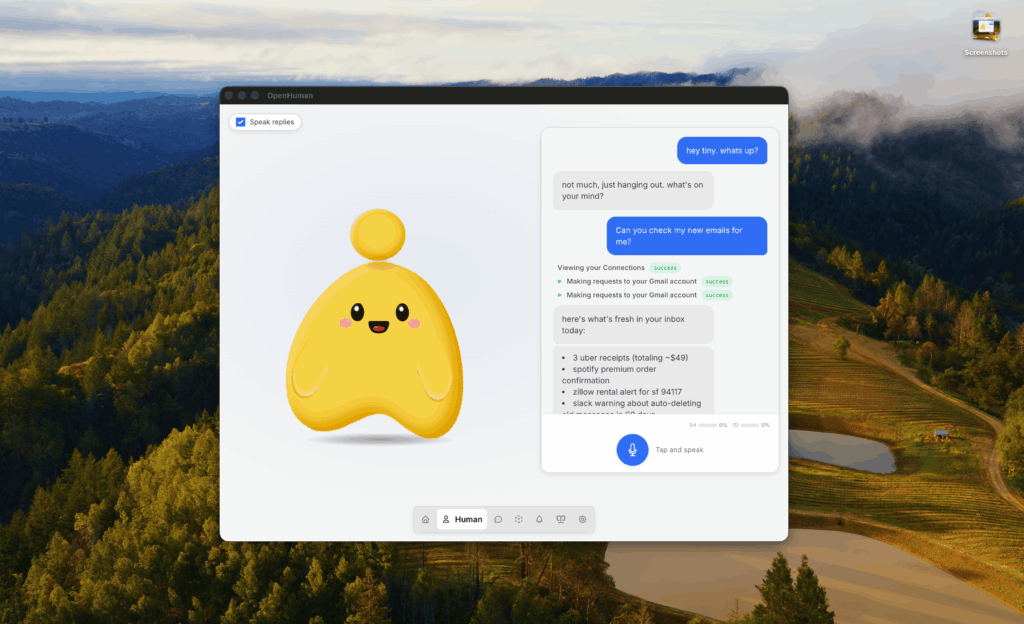
A UI-first, human-friendly experience. OpenHuman is built to be installed and used in minutes. There is no terminal, no YAML, and no config-first ritual. Onboarding takes you from install to a working agent in a few clicks. The agent even has a face – a desktop mascot that speaks, reacts, lip-syncs to native voice output, and can join Google Meet calls as an actual participant.
118+ third-party integrations with auto-fetch. With one-click OAuth, you can connect Gmail, GitHub, Notion, Slack, Stripe, Google Calendar, Drive, Linear, Jira, and many more. Every connection becomes a typed tool the agent can call. Better yet, every 20 minutes OpenHuman silently walks each active connection and pulls fresh data into your local memory, so the agent already has tomorrow’s context this morning.
A local Memory Tree plus Obsidian-compatible vault. All your data is canonicalized into roughly 3K-token Markdown chunks, scored, and folded into hierarchical summary trees stored in SQLite on your machine. The same chunks land as .md files in an Obsidian-compatible vault you can open, browse, and edit – inspired by Andrej Karpathy’s “obsidian-wiki” workflow.
Batteries included. Web search, a web-fetch scraper, a full coding toolset (filesystem, git, lint, test, grep), and native voice (speech-to-text in, ElevenLabs text-to-speech out) are all wired in by default. A built-in model router automatically sends each task to the appropriate LLM – reasoning, fast, or vision – under one subscription. If you prefer fully on-device workloads, optional local AI via Ollama is supported.
TokenJuice token compression. Every tool call, scrape result, email body, and search payload is routed through a smart compression layer before it reaches an LLM. HTML is converted to Markdown, long URLs are shortened, and verbose output is deduped and summarized. The result is the same information for up to 80% less cost and latency – while CJK characters, emoji, and other multi-byte text are preserved grapheme-by-grapheme.
Installing OpenHuman in Under Five Minutes
OpenHuman supports macOS, Linux x64, and Windows. There are two clean installation paths.
Option 1: Download the prebuilt installer (recommended)
Head to the official download page and grab the DMG (macOS) or EXE (Windows) installer that matches your platform. Double-click, follow the onboarding wizard, sign in, and you are ready to connect your first integration. This is the most beginner-friendly route – no terminal required.
Option 2: One-line terminal install
If you prefer the command line, the project ships official install scripts.
For macOS or Linux x64, open a terminal and run:
curl -fsSL https://raw.githubusercontent.com/tinyhumansai/openhuman/main/scripts/install.sh | bashFor Windows, open PowerShell and run:
irm https://raw.githubusercontent.com/tinyhumansai/openhuman/main/scripts/install.ps1 | iexOnce installed, launch the desktop app, sign in with your TinyHumans account, and the onboarding flow will walk you through connecting your first few integrations.
Option 3: Build from source (for contributors)
If you want to contribute or run a development build, the workflow is straightforward but has a few prerequisites: Git, Node.js 24+, pnpm 10.10.0, Rust 1.93.0 with rustfmt and clippy, CMake, Ninja, ripgrep, and your platform’s desktop build prerequisites.
git clone https://github.com/tinyhumansai/openhuman.git
cd openhuman
git submodule update --init --recursive
pnpm install
pnpm dev                          # web UI only
pnpm --filter openhuman-app dev:app   # full desktop shell
Before opening a pull request, the maintainers recommend running pnpm typecheck, pnpm format:check, and cargo check -p openhuman --lib. The CONTRIBUTING.md file in the repo documents the rest, and there is even an AI-agent-friendly contribution guide for newcomers.
Using OpenHuman Day to Day
Once installed, the typical first-run experience looks like this:
Step 1 – Connect your stack. Open the integrations panel and authenticate the services you actually use: Gmail, Calendar, GitHub, Notion, Slack, Drive, Linear. Each connection takes one OAuth click and instantly becomes a tool the agent can call.
Step 2 – Let auto-fetch warm up the memory. In the background, OpenHuman performs a 20-minute sync cycle, pulling emails, events, repos, documents, and messages into your local SQLite store. Within minutes the agent has a compressed view of your week.
Step 3 – Talk to it. Ask things like “Summarize unread emails from clients this week,” “What pull requests are waiting on my review,” or “Draft a follow-up to the meeting I had Tuesday with the design team.” Because the Memory Tree already contains the relevant context, you don’t have to paste threads or upload files manually.
Step 4 – Bring it into your meetings. Activate the desktop mascot and let it join a Google Meet as a real participant – listening, transcribing, and recalling context from prior conversations. With native voice in and ElevenLabs voice out, it becomes a hands-free thinking partner.
Step 5 – Inspect and edit your knowledge. Open the Obsidian-compatible vault to browse the Markdown notes the agent is building from your data. You can edit, delete, or annotate anything – it’s your file system, on your machine.
Optional power-user moves. Configure direct Composio mode to host your own real-time trigger webhooks. Switch the memory backend to the open-source agentmemory project to share durable memory with Claude Code, Cursor, Codex, or OpenCode. Or route specific workloads to a local Ollama model for maximum privacy.
Is OpenHuman Right for You?
OpenHuman is a strong fit if you want a desktop-grade personal AI that respects on-device privacy, minimizes vendor sprawl, and gives you real persistent memory rather than ephemeral chat history. It is especially compelling for developers, founders, and knowledge workers whose context lives across a dozen SaaS tools.
If you only need a quick chatbot, a hosted SaaS like ChatGPT or Claude is likely simpler. But if you’ve ever wished your assistant could remember last month’s emails, your repository structure, and yesterday’s meeting notes – without you babysitting plugins – OpenHuman is one of the most ambitious open-source attempts to make that real.
The project is moving quickly, contributors get free merch and Discord perks, and the roadmap points toward something larger: a transparent path toward a personal agent you actually own. Give the GitHub repository a star, run the installer, and let it pull your world into a memory you can finally read.








