
Key Takeaway:
OpenShorts lets you self‑host a full AI shorts studio—clip generator, AI actors, and YouTube publishing—with no subscriptions and no watermarks, all running on your own infrastructure.
What is OpenShorts?
OpenShorts is a free and open‑source AI video platform that combines three powerful tools in one: a clip generator, an AI UGC shorts creator with virtual actors, and a YouTube Studio automation layer. It is designed to turn long videos or uploaded files into vertical clips optimized for TikTok, Instagram Reels, and YouTube Shorts while also supporting fully AI‑generated marketing videos.
The project is MIT‑licensed and self‑hosted, which means you can run the entire stack on your own server, keep full control over your content, and remove platform watermarks from your workflow. OpenShorts focuses on automating the entire lifecycle—from detecting viral moments to rendering, titling, and publishing—rather than just cropping video segments.
Core Features at a Glance
OpenShorts is built to automate short‑form content production rather than just provide basic trimming tools. Its main feature pillars include:
- AI clip generator from long videos: Paste a YouTube link or upload a local file, and OpenShorts automatically finds and cuts high‑potential moments into vertical clips.
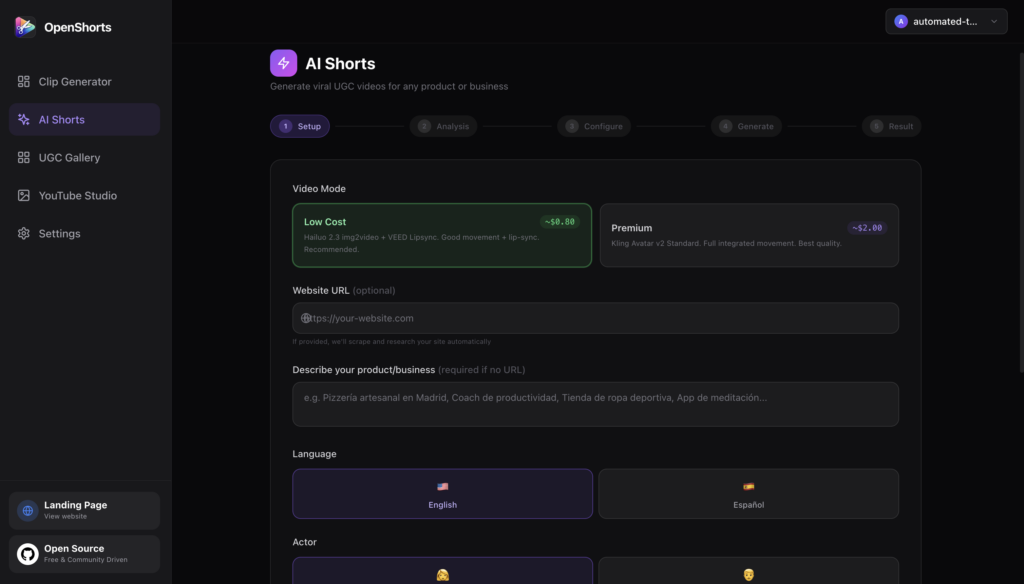
- AI Shorts with virtual actors: Create UGC‑style marketing videos with AI actors, AI voiceover, b‑roll, and subtitles without needing a camera or human talent.
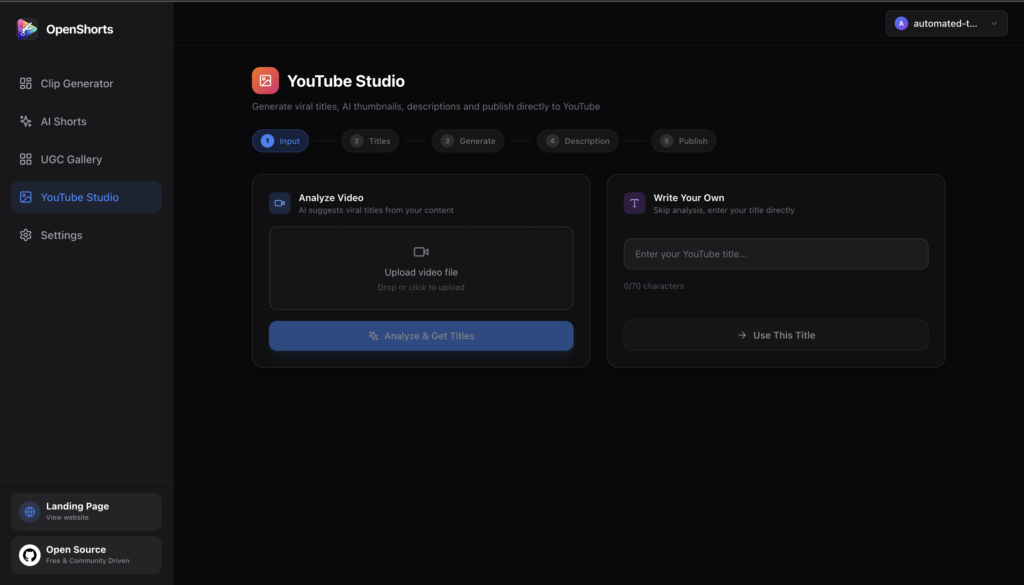
- YouTube Studio integration: Generate titles, descriptions, chapters, and thumbnails and upload directly to YouTube from the same interface.
- Self‑hosted, no watermarks: Run everything on your own infrastructure with no SaaS lock‑in or branded watermarks injected into your final videos.
For more details or to star the project, you can check out the official repository: OpenShorts on GitHub.
How OpenShorts Uses AI Under the Hood
OpenShorts leans heavily on modern AI models to automate the most painful parts of shorts creation. At a high level, the pipeline works like this:
- Transcription and analysis: Faster‑Whisper transcribes your video and produces word‑level timestamps suitable for precise clip cutting.
- Viral moment detection: Google Gemini 2.0 Flash analyzes the transcript to detect 3–15 moments most likely to perform well as short‑form hooks.
- Smart framing and cropping: OpenShorts runs scene analysis to determine the best framing strategy (tracked subject versus general blurred‑background layout).
- Speaker tracking: Face detection models like MediaPipe and YOLOv8 help track the active speaker and keep framing stable on the subject.
On top of this, OpenShorts uses AI copywriting to generate platform‑ready titles and descriptions tailored for Shorts, Reels, and TikTok. If you enable optional integrations like ElevenLabs and Upload‑Post, it can also add multilingual dubbing and one‑click posting to social platforms.
Why Self‑Host OpenShorts Instead of Using SaaS Clip Tools?
Hosted AI clip tools are convenient, but they come with per‑video pricing, watermarking, and limits on customization. OpenShorts flips that model by offering the core engine as MIT‑licensed open source that you can run yourself, with no subscription required from the project.
Because you deploy it on your own server or VPS, you control the infrastructure, scaling model, and where transcripts, videos, and generated clips are stored. This is particularly attractive for agencies, media teams, and power creators who batch‑process large volumes of content and want predictable costs and privacy.
For those who prefer a managed experience, there is also a paid hosted version that charges per video for AI features, while leaving the open‑source core free to self‑host. That gives you flexibility to start hosted for convenience, then migrate to a self‑hosted setup as your volume grows and your DevOps comfort increases.
System Requirements and Prerequisites
Before installing OpenShorts, make sure you have a basic modern infrastructure stack ready. At minimum, you should have:
- Docker and Docker Compose installed on your machine or server.
- A machine with enough CPU, RAM, and storage to handle video processing workloads for your typical clip length and batch size.
- A Google Gemini API key for AI‑powered viral moment detection and title generation.
OpenShorts also supports several optional third‑party integrations:
- Upload‑Post API key for direct posting to TikTok, Instagram, and YouTube.
- ElevenLabs API key to generate AI voice dubbing and translations in over 30 languages.
- Optional S3‑compatible storage for backups and external media storage.
All API keys are configured in the app and stored securely in your browser’s local storage, only being sent to the relevant providers when required by their APIs. That means OpenShorts itself does not become a central data broker of your credentials.
Step‑by‑Step: Installing OpenShorts With Docker
The easiest way to get OpenShorts running is via Docker Compose using the official repository. Here is a streamlined version of the quickstart:
1. Clone the repository
git clone https://github.com/mutonby/openshorts.git
cd openshorts
This pulls down the full codebase, including both backend and frontend services, plus the Docker configuration.
2. Start the stack with Docker Compose
docker compose up --buildThis single command builds and launches all services defined in the Docker Compose file. Under the hood, it will:
- Build the backend container (FastAPI + Python and AI processing stack).
- Build the frontend container (React dashboard built with Vite).
- Start both services with restart policies configured and map ports (backend around 8000, frontend around 5175 by default).
The first build can take a few minutes while dependencies and models are downloaded, but subsequent restarts will be significantly faster. Once the containers are running, you can open the frontend URL in your browser to access the dashboard.
3. Configure your API keys on first launch
When you first open the OpenShorts interface, you’ll be prompted to enter your API keys in a setup flow. At minimum you must provide your Google Gemini key, while Upload‑Post and ElevenLabs are optional but recommended if you want direct social posting and AI dubbing.
You can always revisit configuration later if you decide to enable more providers or switch environments. This makes it easy to start small on a local machine and later move the same configuration to a cloud VPS.
For visuals, the official website includes interface previews and marketing imagery: OpenShorts official site.
Generating Your First AI Clip
Once OpenShorts is installed and configured, creating your first clip takes only a few steps. The workflow looks like this:
1. Choose your source content
From the dashboard, you can either:
- Paste a YouTube URL (e.g., a podcast, interview, webinar, or tutorial).
- Upload a local video file up to roughly 2 GB, ideal for raw recordings or pre‑edited long‑form content.
OpenShorts will ingest the video, queue it for transcription and analysis, and prepare the transcript for AI processing.
2. Let AI find viral moments
After ingestion, OpenShorts uses Gemini to scan the transcript and pick the moments that have strong hooks or high engagement potential. It then maps those moments back to precise timestamps, assembling a set of candidate clips along with suggested titles and descriptions.
At this stage you can review the list of proposed clips, tweak which ones you want to render, and adjust durations or trims if needed. This keeps you in control while still benefiting from automated discovery.
3. Apply framing, subtitles, and styling
For each clip, OpenShorts automatically applies an optimal framing strategy based on scene composition.
- In TRACK mode, it uses face detection and object tracking to keep the primary subject centered with stabilization to avoid camera jitter.
- In GENERAL mode, it uses a professional blurred‑background layout that works better for group shots, landscape scenes, or wide compositions.
The system overlays subtitles using the word‑level timestamps, giving you clean, synced captions suited for silent‑autoplay feeds. You can then adjust visual styles, fonts, or layouts according to the options exposed in the UI.
4. Render and preview
Once you’re happy with the clips and styling, you trigger rendering from the dashboard. The backend processes each clip, applies subtitles and framing, and produces vertical videos ready for export or publishing.
You can preview the outputs inside OpenShorts to verify timing, captions, and framing before sending them out to the world. If something feels off, you can adjust inputs or configuration and re‑render individual clips without restarting the entire batch.
Using AI Shorts With Virtual Actors and Voice
Beyond clipping, OpenShorts also supports AI‑generated UGC‑style shorts by combining scripted content, AI actors, and generative voice. With the right integrations enabled, you can:
- Generate product or explainer scripts using AI instead of writing every line manually.
- Use AI actors and voice models to “perform” the script as if it were a real UGC creator video.
- Add b‑roll, overlays, and subtitles to make the result feel native to TikTok, Reels, and Shorts feeds.
ElevenLabs integration allows you to dub clips into 30+ languages with voice cloning, which makes it feasible to localize your content library globally without re‑recording. Combined with social posting integrations, this turns OpenShorts into a true multi‑market content engine, not just a clipping tool.
Publishing to YouTube and Social Platforms
The YouTube Studio‑style features of OpenShorts simplify the last mile of content distribution. Once clips are rendered, it can:
- Generate SEO‑ready titles, descriptions, and chapters based on the transcript and detected topics.
- Prepare thumbnails and metadata optimized for YouTube Shorts.
- Upload clips directly to YouTube through its publishing pipeline when configured.
When paired with Upload‑Post, you can also push clips directly to TikTok and Instagram using a unified flow instead of manually uploading to each platform. This not only saves time but helps maintain consistent copy, branding, and scheduling across channels.
OpenShorts sits at the intersection of open source, AI video automation, and self‑hosted creator infrastructure—giving you an end‑to‑end shorts factory you can actually own. Whether you’re a solo creator, agency, or media startup, it’s worth spinning up a Docker instance and seeing how much of your clipping and repurposing workflow you can offload to an AI‑powered stack.








