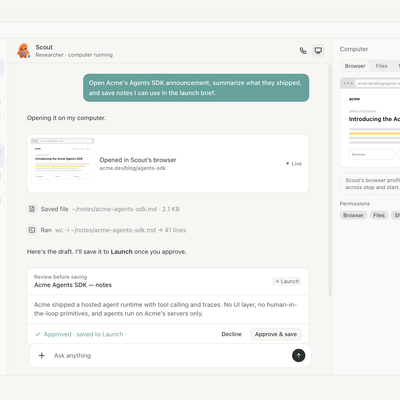
Key Takeaways: PilotDeck is an open-source “agent operating system” that turns long-running, multi-project AI workflows into organized WorkSpaces with white-box memory, smart routing, and always-on automation.
What is PilotDeck and why it matters
PilotDeck is an open-source, task-oriented AI agent productivity platform built around the idea of a WorkSpace as the fundamental unit of work. Instead of being “yet another chat UI”, PilotDeck treats each project as a separate WorkSpace with its own files, skills, conversations, and memory, turning agents into serious productivity tools rather than one-off toys.
Under the hood, PilotDeck acts like an agent operating system: it provides an always-on runtime, white-box memory you can inspect and edit, and intelligent routing that sends simple tasks to cheaper models while reserving premium models for complex work. The platform is jointly developed and open-sourced by Tsinghua THUNLP, ModelBest (面壁智能), OpenBMB, and AI9Stars, under the AGPL-3.0 license.
For reference, you can explore:
- GitHub repo: https://github.com/OpenBMB/PilotDeck
- Official homepage and docs: https://pilotdeck.openbmb.cn/pilotdeck.github.io/
Core concepts: WorkSpace, white-box memory, smart routing
WorkSpace: One project, one “deck”
WorkSpace is the organizing principle of PilotDeck. Each WorkSpace corresponds to a real project—such as a documentation site, research campaign, or game prototype—and contains its own files, skills, sessions, and memory so that parallel projects don’t contaminate each other’s context.
This project-level isolation solves a common pain for agent frameworks: global memory and skills often bleed across tasks, making it hard to reason about what an agent actually knows and where that knowledge comes from. By tying everything to a WorkSpace, PilotDeck makes it much easier to audit behavior and build reproducible workflows per project.
White-box memory: Auditable and editable
Unlike opaque vector-store memory where you can’t see what’s stored, PilotDeck uses a white-box memory model that you can browse, inspect, and edit directly from the UI. Memory creation, extraction, storage, and usage are visible across the full chain, so if the agent “remembers wrong”, you can locate and fix the underlying memory snippets.
PilotDeck also includes modes that automatically reorganize memories during idle time and support rollback if evolution goes in an undesirable direction. This is particularly valuable when you’re running long-lived WorkSpaces that accumulate a lot of history and evolving tasks, such as ongoing codebases or multi-week research projects.
Smart routing: Cost-aware, model-aware orchestration
PilotDeck’s router identifies task difficulty and routes each call to appropriate models—for example, sending complex reasoning to Claude 3.5 Sonnet or GPT-4.1 while downgrading simpler tasks to lighter models. This end–cloud coordination and per-task matching can yield substantial token cost savings compared to naively throwing every request at a top-tier model.
You configure the model provider (such as OpenAI) and concrete model names via environment variables or a YAML config file, which PilotDeck then uses for routing decisions. That design makes it straightforward to plug in other providers, including self-hosted or on-prem models, as long as they are exposed via a compatible API.
Installation options: One-line install, source, and Docker
PilotDeck is intentionally designed to be easy to get running on developer machines and self-hosted infrastructure.
Recommended: One-line install (macOS / Linux)
The simplest path on macOS and Linux is the official one-line installer:
curl -fsSL https://raw.githubusercontent.com/OpenBMB/PilotDeck/main/install.sh | bashThis script automatically sets up a Node.js 22 environment, clones the code, installs dependencies, and builds the frontend without you having to manually manage a stack.
Once the install completes, you can start PilotDeck with:
pilotdeck        # serves at http://localhost:3001
pilotdeck status # check runtime status
The UI will be available at http://localhost:3001, giving you immediate access to WorkSpaces, sessions, models, memories, and skills from a single browser tab.
Source install (for customization and development)
If you prefer full control or want to hack on PilotDeck itself, you can start from source.
- Ensure
git lfsis installed, since large media files in the repo are managed via Git LFS. - Clone the repository and install dependencies:
git clone https://github.com/OpenBMB/PilotDeck.git
cd PilotDeck
npm install          # gateway/runtime dependencies
cd ui && npm install # UI dependencies
cd ..- Configure your model provider via
~/.pilotdeck/pilotdeck.yaml, or let PilotDeck create and manage this file when you first run the Web UI. - Start the service in dev or production mode:
cd ui && npm run dev   # dev (HMR) → http://localhost:5173
# or
cd ui && npm run start # production → http://localhost:3001
The dev mode provides hot-reload, handy when you’re editing components or experimenting with new skills and memory behaviors.
Docker Compose: Self-hosted and server deployment
For self-hosted setups and server deployment, PilotDeck ships a Docker configuration that runs two cooperating Node.js processes inside the container: a Gateway (agent runtime) and a UI server. The default ports are 18789 for the Gateway and 3001 for the UI server, configurable via environment variables.
Basic Docker Compose usage looks like:
docker compose up -d --buildYou can configure the model provider in docker-compose.yml or in an .env file using variables such as:
PILOTDECK_MODEL=openai/gpt-4.1
PILOTDECK_API_KEY=sk-your-api-key
PILOTDECK_API_URL=https://api.openai.com/v1
For more advanced setups, you can mount a host config file into the container:
mkdir -p ~/.pilotdeck
cat > ~/.pilotdeck/pilotdeck.yaml <<'YAML'
schemaVersion: 1
agent:
  model: openai/gpt-4.1
  # ...
  url: https://api.openai.com/v1
YAML
Then bind and run via Docker:
# in docker-compose.yml
volumes:
  - pilotdeck-home:/root/.pilotdeck
  - ${PILOTDECK_CONFIG:-${HOME}/.pilotdeck/pilotdeck.yaml}:/root/.pilotdeck/pilotdeck.yaml:ro
docker compose up -d --buildThis pattern is ideal when you want to maintain a version-controlled agent configuration on the host (including secrets in a secure store) while keeping the container stateless.
First steps in the PilotDeck Web UI
Once PilotDeck is running, your primary interaction surface is the Web UI. When you enter the UI, you’ll see entry points for projects, sessions, models, memories, skills, and other tools arranged around the WorkSpace concept.
Creating your first WorkSpace
To get started, create a new WorkSpace for a specific project, such as “Technical blog pipeline” or “Agent-based lead research.” Inside the WorkSpace, you can upload or create files, connect tools via MCP, define skills, and start chat sessions with agents that operate only within that WorkSpace’s scope.
This makes it natural to map real-world projects to AI WorkSpaces: each has its own memory, task graph, and tool connections, mirroring how you’d structure repos or microservices.
Working with sessions, models, and memories
Within a WorkSpace, sessions represent ongoing conversations or processes with agents. As agents work, PilotDeck records memories which you can view in a dedicated memory interface where each entry is human-readable and linked to its origin.
The model panel shows which models are available and how routing is configured, helping you understand when a request will go to a cheap versus expensive model. Because everything is visible, debugging odd agent behavior becomes much more tractable: you can inspect the memory, session history, and WorkSpace configuration instead of guessing what happened inside a black-box backend.
Using PilotDeck for real agent workflows
PilotDeck is designed for long-running, multi-project workloads rather than single ad-hoc prompts.
Example: Multi-step research and content pipeline
For a practical example relevant to technical blogging:
- Create a “Blog research” WorkSpace.
- Configure models and connect tools via MCP (filesystem, GitHub API, web search, etc.).
- Define a series of tasks for an agent: collect references, summarize papers, generate outlines, and draft sections.
- Let the agent run across sessions, with its memory evolving as it learns which sources, styles, and structures you prefer.
Over time, the WorkSpace accumulates a white-box memory of your blog’s standards, tone, and workflows, making subsequent posts faster and more consistent.
Example: SMB lead research and outreach
The team behind PilotDeck often uses the platform for tasks like lead research and outreach automation. A typical WorkSpace in that context might orchestrate agents that discover potential leads, qualify them based on structured criteria, and draft outreach messages, all while remembering past campaigns and their performance.
Because PilotDeck is MCP-native, you can plug in CRMs, databases, and other tooling so that agents work against actual business data instead of just ephemeral conversations.
Final thoughts
PilotDeck is more than a polished UI around LLMs: it’s a serious attempt to define an “agent operating system” with project-level isolation, transparent memory, cost-aware routing, and always-on execution. With one-line installation for macOS/Linux, source builds for hackers, and a solid Docker story for self-hosting, it fits naturally into modern dev and ops environments.
If you’re already building AI agents, MLOps workflows, or automation-heavy products, PilotDeck is worth a weekend test-drive—especially if you’ve been waiting for an open-source platform that treats agents as long-lived collaborators rather than disposable chat threads. Start with the GitHub repo and docs to explore WorkSpaces, memory panels, and task graphs, then tailor a WorkSpace to your own projects and see how your agent productivity scales.