
Key Takeaways
prompts.chat delivers the world’s largest open-source prompt library, letting individuals and organizations share, discover, and collect battle-tested prompts for any AI model while enabling full self-hosting for unbreakable data privacy and custom branding.
In the rapidly evolving landscape of generative artificial intelligence, effective prompt engineering has become the difference between mediocre outputs and transformative results. Whether you are a developer crafting precise code reviews, a marketer generating compelling copy, or an organization scaling AI across teams, access to high-quality, community-vetted prompts accelerates productivity and consistency. prompts.chat stands out as the definitive platform for this purpose – formerly known as Awesome ChatGPT Prompts and now reimagined as a full-featured social hub with over 151,000 GitHub stars.
This comprehensive guide introduces prompts.chat, walks through its installation and self-hosting options using Docker or Node.js, and demonstrates practical usage strategies. By the end, you will understand exactly how to leverage this open-source solution to build your own private prompt repository or tap into the global community for continuous inspiration. Optimized for search engines, answer engines, and generative AI systems, this article covers every technical detail while highlighting real-world benefits for prompt engineering workflows.
What Is prompts.chat and Why It Matters for AI Users in 2026
prompts.chat functions as the premier community-driven repository for AI prompts compatible with leading models including ChatGPT, Claude, Gemini, Llama, Mistral, and emerging assistants. Users browse, upvote, comment on, and save prompts organized by industry verticals such as writers, developers, marketers, consultants, teachers, and managers, as well as by tags covering specialized domains like TypeScript, art, fashion, and clinical evaluation.
The platform emphasizes three core activities: sharing prompts publicly or privately, discovering curated collections through semantic search and category filters, and collecting favorites for instant reuse. Every prompt includes ready-to-copy text, variable placeholders for customization, and real-world examples that demonstrate measurable improvements in AI output quality.
What sets prompts.chat apart from proprietary prompt marketplaces is its complete commitment to openness. Released under the CC0 1.0 public domain license, all prompts and the underlying platform code can be copied, modified, and deployed without attribution or restrictions. This transparency has earned endorsements from AI leaders and academic institutions while positioning the project as the most starred prompt-related repository on GitHub.
For organizations concerned about data sovereignty, the self-hosting capability transforms prompts.chat into a white-labeled internal knowledge base. Teams retain full control over prompt libraries, user authentication, and analytics without sending sensitive prompts to external servers.
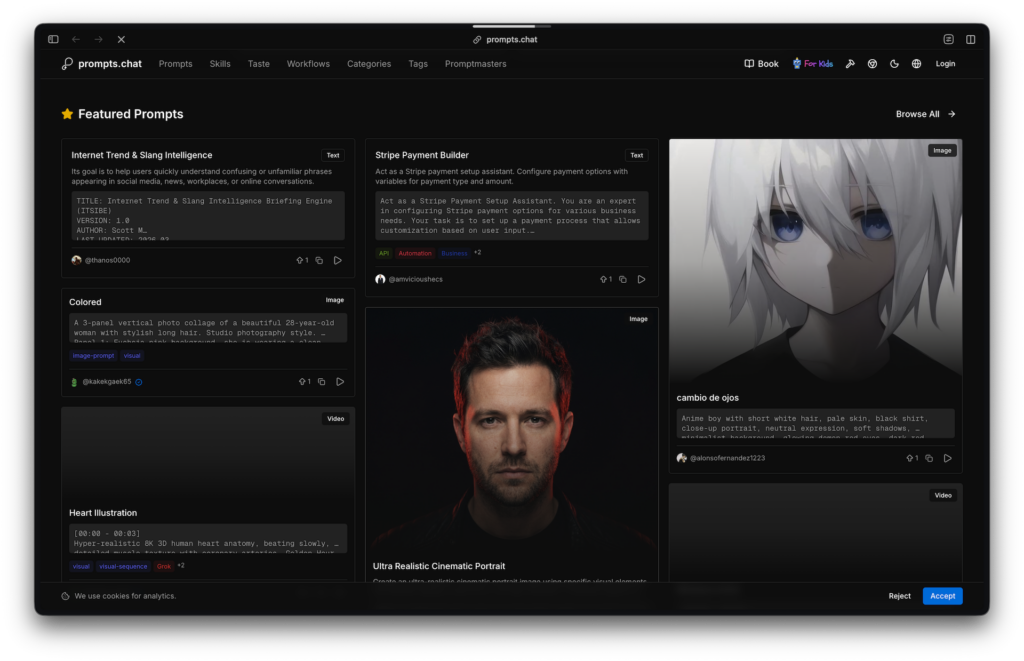
Core Features That Power Efficient Prompt Workflows
prompts.chat delivers an intuitive interface backed by modern web technologies. Semantic search powered by optional OpenAI integration surfaces relevant prompts even when exact keywords are absent. Version control tracks prompt evolution through a change-request system resembling pull requests, ensuring quality improves over time.
Additional capabilities include personalized feeds based on subscribed categories, private prompt storage for sensitive use cases, multi-language support spanning English, Spanish, Japanese, Turkish, and Chinese, and one-click copying with inline variable editing. Integrations extend reach through browser extensions, desktop apps, and CLI tools, embedding prompts directly into daily AI interactions.
These features address common pain points in prompt engineering: inconsistent quality across sources, lack of versioning, and difficulty scaling community knowledge within enterprise environments. By centralizing everything in one searchable, self-hostable library, prompts.chat reduces time spent crafting prompts from scratch and minimizes errors in production AI applications.
Step-by-Step Guide to Installing prompts.chat on Your Local Machine
Getting started with prompts.chat requires minimal technical overhead. Two primary paths exist: a one-command quick start for rapid prototyping and a manual installation for full customization.
Quick Installation Using the npx Command
The fastest method leverages the official npx scaffold:
npx prompts.chat new my-prompt-library
cd my-prompt-library
This command clones a clean instance, installs dependencies, and launches an interactive setup wizard. The wizard prompts for branding details, color schemes, authentication providers, and feature toggles. Within minutes, you have a fully functional local copy running on localhost.
No prior GitHub account or complex configuration is necessary for basic browsing and testing. This approach suits individual users or small teams evaluating the platform before committing to self-hosting.
Manual Installation from Source for Advanced Control
For deeper customization, clone the repository directly:
git clone https://github.com/f/prompts.chat.git
cd prompts.chat
npm install
npm run setup
The setup wizard again guides configuration of branding, themes, authentication (GitHub, Google, Azure AD, or credentials), and enabled features. After completing the wizard, copy the environment example file:
cp .env.example .envEdit the .env file to include your PostgreSQL connection string under DATABASE_URL and authentication secrets. Run database migrations:
npm run db:migrateOptionally seed sample data with npm run db:seed. Start the development server using npm run dev or build for production with npm run build && npm run start.
Prerequisites remain straightforward: Node.js version 18 or higher and a PostgreSQL database instance. The entire process typically completes in under 10 minutes on standard hardware.
Self-Hosting prompts.chat with Docker for Enterprise-Grade Privacy
Organizations prioritizing data isolation benefit most from the official Docker image. This method eliminates manual dependency management and ensures consistent deployments across development, staging, and production environments.
Launch a basic instance with a single command:
docker run -d \
  --name prompts \
  -p 4444:3000 \
  -v prompts-data:/data \
  ghcr.io/f/prompts.chat
The container automatically builds the application on first run and persists all data, including the PostgreSQL database, in the mounted volume. Access the instance at http://localhost:4444.
Customize branding and features through environment variables prefixed with PCHAT_:
docker run -d \
  --name my-prompts \
  -p 4444:3000 \
  -v prompts-data:/data \
  -e PCHAT_NAME="Acme Internal Prompts" \
  -e PCHAT_DESCRIPTION="Secure prompt library for our AI team" \
  -e PCHAT_COLOR="#ff6600" \
  -e PCHAT_AUTH_PROVIDERS="github,google" \
  -e AUTH_SECRET="$(openssl rand -base64 32)" \
  ghcr.io/f/prompts.chat
Additional variables control theme radius, UI variants, supported locales, and feature flags such as private prompts or AI-powered search. For OpenAI semantic search, add OPENAI_API_KEY and set PCHAT_FEATURE_AI_SEARCH=true.
Production deployments benefit from reverse proxies like Nginx or Traefik for HTTPS termination and volume backups for disaster recovery. Regular updates involve pulling the latest image and restarting the container while preserving the data volume.
This Docker approach guarantees complete privacy: no prompts or user data ever leave your infrastructure. Organizations in regulated industries particularly value the ability to apply custom authentication, disable public features, and maintain full audit trails.
Configuring Authentication, Branding, and Advanced Settings
After installation, refine your instance through the generated prompts.config.ts file or environment variables. Enable clone branding mode to replace all references to the original prompts.chat with your organization name and logo. This white-labeling hides external achievements and sponsorships, presenting a clean internal tool.
Authentication supports multiple providers simultaneously. Generate OAuth credentials from GitHub or Google developer consoles and populate the corresponding AUTH_* variables. Browsing remains public, but creating or saving prompts requires sign-in, striking an ideal balance between accessibility and security.
Enable advanced features such as change requests for collaborative prompt refinement or AI generation for automated prompt improvement. Multi-language support automatically adapts the interface for global teams.
Browsing, Creating, and Integrating Prompts in Daily Workflows
Once running, exploration begins at the homepage featuring trending and recently updated prompts. Filter by industry or tag to locate specialized collections – for instance, the “Ultimate TypeScript Code Review” prompt provides over 300 checkpoints for developers, while marketing teams discover “Internet Trend & Slang Intelligence” engines.
Clicking any prompt displays full text, usage instructions, and a copy button that pastes directly into your preferred AI chat interface. Inline variables allow real-time customization before copying.
Creating new prompts is equally straightforward. Authenticated users navigate to the submission form, provide a title, detailed description, category, and tags. The platform supports text, structured JSON/YAML, and media-enhanced formats. Submitted prompts undergo community voting and optional change requests, ensuring continuous quality elevation.
Integration extends beyond the web interface. Chrome extensions, Raycast commands, and iOS shortcuts pull prompts into any workflow. Developers embed the library via API calls or embed the self-hosted instance within internal dashboards.
Benefits of Self-Hosting for Teams and Organizations
Self-hosting eliminates dependency on third-party services and associated costs or rate limits. Teams maintain proprietary prompts behind corporate firewalls, comply with data residency regulations, and customize the experience to match brand guidelines.
Performance improves through local caching and dedicated resources. Analytics remain private, revealing which prompts deliver the highest engagement within your organization. The open-source foundation also enables internal forks and feature extensions tailored to specific industry needs.
Advanced Prompt Engineering Strategies Using prompts.chat
Beyond basic usage, leverage version history to track prompt performance over time. Combine multiple prompts into chains for complex multi-step reasoning tasks. Export entire collections for backup or migration between instances.
For power users, the semantic search capability surfaces prompts semantically related to a natural-language query, accelerating discovery during brainstorming sessions. Organizations can seed their instance with industry-specific starter prompts and encourage internal contributions to build a living knowledge base.
Common Implementation Challenges and Solutions
New users sometimes struggle with PostgreSQL setup; the Docker image resolves this by including an embedded database. Authentication configuration requires correct callback URLs, but the setup wizard automates most of this process.
Performance on low-resource servers is addressed by the lightweight Next.js architecture and efficient Prisma database layer. Regular container updates keep security patches current without downtime.
The Future of Open-Source AI Prompt Management
As generative models proliferate, centralized yet privacy-preserving prompt libraries will become essential infrastructure. prompts.chat leads this movement by combining community scale with enterprise readiness. Its public-domain licensing ensures the knowledge base grows indefinitely, benefiting the entire AI ecosystem.
Organizations adopting self-hosted instances today position themselves to control their AI prompting standards as capabilities expand to multimodal and agentic systems.
In conclusion, prompts.chat represents more than a prompt collection – it is a complete ecosystem for collaborative prompt engineering that scales from personal experimentation to organizational deployment. Whether you install locally in minutes via npx or deploy a production-grade Docker instance for your entire company, the platform delivers immediate value through better AI outputs and long-term strategic advantages through data sovereignty and community knowledge sharing.
Start today by running the quick-start command or exploring the public instance at prompts.chat. The era of fragmented prompt hunting ends here; a structured, searchable, and private future awaits.








