
Key Takeaway: RAGFlow turns your documents into a self-hosted, production-ready RAG engine so your AI agents can answer questions accurately with explainable citations.
What is RAGFlow?
RAGFlow is an open‑source Retrieval‑Augmented Generation (RAG) engine designed to give AI agents a much richer, more reliable context layer built on top of your own documents. Instead of throwing raw PDFs or web pages at a vector store and hoping for reasonable answers, RAGFlow focuses on deep document understanding, hybrid search, and explainable citations across complex formats like PDFs, Office docs, images, and spreadsheets.
It acts as an end‑to‑end platform for building AI chatbots and agents that can genuinely “know” your knowledge base, from ingestion and chunking to retrieval, orchestration, and deployment. RAGFlow is maintained by InfiniFlow and integrates well with their AI‑native database Infinity, but it also works with a wide range of LLM providers and local models.
Official links to bookmark:
- GitHub repo: https://github.com/infiniflow/ragflow
- Homepage and docs: https://ragflow.io
Core features of RAGFlow
RAGFlow brings a lot more to the table than a simple “upload docs and chat” tool. At a high level, you get:
- Deep document understanding: layout‑aware parsing for PDFs, tables, slides, resumes, legal docs, and more, with template‑based chunking tuned for different formats.
- High‑precision hybrid search: combines vector search, BM25, and tensor/multi‑vector scoring with re‑ranking for better recall and precision on long or messy documents.
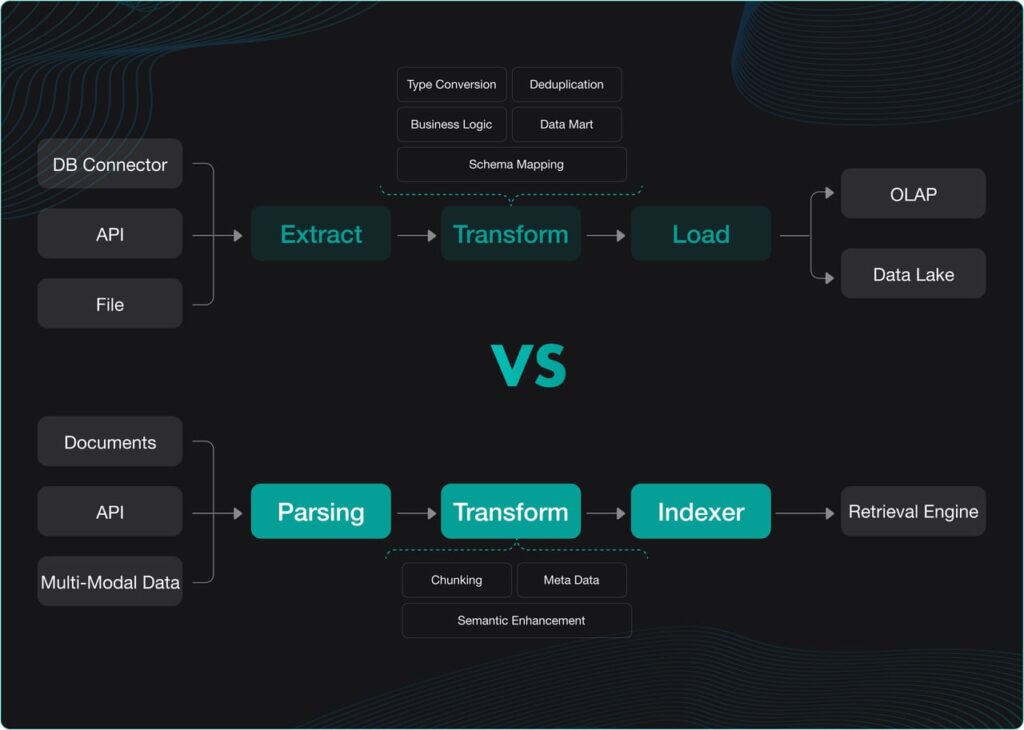
- Visual ingestion pipeline: RAGFlow exposes the entire ETL flow—parsing, transforming, indexing, and retrieval—so you can see and adjust how content is chunked and stored.
- Unified agent orchestration: build AI agents and workflows that combine RAG, tools, and Model Context Protocol (MCP) in a visual, node‑based editor.
- Multimodal file support: handle PDFs, DOC/DOCX, TXT/MD, CSV/XLSX, PPT/PPTX, plus images like JPEG/PNG/TIF/GIF in one consistent pipeline.
- LLM flexibility: connect to mainstream hosted LLMs or run local models via Ollama, Xinference, or LocalAI for privacy‑sensitive setups.
How RAGFlow fits into a RAG architecture
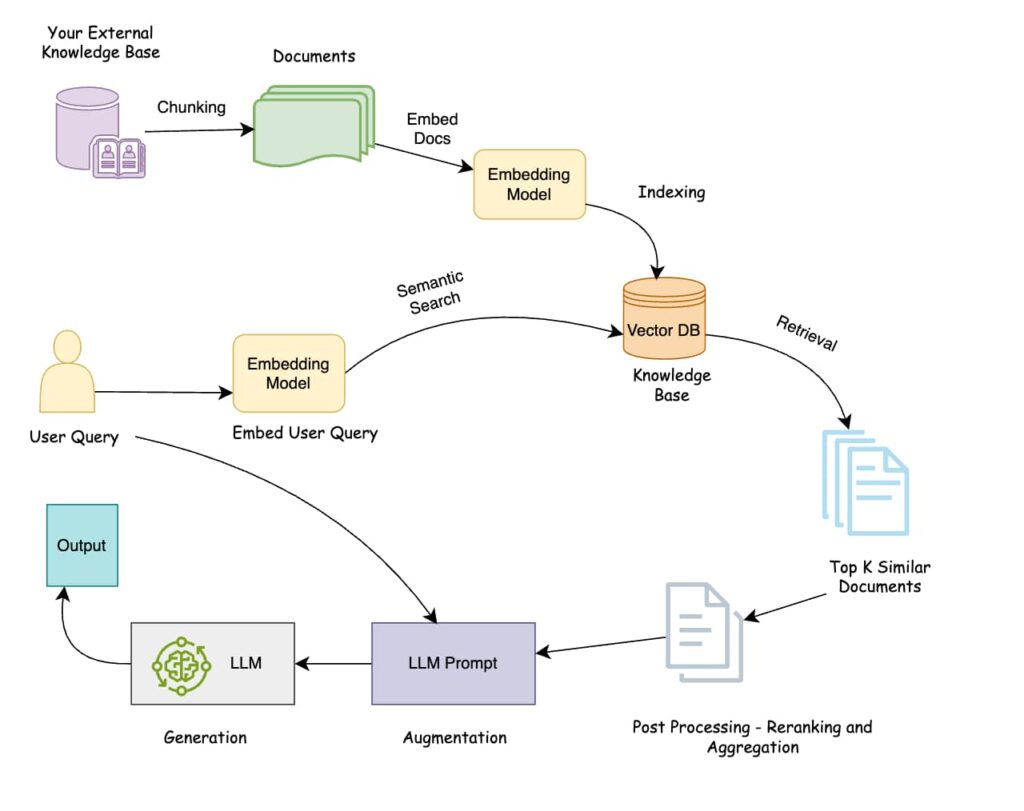
Under the hood, RAGFlow looks like a full RAG stack in a box. It contains:
- An ingestion pipeline that parses and normalizes documents, applies layout‑aware chunking templates, and enriches content with metadata, keywords, and questions.
- A retrieval engine that indexes chunks with hybrid search (vector + BM25 + tensor) and re‑ranking to surface the most relevant context for each query.
- An orchestration layer where you define workflows and agents that decide when to call retrieval, how to combine tools, and how to construct prompts for the LLM.
- A chat interface and API where users or applications ask questions and receive grounded, citation‑backed answers.
In practice, you upload your documents, RAGFlow ingests them into a knowledge base, and your chatbots or agents query that knowledge base rather than relying solely on the base model’s training data.
Installing RAGFlow with Docker (recommended)
The easiest way to get RAGFlow running is with Docker and Docker Compose, which encapsulate Elasticsearch, MinIO, MySQL, Redis, and the RAGFlow services in one stack. This approach works on Linux, macOS, and Windows hosts as long as Docker is installed.
Prerequisites
The official quickstart and deployment docs recommend at least:
- CPU: 4+ cores (x86 recommended).
- RAM: 16 GB or more.
- Disk: 50 GB+ free for documents, indexes, and logs.
- Docker: version 24.0.0 or higher.
- Docker Compose: v2.26.1 or higher.
Because Elasticsearch is part of the stack, you must set vm.max_map_count on the host to at least 262144 before starting containers:
# Check current value
sysctl vm.max_map_count

# Temporary change (resets on reboot)
sudo sysctl -w vm.max_map_count=262144
To persist this across reboots, add the following to /etc/sysctl.conf and reboot:
vm.max_map_count=262144Quick Docker deployment
Once Docker is ready and vm.max_map_count is configured, the typical flow is: [
git clone https://github.com/infiniflow/ragflow.git
cd ragflow
Then start the full stack (command may vary slightly by version):
cd docker
docker compose -f docker-compose.yml up -d
This brings up RAGFlow along with its dependencies (MySQL, Elasticsearch, MinIO, Redis, Nginx) using prebuilt images. After containers are healthy, you can open your browser and navigate to the configured host and port, typically:
http://localhostorhttp://127.0.0.1in local setups.http://<server-ip>orhttps://<domain>in cloud deployments.
You should see the RAGFlow welcome screen and be able to sign up an initial admin user on first launch.
Running RAGFlow on ARM and custom Docker images
RAGFlow officially ships images for x86, but you can also run it on ARM64 (e.g., Apple Silicon) by building your own Docker image. The docs describe a build process like:
git clone https://github.com/infiniflow/ragflow.git
cd ragflow
uv run python3 download_deps.py
docker build -f Dockerfile.deps -t infiniflow/ragflow_deps .
docker build -f Dockerfile -t infiniflow/ragflow:nightly .
You then update the RAGFLOW_IMAGE environment variable in docker/.env to point at your newly built image and start the stack with the platform‑specific compose file, for example:
cd docker
docker compose -f docker-compose-macos.yml up -d
This is handy if you’re developing locally on an M‑series Mac but deploying to x86 servers in production.
Launching RAGFlow from source (developer mode)
If you want deeper control or need to debug the backend, you can launch RAGFlow directly from source instead of via Docker. The docs outline a workflow along these lines:
- Clone the repo and install Python dependencies with
uv, creating a.venvvirtual environment. - Use Docker Compose only for “base” services (MinIO, Elasticsearch, Redis, MySQL) via
docker-compose-base.yml. - Configure hosts and ports in
service_conf.yamland/etc/hosts(mappinges01,mysql,minio,redis, etc. to127.0.0.1). - Start the backend service by running the Python entrypoints (
ragflow_server.pyand task executors). - In the
webdirectory, install Node dependencies and runnpm run devto bring up the frontend.
This mode is more involved but ideal if you plan to extend RAGFlow, instrument it heavily, or contribute to the project.
First steps in the RAGFlow UI
Once RAGFlow is running, your typical first move is to create a workspace and knowledge base, then upload a few documents and start chatting.
Creating a knowledge base
After logging in:
- Open the Knowledge Base section.
- Click Create or New Knowledge Base, give it a descriptive name and description matching the domain (e.g., “Product Docs”, “Internal Policies”).
- Choose your primary language and any special chunking templates if offered (for example, templates tuned for PDFs vs. tables).
You can then upload documents in supported formats—PDFs, Word, PowerPoint, Excel, text, markdown, CSV, and common image formats. RAGFlow parses them, applies document‑structure recognition, and splits them into chunks that preserve semantic and visual context.
The UI lets you inspect chunks, tweak metadata, and even attach additional keywords or “seed questions” to improve retrieval ranking. This visibility is crucial when you want to debug why certain answers are appearing or missing.
Configuring model providers
Next, configure one or more LLM providers:
- Plug in API keys for hosted providers (OpenAI, Anthropic, etc.) in the Model Providers panel.
- Or, for privacy‑first setups, point RAGFlow at a local model server using Ollama, Xinference, or LocalAI.
You can usually assign different models for retrieval, rewriting, and final answer generation, balancing cost and quality per use case.
Building your first chatbot or agent on RAGFlow
With a knowledge base and model provider configured, you can create a chatbot or agent that uses RAGFlow’s retrieval pipeline.
Knowledge‑base chatbots
In the UI, create a new Chatbot or Assistant and connect it to one or more knowledge bases you just built. Define:
- The assistant persona/instructions (“You are a support agent who only answers from these docs”).
- Whether to show citations and sources for each answer.
- Any guardrails you need around tone, language, or allowed topics.
Once saved, you can chat directly in the browser or embed the chatbot into your website or internal tools via JavaScript snippets or REST APIs.
Agentic workflows and tools
RAGFlow is built not just for simple Q&A but also for agentic workflows. Through a visual canvas, you can connect nodes such as:
- “Receive user query”
- “Retrieve from knowledge base”
- “Call external API/tool”
- “Let LLM reason over retrieved context”
- “Format final answer with citations and next‑step suggestions”
RAGFlow also supports Model Context Protocol (MCP) which lets agents call out to external tools (databases, APIs, other services) in a structured way. You can run the MCP server in self‑hosted mode pointing at your RAGFlow instance, then wire it into IDE agents or other MCP‑aware clients.
Self‑hosting, scaling, and managed options
RAGFlow is designed to be self‑hosted by default, but you are not locked into a single deployment model. Options include:
- On‑premise Docker: run the official stack on your own Linux servers or Kubernetes clusters, attaching persistent volumes for Elasticsearch, MySQL, MinIO, and Redis
- Cloud VMs: deploy via Azure Marketplace or similar images that bundle RAGFlow, Ollama, and GPU‑accelerated models for faster inference.
- Managed services: use providers like Railway or Elestio that offer “RAGFlow as a Service” if you want to avoid infrastructure maintenance while keeping an open‑source core.
Whichever path you choose, you still benefit from an open, inspectable engine that you can extend, fork, and integrate into your broader AI stack.
If you are serious about building RAG‑powered applications—support bots, internal knowledge tools, or agentic workflows—RAGFlow gives you an opinionated, production‑grade foundation rather than a pile of libraries. You get deep document understanding, hybrid search, transparent chunking, and a visual orchestration layer, all packaged in an open‑source project you can self‑host and customize.
For developers, data teams, and AI practitioners who want to move beyond “demo‑ware” RAG into something reliable, explainable, and scalable, spinning up RAGFlow with Docker, loading a small corpus, and wiring an agent on top is an excellent next experiment.








