You find a video you want to save. Look for the download button: it’s missing. A screenshot? The result is just a single frozen frame.
Screen recording? The quality is ruined and the sound is messed up, making a proper Instagram Reels Downloader the only way to capture the original file intact.
If you need to download IG videos in a more reasonable way, Snapgram is the answer.
Paste the link, click the button, and the video is instantly saved to your gallery. No login, no watermark, no drama.
Why Snapgram is the First Choice for Downloading IG Videos
Whether you are dealing with Reels or a standard Instagram Story download, the main problem isn’t the technical side, but the complexity of the process.
Screen recording does work, but the results are never clean: notifications pop up suddenly, the resolution drops, and the audio often desyncs.
Snapgram cuts out all the hassle. From Reels videos to regular feed videos, everything is processed in seconds.
What you receive is an MP4 file with the original resolution up to 1080p, exactly as the original creator uploaded it.
No apps to install. No accounts to create.
Snapgram works directly from your browser, wherever you open it: Safari, Chrome, or any other browser you use every day.
And it’s free. Not free with a watermark, not free with download limits. Absolutely free with no strings attached.
Snapgram Features That Make Downloading Simpler
Snapgram isn’t just a Reels downloader. When you open the platform, you’ll find several features that are immediately useful for various purposes.
The Reels Downloader built into Snapgram saves vertical videos complete with original audio.
So if there’s a Reel with a song you like, the music remains intact in the file you download, not cut, not lost.
Video Post Downloader handles videos posted in regular feeds, including longer ones. One click, and they go straight to your downloads folder or photo gallery.
Stories Downloader is useful for saving content that by default disappears after 24 hours.
Want to save important announcements from the accounts you follow before they expire? Here’s the solution.
Both carousels and photo albums can be downloaded simultaneously. Snapgram loads the entire gallery of posts, so you can choose which ones to save, or save them all at once.
All without watermarks, without additional logos. The file you receive is a clean file, ready to be used for any purpose.
How to Use Snapgram Instagram Reel Downloader, Step by Step
The process is three steps. No need for lengthy tutorials.
First, open Instagram and find the video or Reel you want to save.
Tap the three-dot icon (…) in the top right corner of the video, then select “Copy Link.” The link is now in your clipboard.
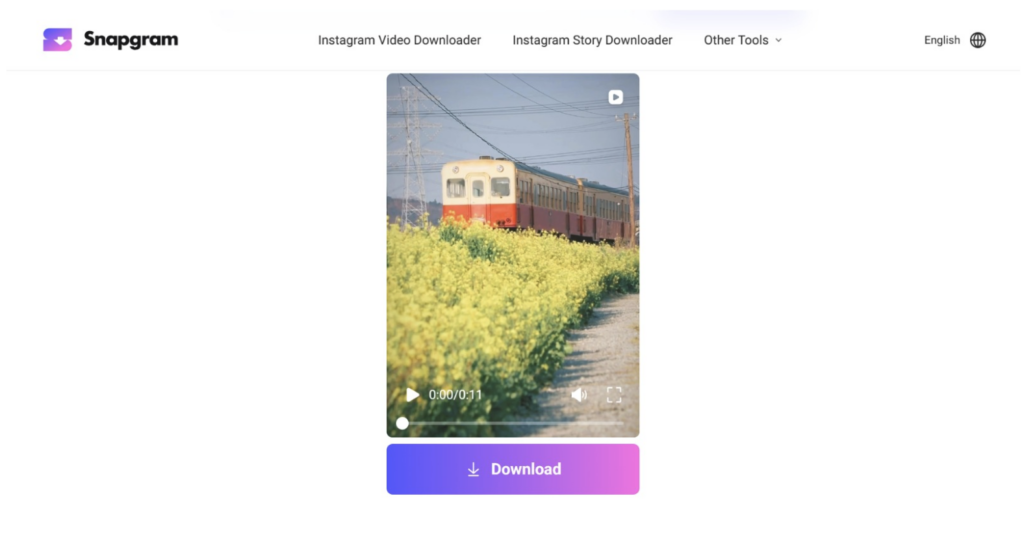
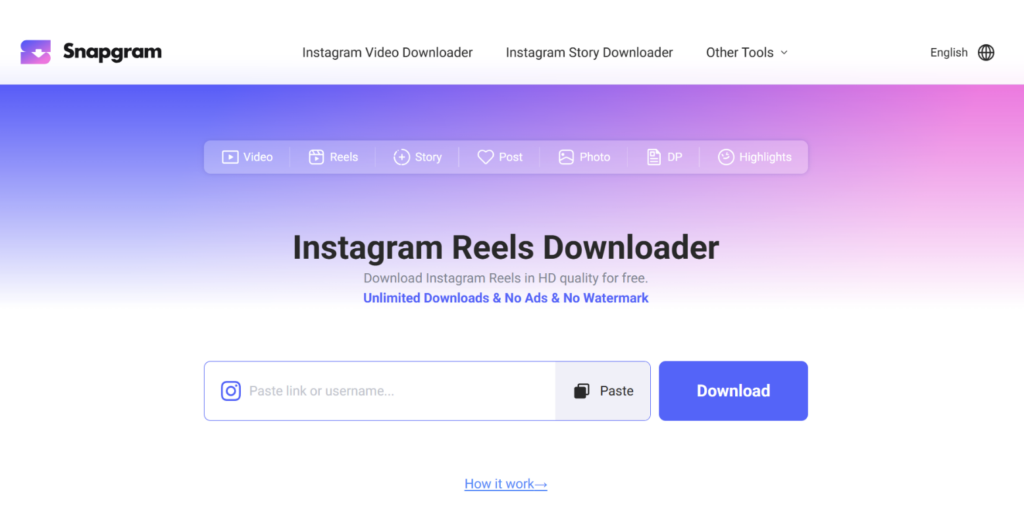
Second, open Snapgram in your browser. Paste the link into the provided field, then click the download button. Snapgram will process your request within seconds.
Third, select your desired quality (if available), then click download. The file will be saved directly to your photo gallery or downloads folder on your device.
For iPhone users: the process is the same, but make sure you open Snapgram via Safari.
iOS has a slightly different way of working with saving files, and Safari handles it more smoothly than any other browser.
For Android users: no additional steps. Paste, click, save. Finished.
Is Snapgram Safe to Use? Here’s What You Need to Know
These security questions are natural, especially if you’ve never used a third-party download tool before.
Snapgram does not store user data. No download history is recorded.
No personal information is collected. Because Snapgram doesn’t require a login, no account can be traced back to you.
What you need to understand: Snapgram can only download content from public accounts.
If the Instagram account whose posts you want to save is set to private, Snapgram can’t access it. This isn’t a bug, but rather the way things work, in accordance with its content access policy.
Regarding the use of downloaded content: saving it for personal use, watching it offline, or archiving one’s own posts are common.
What’s important to note is that when someone else’s content is reuploaded without permission or credit, it’s not about Snapgram, but about how you use it.
Tips for Maximizing Snapgram for Daily Needs
Bookmark Snapgram in your browser now. This is the easiest way to avoid having to retype the address every time you need to download a video.
If you frequently download from Instagram via your phone, try adding Snapgram to your home screen as a web shortcut.
In both Safari and Chrome, there’s an “Add to Home Screen” option that allows quick access to regular apps.
One thing that’s often overlooked: the quickest way to copy a link on Instagram is from the app directly, not from a browser.
Tap the three-dot icon on a post or Reel, select “Copy Link,” and the link is ready to be pasted into Snapgram.
Snapgram works just as well on desktop. If you’re working on your laptop and come across interesting content, open Instagram in a browser tab, copy the link, and then paste it into Snapgram in another tab. Everything is saved to your downloads folder without having to switch to your phone.
That Instagram video that piqued your interest doesn’t have to disappear after you close the app.
Snapgram Instagram Reel Downloader is exactly what you need: fast, clean, and hassle-free. You already know how, just give it a try.
Conclusion
Saving videos from Instagram shouldn’t be as complicated as you might think.
Snapgram Instagram Reel Downloader is a truly simple solution: no installation required, no account required, and no watermark left on the files you download.
From viral Reels, videos in feeds, to Stories that disappear in 24 hours,
Snapgram handles everything in one place. Video quality is maintained up to 1080p, and the original audio is not lost during the download process.
More importantly, your privacy is secure. Snapgram doesn’t store your search history, doesn’t log what you download, and doesn’t ask for any information to use it.
If you’ve been relying on screen recording or other complicated methods, now’s the perfect time to switch.
Open Snapgram, paste the video link, and save it directly to your gallery. Three steps, and you’re done.
Snapgram is a sensible choice for anyone who deals with video content on Instagram on a daily basis.