
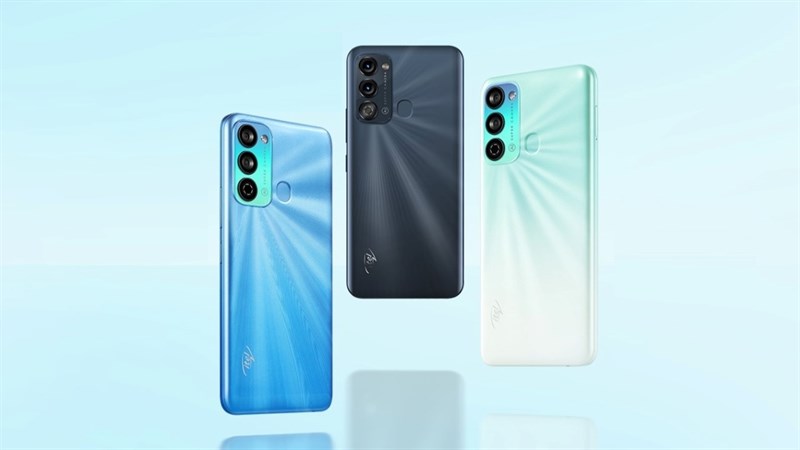
This mobile phone features a 16.76 cm (6.6) HD+ IPS Waterdrop display so that you can enjoy vibrant videos and true-to-life images. With a 90% screen-to-body ratio and up to 480 nits brightness, you can get an enhanced user experience even during bright sunlight. Also, courtesy of the 2.5 D Curved display, you can get a panoramic viewing experience on this phone.
With a media playback time of up to 58.33 hrs, talk time of up to 28.11 hrs and up to 15.32 hrs of YouTube browsing, this 5000 mAh mega battery allows you to stream unlimited TV shows or videos and play games for a long time. Also, it comes with an AI Power Master feature in this phone that monitors your app usage and increases the battery backup by 20%, thus ensuring low power consumption.
This smartphone is equipped with up to 3 GB of RAM so that you can get exceptional performance and seamless multitasking between apps. And, thanks to the 64 GB of ROM which can be further expanded up to 128 GB, you can enjoy ample storage space to store all your necessary data, media, files, and more.
Boasting an 18 W fast charging feature, the Itel Vision 3 smartphone allows you to remain glued to your device, playing games and streaming movies without constantly worrying about charging your phone.
Prerequisites & Preparation
- Backup Data: Flashing will completely wipe all data on your device. Back up important files and settings before proceeding.
- Battery Level: Ensure your device has at least 50% battery to prevent shutdown during the flashing process.
- USB Driver & Tools: Install the correct USB drivers for your brand and prepare the flashing tool (Odin for Samsung, SP Flash Tool/QPST for Qualcomm/MTK, etc.).
CAUTION: Flashing official firmware carries a risk of bricking your device. Proceed with caution and at your own risk. addROM is not responsible for any damage caused to your device.
Download Stock ROM & Firmware
Global / General
| File Type | Firmware / Build | Region / Model | OS Version | Download Link |
|---|---|---|---|---|
| Stock ROM | Stock ROM | Global / General | – | Google Drive |
| Stock ROM | Stock ROM | Global / General | – | Google Drive |
| Stock ROM | Stock ROM | Global / General | – | Google Drive |
| Stock ROM | Stock ROM | Global / General | – | Google Drive |
| Stock ROM | Stock ROM | Global / General | – | Google Drive |
| Stock ROM | Stock ROM | Global / General | – | Google Drive |
| Stock ROM | Stock ROM | Global / General | – | Google Drive |
| Stock ROM | Stock ROM | Global / General | – | Google Drive |
| Stock ROM | Stock ROM | Global / General | – | Google Drive |
| Stock ROM | Stock ROM | Global / General | – | Google Drive |
| Stock ROM | Stock ROM | Global / General | – | Google Drive |
| Stock ROM | Stock ROM | Global / General | – | Google Drive |
| Stock ROM | Stock ROM | Global / General | – | Google Drive |
| Stock ROM | Stock ROM | Global / General | – | Google Drive |
| Stock ROM | Stock ROM | Global / General | – | Google Drive |
| Stock ROM | Stock ROM | Global / General | – | Google Drive |
| Stock ROM | Stock ROM | Global / General | – | Google Drive |
| Stock ROM | Stock ROM | Global / General | – | Google Drive |
How to Flash Firmware / Stock ROM
To flash the stock firmware on your itel device using SPD Upgrade Tool, follow these steps:
- Download and install the SPD USB Drivers on your computer.
- Download and extract the SPD Upgrade Tool (ResearchDownload).
- Open the tool and click on the Gear (Load Packet) icon to load the
.pacfirmware file. - Click the Play (Start Downloading) button.
- Power off your device completely, hold the Volume Down (or Volume Up) button, and connect it to the computer via USB cable.
- Wait for the flashing process to complete and show the “Passed” status.








