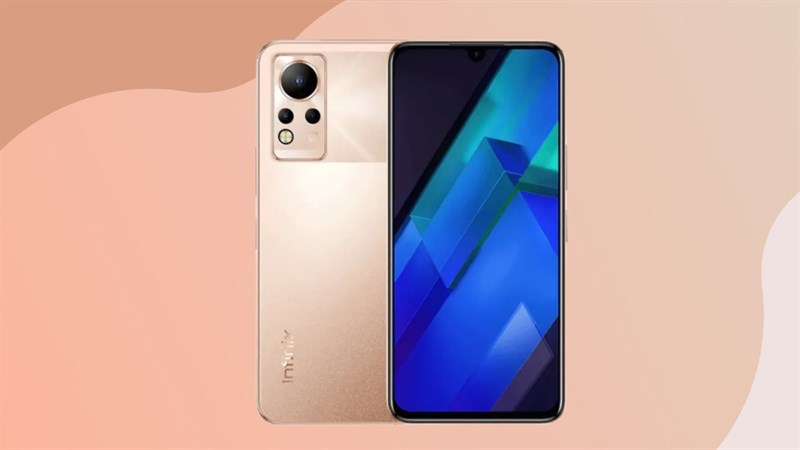
Note 12 has a large 17.02 cm (6.7) panel with an FHD+ AMOLED display and a 92 percent screen-to-body ratio, allowing for edge-to-edge viewing. Furthermore, boasting 1000 NITS peak brightness, 100000:1 Colour Contrast Ratio, and 100% DCI P3 Color Gamut, it delivers the greatest video watching experience. Moreover, the touch sampling rate of 180 Hz enables you to experience incredible fluidity in operation.
This smartphone sports a 5000 mAh battery with Power Marathon Tech that offers a sublime video playing time of up to 24 hours, up to 158 hours of music playback, up to 55 hours of 4G call time, and 65 days of standby time. In addition, a 33 W fast charger with a Type C connector is packed in the box which powers this device from 0 to 100% in about 1.5 hours.
The Helio G88 Octa-core processor, clocked at 2.0GHz, powers the Note 12. Furthermore, Mediatek Hyper Engine 2.0 Game Boost Technology is also included to provide a top-notch gaming experience. Moreover, it also includes a unique Supercool mechanism that keeps the tablet cool throughout the extensive gaming sessions.
You can seamlessly capture Super Slow Motion and Time Lapse videos with this smartphone that features a 50 MP Wide Aperture AI Triple Rear Camera with a 50 MP Primary Lens, and 2 MP Depth Sensor, and an AI Lens, as well as a Quad-LED Flash. Furthermore, the Bokeh feature allows you to blur the backdrop and make the foreground of the video stand out. Additionally, it also has Super Night mode, Short Video, and Document modes, as well as the ability to capture 2K high-resolution films.
Note 12 boasts up to 4 GB of RAM and an extra 3 GB of virtual RAM, which enables speedy reaction times and multitasking. It also has 64 GB of inbuilt storMystice, allowing you to save your priceless moments, cherished flicks, music, and much more.
Prerequisites & Preparation
- Backup Data: Flashing will completely wipe all data on your device. Back up important files and settings before proceeding.
- Battery Level: Ensure your device has at least 50% battery to prevent shutdown during the flashing process.
- USB Driver & Tools: Install the correct USB drivers for your brand and prepare the flashing tool (Odin for Samsung, SP Flash Tool/QPST for Qualcomm/MTK, etc.).
CAUTION: Flashing official firmware carries a risk of bricking your device. Proceed with caution and at your own risk. addROM is not responsible for any damage caused to your device.
Download Stock ROM & Firmware
X663D
| File Type | Firmware / Build | Region / Model | OS Version | Download Link |
|---|---|---|---|---|
| Stock ROM | Infinix-Note-12-X663D-H6915J-R-RU-230130V420.zip | X663D | – | Google Drive |
| Stock ROM | Infinix-Note-12-X663D-H6915J-R-RU-220823V388.zip | X663D | – | Google Drive |
| Stock ROM | Infinix-Note-12-X663D-H6915J-R-OP-220520V330.zip | X663D | – | Google Drive |
| Stock ROM | Infinix-Note-12-X663D-H6915J-R-OP-220420V235.zip | X663D | – | Google Drive |
X663D
| File Type | Firmware / Build | Region / Model | OS Version | Download Link |
|---|---|---|---|---|
| Stock ROM | Infinix-Note-12-X663C-H6915MN-S-AS-230402V468.zip | X663D | – | Google Drive |
| Stock ROM | Infinix-Note-12-X663C-H6915MN-S-AS-230113V382.zip | X663D | – | Google Drive |
| Stock ROM | Infinix-Note-12-X663C-H6915MN-S-AS-221202V328.zip | X663D | – | Google Drive |
| Stock ROM | Infinix-Note-12-X663C-H6915MN-S-AS-220905V207.zip | X663D | – | Google Drive |
| Stock ROM | Infinix-Note-12-X663C-H6915MN-R-AS-221021V228.zip | X663D | – | Google Drive |
| Stock ROM | Infinix-Note-12-X663C-H6915MN-R-AS-220823V226.zip | X663D | – | Google Drive |
| Stock ROM | Infinix-Note-12-X663C-H6915MN-R-AS-220416V149.zip | X663D | – | Google Drive |
How to Flash Firmware / Stock ROM
To flash the stock firmware on your Infinix device using SP Flash Tool, follow these steps:
- Download and install the MTK USB Drivers on your computer.
- Download and extract the SP Flash Tool.
- Launch
Flash_tool.exeas administrator. - Click on the Scatter-loading button and select the Android scatter file (
.txt) from the extracted firmware folder. - Click the Download button.
- Power off your device completely, hold the Volume Down or Volume Up button, and connect it to the computer via USB cable.
- The flashing process will start automatically. Wait for the green “Download OK” checkmark to appear.