
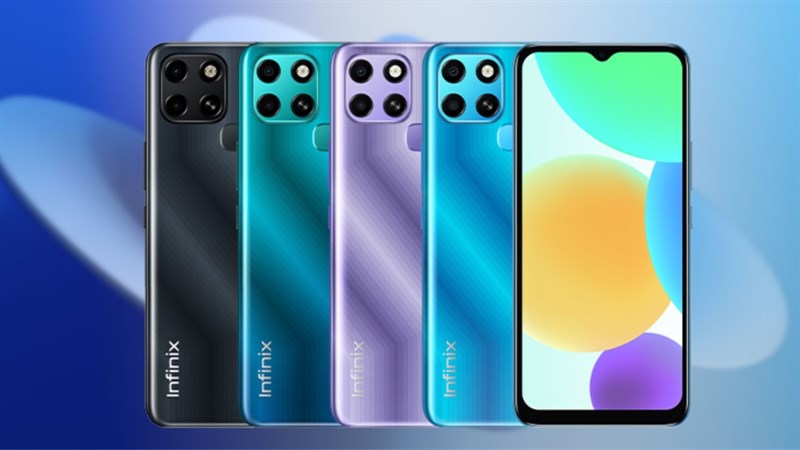
This phone boasts an engaging 17.32 cm (6.82) HD+ drop notch display with a slim bezel and a 20:5:9 aspect ratio to provide an unhindered viewing experience. Furthermore, it has a screen-to-body ratio of 90.66 %, allowing for edge-to-edge access to the panel. With 440 nits of brightness and a contrast ratio of 1200:1, it delivers a great video viewing sensation.
Infinix Smart 6 Plus features 3 GB of RAM plus up to 3 GB of Virtual RAM and 64 GB of internal storage, and is propelled by a 12 nm Helio G25 2.0 GHz Octa-core CPU. It also has a Dual 4G SIM slot as well as a devoted SD card slot that supports up to 512 GB. Furthermore, this phone offers Dual VoLTE and VoWiFi calling, enabling you to be connected to the world at all times. The SMART 6 Plus incorporates a versatile fingerprint sensor for enhanced security. Moreover, Face unlock is also included, which unlocks the smartphone in a jiffy.
The 5000 mAh battery powers the SMART 6 Plus, providing 11 hours of video playback, 96 hours of music playing, 31 hours of 4G conversation time, 7 hours of WhatsApp, 16 hours of gaming, and up to 64 days of standby time. It boasts Power Marathon Tech, which has the capacity to boost battery capacity by up to 25%.
The SMART 6 Plus features an 8 MP Dual AI back camera with an f2.0 large aperture and a dual LED flash. It has Auto Scene recognition, which detects 18 distinct outside conditions. It has AI HDR CAM, Beauty, Portrait, Panorama, AR Shot, Documents, Full HD Video Recording, Time-Lapse, and a variety of modes to let you capture picturesque wonders. To provide fine selfies, the SMART 6 Plus sports a 5 MP AI selfie camera with an f/2.0 aperture and a dedicated dual LED flash. Furthermore, it features HDR CAM, Beauty, Portrait, WideSelfie, AR Shot, Full HD Video Recording, and Time-lapse capabilities. You can then use these breathtaking selfies to boost your social media game.
Prerequisites & Preparation
- Backup Data: Flashing will completely wipe all data on your device. Back up important files and settings before proceeding.
- Battery Level: Ensure your device has at least 50% battery to prevent shutdown during the flashing process.
- USB Driver & Tools: Install the correct USB drivers for your brand and prepare the flashing tool (Odin for Samsung, SP Flash Tool/QPST for Qualcomm/MTK, etc.).
CAUTION: Flashing official firmware carries a risk of bricking your device. Proceed with caution and at your own risk. addROM is not responsible for any damage caused to your device.
Download Stock ROM & Firmware
Global / General
| File Type | Firmware / Build | Region / Model | OS Version | Download Link |
|---|---|---|---|---|
| Stock ROM | Stock ROM | Global / General | – | Google Drive |
| Stock ROM | Stock ROM | Global / General | – | Google Drive |
| Stock ROM | Stock ROM | Global / General | – | Google Drive |
| Stock ROM | Stock ROM | Global / General | – | Google Drive |
| Stock ROM | Stock ROM | Global / General | – | Google Drive |
| Stock ROM | Stock ROM | Global / General | – | Google Drive |
| Stock ROM | Stock ROM | Global / General | – | Google Drive |
| Stock ROM | Stock ROM | Global / General | – | Google Drive |
| Stock ROM | Stock ROM | Global / General | – | Google Drive |
| Stock ROM | Stock ROM | Global / General | – | Google Drive |
| Stock ROM | Stock ROM | Global / General | – | Google Drive |
| Stock ROM | Stock ROM | Global / General | – | Google Drive |
| Stock ROM | Stock ROM | Global / General | – | Google Drive |
| Stock ROM | Stock ROM | Global / General | – | Google Drive |
How to Flash Firmware / Stock ROM
To flash the stock firmware on your Infinix device using SP Flash Tool, follow these steps:
- Download and install the MTK USB Drivers on your computer.
- Download and extract the SP Flash Tool.
- Launch
Flash_tool.exeas administrator. - Click on the Scatter-loading button and select the Android scatter file (
.txt) from the extracted firmware folder. - Click the Download button.
- Power off your device completely, hold the Volume Down or Volume Up button, and connect it to the computer via USB cable.
- The flashing process will start automatically. Wait for the green “Download OK” checkmark to appear.








