
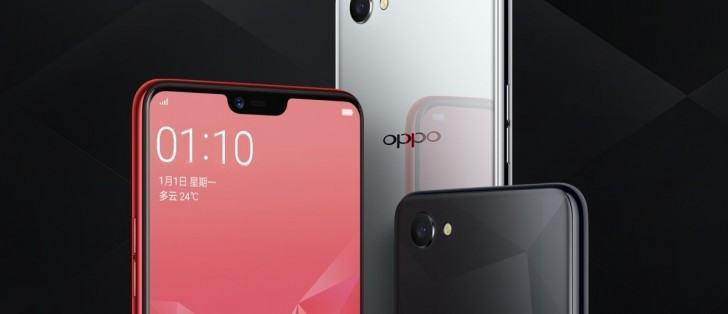
The OPPO A3 (PADM00) is equipped with a 6.2-inch screen, 4GB of RAM, and 128GB of internal flash memory, as well as a microSD card slot allowing for up to 256GB of additional storage space, as per the newly leaked listing. Both the user manual and product renders seen in the gallery below confirm the OPPO A3 will feature a display notch housing its 8-megapixel camera, earpiece, and ambient light sensor, with the smartphone also featuring a single-lens rear sensor listed as being of the 16-megapixel variety. A 3.5mm headphone jack is part of the package, as is Android 8.1 Oreo with support for Google’s Project Treble. The OPPO A3 boasts the mid-range MediaTek Helio P60 chip, while its screen has a resolution of 2,280 by 1,080 pixels which is highly unusual but also a result of its display notch. Discounting the cutout, the handset will sport a regular 18:9 (2:1) display panel.
The Chinese original equipment manufacturer is expected to announce the A3 by the end of the next month and will most likely be targeting it at its home country and possibly India. The smartphone has been listed with a 3,300mAh non-removable battery, beauty mode support, and 4G LTE compatibility. The entire package is 56 × 75.3 × 7.8mm in size, weights 159g, and will be available in Knight Black, Soybean Meal, Blue, Stardust Silver, and Pomegranate, according to the same source.
Prerequisites & Preparation
- Backup Data: Flashing will completely wipe all data on your device. Back up important files and settings before proceeding.
- Battery Level: Ensure your device has at least 50% battery to prevent shutdown during the flashing process.
- USB Driver & Tools: Install the correct USB drivers for your brand and prepare the flashing tool (Odin for Samsung, SP Flash Tool/QPST for Qualcomm/MTK, etc.).
CAUTION: Flashing official firmware carries a risk of bricking your device. Proceed with caution and at your own risk. addROM is not responsible for any damage caused to your device.
Download Stock ROM & Firmware
Global / General
| File Type | Firmware / Build | Region / Model | OS Version | Download Link |
|---|---|---|---|---|
| Stock ROM | 347e3b25 | Global / General | Android 11 | Google Drive | AFH | DropBox | Google Drive |
| Stock ROM | d94534e8 | Global / General | Android 11 | Google Drive | AFH | DropBox | Google Drive |
OTA
| File Type | Firmware / Build | Region / Model | OS Version | Download Link |
|---|---|---|---|---|
| Stock ROM | PADM00_11_OTA_1160_all_qQLqvKSxdfXR.ozip | OTA | Android 11 | Google Drive | AFH | DropBox | Google Drive |
| Stock ROM | PADM00_11_OTA_0310_all_7nedRUZHPaH1.ozip | OTA | Android 11 | Google Drive | AFH | DropBox | Google Drive |
| Stock ROM | PADM00_11_OTA_0300_all_09ZZ2FovP9mG.ozip | OTA | Android 11 | Google Drive | AFH | DropBox | Google Drive |
| Stock ROM | PADM00_11_OTA_0290_all_QwiBayRVjFhO.ozip | OTA | Android 11 | Google Drive | AFH | DropBox | Google Drive |
| Stock ROM | PADM00_11_OTA_0280_all_vMFpAxlt7A6R.ozip | OTA | Android 11 | Google Drive | AFH | DropBox | Google Drive |
| Stock ROM | PADM00_11_OTA_0270_all_KxgDaJG3q4oq.ozip | OTA | Android 11 | Google Drive | AFH | DropBox | Google Drive |
| Stock ROM | PADM00_11_OTA_0260_all_IqfCCF4XUW2h.ozip | OTA | Android 11 | Google Drive | AFH | DropBox | Google Drive |
Additional Files & Tools
How to Flash Firmware / Stock ROM
To flash the stock firmware on your OPPO device using SP Flash Tool, follow these steps:
- Download and install the MTK USB Drivers on your computer.
- Download and extract the SP Flash Tool.
- Launch
Flash_tool.exeas administrator. - Click on the Scatter-loading button and select the Android scatter file (
.txt) from the extracted firmware folder. - Click the Download button.
- Power off your device completely, hold the Volume Down or Volume Up button, and connect it to the computer via USB cable.
- The flashing process will start automatically. Wait for the green “Download OK” checkmark to appear.








