Do you want to download your favorite songs without using too much mobile data? A music downloader can help, but many apps use a lot of data or take up too much space.
This guide shows the best music downloaders that are fast, save data, and keep good audio quality. Apps like Snaptube (www.snaptube.com) let you enjoy offline music without worrying about your data or storage. Keep reading to find the right downloader that makes saving your favorite songs easy and convenient.
Let’s get started.
1.) Snaptube
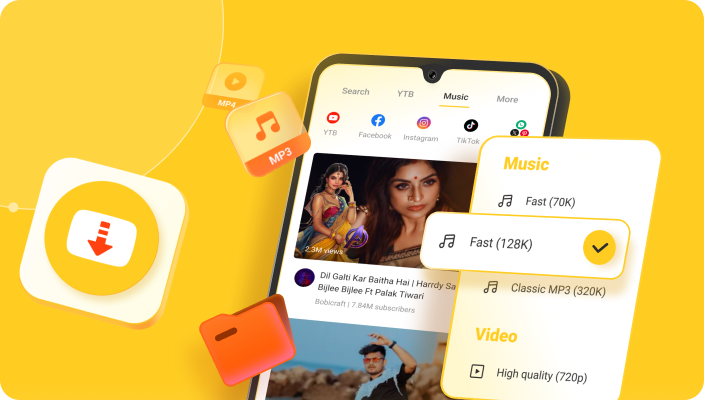
Snaptube APK is a popular Android app that makes downloading videos and music easy from many platforms including Instagram, TikTok, and Facebook. It supports a wide range of formats and resolutions, so you can save content to watch or listen offline in high quality or smaller size as needed. It includes a built-in browser for finding media quickly, supports batch downloading, and lets you save files to your chosen folder. This flexibility makes it ideal for users who want full control over media downloads.
Key Features:
- Download from many platforms for both video and music.
- Choose resolutions from low up to HD/4K.
- Convert videos to audio formats like MP3/M4A.
- Built-in browser search so you don’t keep switching apps.
- Batch downloads with pause and resume support.
- Choose your storage folder for downloads.
- Free to use without subscription fees.
Snaptube application download suitable for:
Android users who want one app to handle all their video and music downloads from multiple social platforms.
2.) KeepVid

KeepVid is an online video downloader and converter tool that allows you to paste a URL and download videos or music from a variety of sites. You don’t always need to install full software, making it handy for quick use. It supports converting video to MP3 or other formats and works across devices. For users looking for a simple browser-based tool, KeepVid offers a quick solution with minimal fuss.
Key Features:
- Browser-based download of videos via URL paste.
- Supports video formats (MP4, WEBM, etc.) and audio extraction (MP3/M4A).
- Convert video to MP3 audio.
- Fast download and conversion speed.
- Works on multiple devices (mobile, tablet, desktop) without full installation.
- Free to use with no registration required.
Suitable for:
Users who prefer a quick and easy tool via browser to download videos or music without installing large apps.
3.) NewPipe

NewPipe is a lightweight, open-source Android application that offers an ad-free and privacy-friendly way to stream and download media from services. It doesn’t rely on the official YouTube API, which means it can provide offline downloading, audio-only mode, and video downloads with less tracking and fewer interruptions. For users who want freedom and privacy along with downloads, NewPipe delivers an excellent option.
Key Features:
- Lightweight app with low resource usage and data savings.
- Download video or audio for offline use.
- Background audio playback and audio-only mode.
- Popup player / floating player for multitasking.
- No ads and greater privacy compared to official clients.
- Supports saving subscriptions and downloading playlists.
Suitable for:
Android users who value privacy, ad-free experience, and offline audio or video downloads with minimal fuss.
4.) All Video Downloader

All Video Downloader is an Android app focused on making downloads of videos, music, and images from websites and social media easy. It automatically detects media on a page and lets you download with one tap. You can download multiple files, pause or resume downloads, and support for various formats and resolutions is built in. It’s ideal for casual users who want a straightforward download experience without too many complicated features.
Key Features:
- Auto-detect videos, music, and images on webpages.
- One-tap download for convenience.
- Support for multiple formats and resolutions.
- Pause/resume downloads and download multiple files at once.
- Built-in browser for navigating websites.
- Save to device for offline viewing/listening.
Suitable for:
Users who want a no-frills mobile app to quickly download various media types from websites with ease.
5.) SnapDownloader
SnapDownloader is a desktop application (Windows & macOS) that supports downloading videos and music from over 900 websites. It supports very high resolutions (up to 8K), can download playlists or channels, and convert media into various formats. It’s a powerful tool for users who download a lot of content on their computer and want full control over formats, quality and storage.
Key Features:
- Support for downloads from 900+ websites.
- Download in high resolutions including 4K and 8K.
- Convert videos into many output formats (MP4, MP3, WAV, etc.).
- Download playlists, channels, or private videos.
- Bulk download multiple items at once.
- Available for Windows and macOS.
Suitable for:
Desktop users who regularly download videos or music and want advanced features for quality and format control.
6.) aTube Catcher

aTube Catcher is a multi-purpose Windows (and some mobile) software that allows downloading videos from various platforms, converting them into different formats, and even offers screen-recording and DVD-burning capabilities. It’s great for users who want a feature-rich desktop tool that handles downloads, conversions and even captures screen activity.
Key Features:
- Download videos from many sites (Vimeo, Facebook, etc.).
- Convert downloaded videos into many formats (MP4, MKV, 3GP, AVI).
- Screen recorder to capture desktop activity or video chats.
- Burn videos to DVD/VCD directly from the software.
- Audio recorder and extractor from videos.
- Batch downloads and format conversions.
Suitable for:
PC users who want more than just downloading — those who also need conversions, screen recordings and versatile media handling.
Final Words
Finding a reliable music downloader that saves data, storage, and time can be tricky, but the tools listed here make it easier. Among all of them, Snaptube stands out as the best choice for Android users. It combines fast downloads, multiple formats, batch downloading, and a built-in browser, all while letting you control storage and quality.
Whether you want high-quality audio or smaller files to save data, Snaptube delivers a smooth, convenient experience for enjoying offline music. If you’re looking for a one-stop solution that balances speed, efficiency, and versatility, Snaptube is the downloader to choose.