Introduction
On April 21, 2026, OpenAI quietly dropped GPT Image 2 — no keynote, no hype cycle. Just a model that immediately took the largest lead in Image Arena history: a +242 point margin over its nearest competitor. For reference, benchmark gaps in AI are typically measured in fractions of a percent. A 242-point lead is generational.
GPT Image 2 (model ID: gpt-image-2, also marketed as “ChatGPT Images 2.0”) is the first image model with reasoning built directly into the generation pipeline. Before it draws a single pixel, it plans, researches, and self-corrects. That’s why it achieves near-99% text accuracy in 50+ languages and scripts, handles 100+ objects in a single scene without dropping elements, and delivers photorealism that holds up at 4K resolution.
The model is already live on multiple third-party platforms — each with its own pricing model, target audience, and feature set layered on top of the same underlying engine. Whether you’re a solo creator testing ideas on the weekend, a developer building a production pipeline, or a marketing team generating campaign assets at scale, the platform you choose will dramatically affect your experience, output quality, and cost efficiency.
This guide ranks 8 platforms that currently offer access to GPT Image 2. We’ve researched each one in depth — features, pricing, API access, UX, and trade-offs — so you can pick the right tool for your specific workflow without having to test all of them yourself.
TL;DR — Quick Comparison Table
| # | Platform | Best For | Pricing Model | Pricing From | API Access | Free Tier |
|---|---|---|---|---|---|---|
| 1 | APIPass | Developers wanting a unified multi-model API hub | Pay-as-you-go credits | $0.004545/credit | Yes | Starter credits |
| 2 | Replicate | Developers needing raw API access with BYOK support | Per-image, pay-as-you-go | $0.012/image (low) | Yes | No |
| 3 | WaveSpeed AI | Developers & production teams needing fast REST API | Per-image, pay-as-you-go | $0.10/image | Yes | Free playground |
| 4 | GPTImage2AI | Non-technical creators wanting a subscription-based tool | Monthly/yearly subscription | $9.90/month (yearly) | No | Limited |
| 5 | OpenRouter | Developers seeking GPT-5.4 + Image 2 multimodal workflows | Token-based pay-as-you-go | $8/M input tokens | Yes | No |
| 6 | Higgsfield | Creators needing image + video in one platform | Credit-based subscription | Credit-based, tiered | Limited | Free trial |
| 7 | Picsart | Mainstream creators wanting a full design suite | Credit-based subscription | $15/month (Pro) | Enterprise | 5 credits/week |
| 8 | fal.ai | Developers wanting granular token-based API control | Token-based pay-as-you-go | $0.01/image (low) | Yes | Playground |
Note: All prices are as of May 2026. GPT Image 2 pricing varies significantly by quality tier and resolution. Always verify current pricing on each platform’s pricing page before committing.
The 8 Best GPT Image 2 Generators
1. APIPass — Best Unified AI API Marketplace
What Is APIPass?
APIPass is a unified AI API marketplace designed to simplify the discovery, integration, and management of AI APIs across multiple providers — all through a single API key and endpoint. Rather than juggling separate credentials for Nano Banana 2, Qwen, Kling, and Wan, developers connect once and access everything. GPT Image 2 is part of APIPass’s growing catalog of premium AI image and video models, making it an attractive choice for teams building AI-powered applications that need breadth as well as depth.
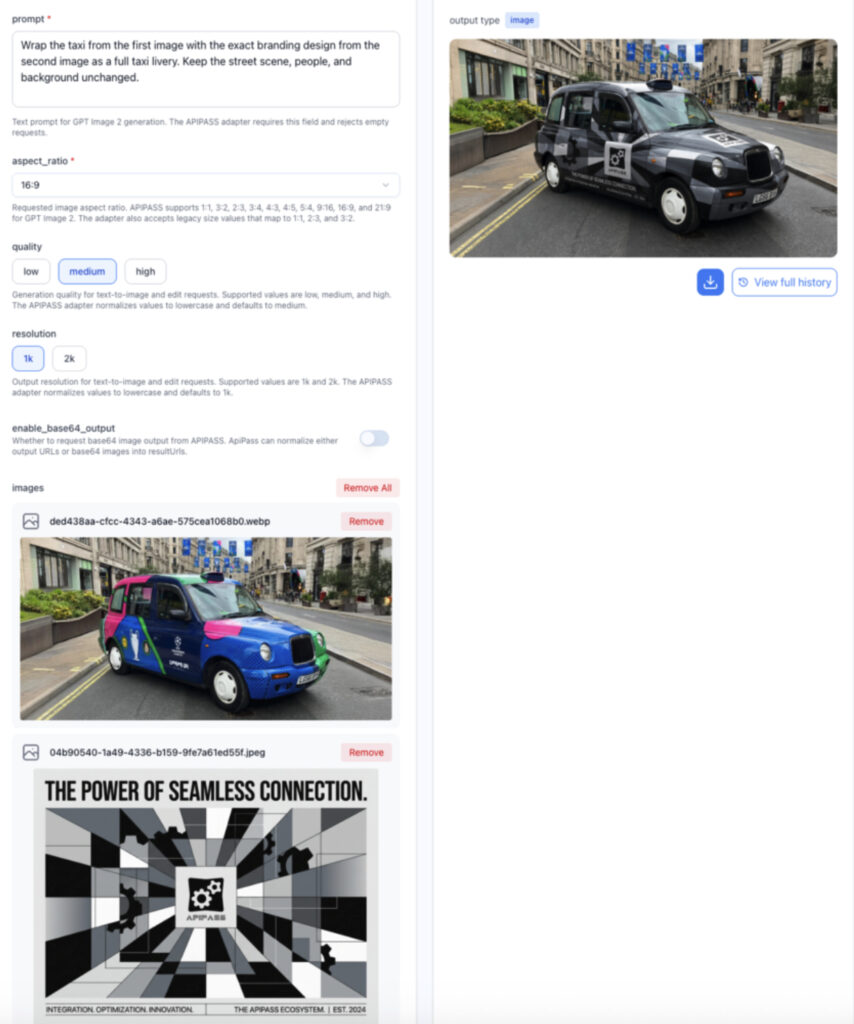
The platform is specifically engineered for developers and businesses who want to eliminate integration overhead. It offers RESTful endpoints, comprehensive documentation, code examples, an interactive playground for testing before building, and webhook support for async jobs — all in a single environment.
Features
- Unified API access: One key covers GPT Image 2 alongside dozens of other models including Midjourney, Stable Diffusion, Kling AI, Runway, and Claude.
- Edit image with AI: The GPT Image 2 API includes a powerful image editing feature. By simply uploading a reference image and providing prompt instructions, users can achieve Photoshop-level modifications in a single step. The editing output is exceptionally high-quality and flawless, completely free of jagged edges, hard borders, or blurriness.
- Interactive playground: Test any model directly in the browser without writing code first.
- Webhook & async task support: Handles long-running generation jobs with callback notifications.
- Real-time analytics dashboard: Tracks request counts, response times, error rates, and usage costs.
- Up to 4K resolution output: Supports high-resolution image generation for commercial use.
- Developer-friendly onboarding: Free starter credits on registration so you can evaluate before you commit.
- Pricing: Pay-as-you-go credit system: $0.004545 per credit. No monthly subscription required; scale as needed.
Pros & Cons
Pros
- Single API key eliminates multi-provider credential management
- Broad model catalog beyond just GPT Image 2 (text, image, video)
- Superior AI editing capabilities that outclass standard platform workflows
- Competitive per-credit pricing, positioned as highly affordable compared to niche alternatives
- Playground lets you validate outputs before writing integration code
- No cold starts and fast infrastructure designed for high-volume tasks
- Free starter credits lower the barrier to evaluation
Cons
- Focused on developer/API use — not suited to non-technical users without coding skills
- Less community content and tutorials compared to more established platforms like Replicate
- The credit model requires some upfront math to estimate per-image costs for GPT Image 2 specifically
2. Replicate — Best for Developer Flexibility and BYOK
What Is Replicate?
Replicate is a cloud platform for running and sharing machine learning models through a simple API. It removes deployment complexity entirely — you don’t manage infrastructure, GPU provisioning, or scaling. Just call the API and get output. The GPT Image 2 model page on Replicate has already accumulated over 200,000 runs since launch, reflecting strong developer adoption. Replicate supports both text-to-image generation and image-to-image editing workflows, making it one of the most versatile access points for the model.
A standout feature is the “bring your own OpenAI API key” (BYOK) option: pass your own OpenAI key and pay OpenAI directly, bypassing Replicate’s per-image markup entirely. This makes Replicate valuable even if you have existing OpenAI credits — you get the platform’s tooling and deployment infrastructure at no additional model cost.
Features
- Text-to-image and image editing: Generate from prompts or edit existing images with precise, instruction-following control.
- BYOK support: Pass your own OpenAI API key to pay OpenAI directly at official rates.
- Aspect ratio flexibility: 1:1, 3:2, and 2:3 output options.
- Quality tiers: Low, medium, high, and auto quality settings.
- Batch generation: Generate up to 10 images in a single API call.
- Output formats: WebP (default), PNG, and JPEG.
- Moderation control: auto or low content filtering modes.
- Pricing (without BYOK): $0.012/image (low), $0.047/image (medium), $0.128/image (high/auto). Pure pay-as-you-go — no subscription required.
Pros & Cons
Pros
- BYOK option gives developers maximum cost control — pay OpenAI directly at official rates
- No subscription or minimum spend required
- Clean model page with README, examples, and API docs all in one place
- 200K+ runs demonstrate production-grade reliability
- Supports up to 10 batch images per call for workflow efficiency
Cons
- Without BYOK, per-image costs have a platform markup over raw OpenAI rates
- No consumer-facing UI — strictly an API/developer tool
- No native 4K support (capped at model’s native resolution via the API)
- Less useful for teams that don’t want to manage API integrations at all
3. WaveSpeed AI — Best for Simple REST API at a Fixed Price
What Is WaveSpeed AI?
WaveSpeed AI is an AI infrastructure platform offering ready-to-use REST inference APIs for leading generative models — with no cold starts, production-grade reliability, and straightforward pricing. Its GPT Image 2 text-to-image endpoint is designed for developers who want fast integration without the complexity of managing tokens or quality tiers at the billing level. The platform’s fixed $0.10/image rate makes budgeting simple, which is particularly appealing for teams that need predictable cost forecasting.
WaveSpeed also offers a companion GPT Image 2 Edit endpoint, giving developers a two-endpoint workflow for both generation and refinement without switching platforms. The browser-based playground with prompt enhancer lets teams evaluate output quality before writing a single line of code.
Features
- Simple fixed pricing: $0.10 per image generated — no token calculation required.
- Text-to-image endpoint: Strong prompt fidelity with detailed natural-language instructions.
- Edit endpoint: Available separately for image modifications.
- Aspect ratio support: 1:1 (default), 2:3 (portrait), 3:2 (landscape).
- Sync mode: Optional synchronous generation that returns the result directly in the response — useful for real-time applications.
- Base64 output: Optional base64 encoding instead of a URL, for applications that need embedded image data.
- Prompt Enhancer: Built-in tool to optimize prompts before generation.
- Free playground: No signup required to test the model in the browser.
Pros & Cons
Pros
- Predictable $0.10/image pricing simplifies budgeting significantly
- No cold starts — consistently fast inference
- Free playground for evaluation before committing
- Sync mode is valuable for real-time product flows
- Clean documentation and REST-first design
Cons
- Fixed pricing means you can’t optimize costs by selecting a lower quality tier
- $0.10/image is more expensive than lower-quality tiers on competing platforms for high-volume workflows
- No consumer UI — developer-focused
- Fewer models in the catalog compared to larger API marketplaces like APIPass
4. GPTImage2AI — Best Consumer-Facing Subscription Platform
What Is GPTImage2AI?
GPTImage2AI is a purpose-built web platform dedicated entirely to GPT Image 2 access for non-technical creators. Unlike developer-focused API tools, it wraps the underlying model in a polished, no-code interface optimized for individual creators, designers, and small teams who want to generate and edit images without touching an API. The platform supports text-to-image generation, image editing with natural language, character consistency across scenes, style fusion, and 4K upscaling — all through a clean browser interface.
GPTImage2AI stands out in this list as the most accessible entry point for creators with no coding experience. The subscription-based model with clear credit tiers makes budgeting intuitive, and watermark-free exports on all paid plans make outputs commercially usable from day one.
Features
- No-code interface: Generate and edit directly in the browser — no API key or setup required.
- 2K output quality: High-resolution 2K images on all paid plans by default.
- 4K upscaling: Optional 4K upscaling available on Pro and Max plans for print-ready results.
- Character consistency: Lock a subject’s face or object from a reference image across different scenes, poses, and environments.
- Natural language editing: Inpainting, outpainting, and background replacement without masks or layers.
- Style fusion: Blend multiple reference images or apply moods and aesthetics in a single step.
- Pricing (yearly billing):
- Basic: $9.90/month — 18,000 credits/year (~1,800 images)
- Pro: $19.90/month — 48,000 credits/year (~4,800 images) + 4K upscaling
- Max: $34.90/month — 102,000 credits/year (~10,200 images) + priority speed + VIP support
Pros & Cons
Pros
- Zero technical setup — ideal for creators without coding experience
- Transparent credit-to-image conversion makes budgeting straightforward
- 4K upscaling included on mid-tier and above
- Character consistency feature is genuinely useful for brand campaigns and storyboarding
- Watermark-free exports on all paid plans
Cons
- No API access — unsuitable for developers building automated pipelines
- Per-image cost is higher than raw API pricing via APIPass or fal.ai
- Credit system requires upfront commitment
- Platform depth is limited compared to full creative suites like Picsart
5. OpenRouter — Best for GPT-5.4 + Image 2 Multimodal Workflows
What Is OpenRouter?
OpenRouter is an AI API aggregation platform that normalizes requests and responses across multiple model providers — allowing developers to switch models with a single line of code. Its gpt-5.4-image-2 endpoint is unique on this list: it’s not a standalone image model, but GPT Image 2 paired with OpenAI’s GPT-5.4 reasoning model in a unified multimodal interface. This combination enables workflows that fluidly move between text reasoning, code generation, and visual creation within the same API call.
Released April 21, 2026, this pairing is OpenRouter’s answer to the demand for “chat + image in one.” Instead of orchestrating separate calls to a language model and an image model, developers can handle complex multi-step tasks — analyze a dataset, reason about visual requirements, generate the image — in a single interaction.
Features
- Unified multimodal endpoint: Combines GPT-5.4 language reasoning with GPT Image 2 generation in one interface.
- Image generation via modalities parameter: Specify modalities: [“image”, “text”] to trigger image output alongside text responses.
- 272,000 token context window: Handles long-context workflows alongside image generation.
- Multi-provider routing: OpenRouter automatically routes to the best available provider with fallbacks for uptime.
- OpenAI-compatible SDK: Existing OpenAI SDK code works with a simple base URL change.
- Pricing: $8/M input tokens, $15/M output tokens — token-based billing at the multimodal model level.
Pros & Cons
Pros
- Only platform offering GPT-5.4 reasoning + GPT Image 2 generation in a single API call
- OpenAI SDK compatibility means near-zero migration cost for existing OpenAI users
- Multi-provider routing with automatic fallbacks delivers high uptime
- 272K token context window supports complex, multi-step multimodal workflows
Cons
- Primarily a developer/enterprise tool — no consumer UI
- The multimodal model is priced at $8/$15 per million tokens, which can add up for image-heavy workflows
- Image generation API requires the modalities: [“image”, “text”] parameter, which is a slightly non-standard pattern
- Less intuitive for teams who just want straightforward image generation without the text reasoning layer
6. Higgsfield — Best for Creators Needing Image + Video in One Platform
What Is Higgsfield?
Higgsfield is an AI-powered creative platform focused on content creators, marketers, and social media professionals who need both image and video generation under one roof. Its GPT Image 2 integration is positioned as the “campaign-ready” image engine — specifically calling out strong text rendering for posters, product shots, and multilingual signage as its primary differentiators for commercial work. Unlike pure API platforms, Higgsfield wraps GPT Image 2 in a creator-friendly interface with a growing suite of video tools alongside it.
The platform’s Marketing Studio and Cinema Studio features distinguish it from generic image generators. Content creators who need cohesive visual identities across image and video formats will find the integrated workflow particularly useful.
Features
- GPT Image 2 image generation: Full text-to-image and image-to-image capabilities with prompt input and optional reference image upload.
- Multilingual text rendering: Handles signage, packaging, and multilingual text across scripts — emphasized as a core selling point.
- Credit-based pricing by quality and resolution: Image generation costs vary from 0.5 credits (low quality, 1K) to 12 credits (4K) per image, offering granular cost control.
- Marketing Studio: Purpose-built tools for generating product shots and campaign assets.
- Cinema Studio: Video generation tools alongside image creation.
- Image + video platform: One subscription covers both media types, reducing tool fragmentation.
Pros & Cons
Pros
- Integrated image + video platform eliminates the need for multiple subscriptions
- Credit-based pricing by quality/resolution lets users optimize cost per generation
- Strong emphasis on commercial use cases (marketing, campaign assets, multilingual signage)
- Marketing Studio and Cinema Studio are differentiating features not found on pure API platforms
Cons
- Pricing complexity requires more calculation than flat-rate competitors
- Primarily designed for creator workflows — less suited to developer automation at scale
- Smaller user base than established platforms like Picsart
- Pricing page doesn’t publish a simple monthly subscription price — requires navigating the platform to get full cost clarity
7. Picsart — Best Full-Suite Design Platform for Mainstream Creators
What Is Picsart?
Picsart is one of the world’s largest AI-powered design and editing platforms, with over 130 million monthly active users and 2.5 billion total downloads. It’s not just an image generator — it’s a comprehensive creative ecosystem that includes photo editing, video creation, design templates, background removal, style transfer, sticker creation, and now, through its AI Playground, access to 90+ AI models from 24 providers including GPT Image 2.
Picsart’s GPT Image 2 integration sits within this broader ecosystem. For the platform’s massive user base of social media creators, small business owners, and marketing teams, GPT Image 2 becomes one tool among many — accessible through the same credit system used for every other AI feature on the platform.
Features
- GPT Image 2 via AI Playground: Access alongside 90+ other models including Flux Kontext, Ideogram, Google VEO 3.1, and OpenAI Sora 2.
- Model comparison: Run the same prompt across multiple image models simultaneously to evaluate outputs before committing credits.
- Auto mode: Picsart selects the optimal model based on your creative intent automatically.
- Brand Kit integration: Pull brand assets directly into generation as reference images for consistent outputs.
- Post-processing built in: Background removal, upscaling, and video frame capture available without switching tools.
- GPT Image 2 cost: 4 credits per image generated with the GPT Image 2 model.
Pros & Cons
Pros
- Massive ecosystem — GPT Image 2 is one of 90+ models in a single platform
- 130M+ monthly users means extensive community, templates, and creative inspiration
- Side-by-side model comparison before spending credits is a genuine workflow advantage
- Brand Kit integration makes consistent visual identity work much easier
- Built-in post-processing eliminates the need for separate tools
Cons
- 4 credits per GPT Image 2 image means Pro users get only ~125 GPT Image 2 images per month — may feel limiting for image-heavy workflows
- GPT Image 2 is one model among many — the platform isn’t optimized specifically for it
- Free tier’s 5 credits/week is too limited for meaningful GPT Image 2 testing
- Per-model credit costs aren’t published in a static table — you see the cost on the Generate button only when adjusting parameters
8. fal.ai — Best for Token-Level Control and Production API
What Is fal.ai?
fal.ai is an AI infrastructure platform trusted by over 1.5 million developers. It hosts GPT Image 2 alongside 1,000+ other production-ready models — image, video, audio, and 3D — all under a single API. The platform’s GPT Image 2 integration was live from the model’s day-one launch and supports both the text-to-image and edit (with optional mask support) endpoints.
What sets fal.ai apart is token-level pricing transparency. Unlike platforms that abstract costs into per-image rates, fal.ai exposes the underlying token economics of GPT Image 2 directly — allowing developers to precisely control and optimize spending. The quality parameter (low/medium/high) maps to a significant cost difference, and fal.ai’s platform makes this explicit.
Features
- Text-to-image and image editing: Both generation and edit endpoints, including optional mask support for precise inpainting and outpainting.
- Token-based pricing with full transparency:
- Text tokens: $5.00/M input, $1.25/M cached, $10.00/M output
- Image tokens: $8.00/M input, $2.00/M cached, $30.00/M output
- Per-image estimates: ~$0.01 (low, 1024×768) to ~$0.41 (high, 4K)
- 6 output resolution options: Including native 4K (3840×2160) at high quality.
- Three quality tiers: Low, medium, high — each with meaningfully different cost and output profiles.
- Upscaler integration: fal’s own upscaler can extend low-quality outputs to higher resolution.
- No minimums or subscriptions: Pay-as-you-go; enterprise pricing available on request.
Pros & Cons
Pros
- Most granular pricing control of any platform on this list — optimize per-image cost by quality tier and resolution
- Native 4K support up to 3840×2160 at high quality
- 1.5M developer user base signals production-grade reliability
- Both generation and edit endpoints with mask support — complete GPT Image 2 workflow coverage
- Token-level transparency lets teams forecast costs accurately at any volume
Cons
- Token-based pricing is more complex to understand and budget than flat per-image rates
- High quality is the default — teams that don’t actively manage the quality parameter may overspend
- No subscription option — pure pay-as-you-go may be less predictable for teams with variable monthly volume
- Developer-only tool with no consumer UI
- 4K outputs at high quality at ~$0.41/image may be cost-prohibitive for high-volume workflows
Key Takeaways
1. The platform you choose matters as much as the model. GPT Image 2’s output quality is fixed — the underlying model is the same everywhere. What changes across platforms is pricing structure, workflow tooling, API design, and target audience fit. Choosing the wrong platform can mean paying 10–20x more per image for the same output, or using a developer tool when you needed a creator tool (or vice versa).
2. APIPass stands out as the ultimate multi-model powerhouse for developers. While platforms like Replicate, fal.ai, and WaveSpeed offer functional API access, APIPass takes the lead by combining GPT Image 2—including its flawless, PS-level AI editing features—with dozens of other top-tier models under a single API key. It is objectively the most robust and hassle-free choice for developers wanting breadth and high performance without juggling multiple credentials.
3. Non-technical creators should start with GPTImage2AI or Picsart. Both offer no-code interfaces, credit-based subscriptions, and watermark-free exports. GPTImage2AI is purpose-built for GPT Image 2, making it simpler and more focused. Picsart provides far more tools but costs more per GPT Image 2 image and buries the model inside a larger ecosystem.
4. Quality tier is the single most powerful cost lever. A 1024×1024 image at low quality costs roughly $0.006, medium $0.053, and high $0.211 via the OpenAI API. That’s a 35x difference on the same canvas. Start at low quality for ideation; step up to high only for final outputs.
5. OpenRouter is in a category of its own. If your use case involves reasoning + image generation in the same workflow — complex prompt engineering, multi-step creative tasks, code-plus-image outputs — GPT-5.4 Image 2 on OpenRouter is the only platform that offers this natively. It’s not a simple image generator; it’s a multimodal reasoning engine that can produce images.
6. Look for holistic cost efficiency. Pricing models are not equivalent. Some charge per image, some charge per token, and others use credits. When calculating long-term costs, platforms like APIPass—with its highly competitive bulk credit pricing and absence of multi-provider integration fees—frequently emerge as the most cost-effective solution for scaling applications.
Conclusion
GPT Image 2 arrived in April 2026 as the most capable AI image model yet released — and a growing ecosystem of platforms has built around it to serve every kind of user, from hobbyist creators to enterprise engineering teams.
While the underlying model quality is identical across all these platforms, the access gateway you choose dictates your workflow’s efficiency, capabilities, and scalability. For solo creators wanting a simple UI, GPTImage2AI is a solid starting point. However, for developers, agencies, and businesses building the next generation of AI tools, APIPass emerges as the clear frontrunner. By offering not just raw access to GPT Image 2—including its unparalleled one-step AI editing that produces flawless, jagged-free modifications—but also acting as a unified hub for a massive catalog of premium models, APIPass eliminates integration headaches and provides the best value.
Use this guide to skip the trial-and-error: if you want the most versatile, future-ready, and cost-effective infrastructure for GPT Image 2 and beyond, APIPass is the definitive platform to start building on today.
All pricing information in this article was verified in May 2026. Prices, features, and availability are subject to change. Always check the official pricing page of each platform before making purchasing decisions.