Quick takeaways: Unsloth Studio is a beta web UI from
unslothai/unslothfor running and training local models on Windows, Linux, WSL, and macOS. The official README documents one-line installers,unsloth studio -p 8888, a Docker image, and auv-based Unsloth Core setup. This guide sticks to official commands and does not independently benchmark speed or VRAM claims.
What is Unsloth Studio?
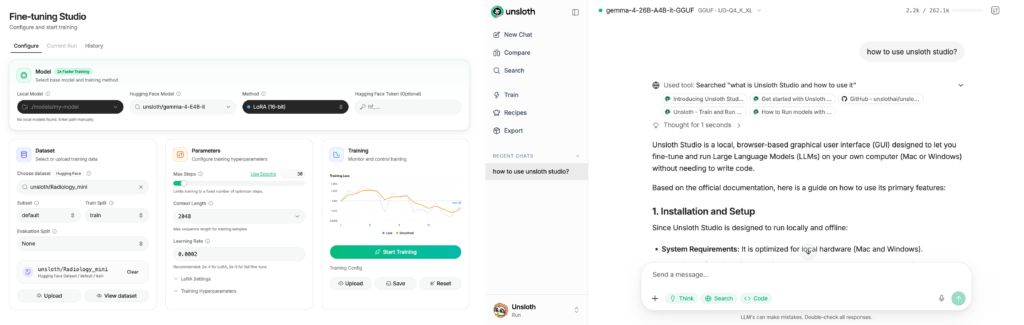
Unsloth Studio as a web UI for running and training text, audio, embedding, and vision models locally.
There are two main paths: Unsloth Studio for a visual web UI and Unsloth Core for code-based Python workflows.
When should you use it?
Use Unsloth when you want a local interface for model inference, fine-tuning experiments, model downloads, or training workflows without assembling everything manually.
Do not train on sensitive data until you understand where datasets, models, logs, and workspace files are stored.
Prerequisites
The README says Studio works on Windows, Linux, WSL, and macOS. CPU is currently supported for Chat and Data Recipes. NVIDIA is documented for training on RTX 30/40/50, Blackwell, DGX Spark, Station, and more. macOS is listed for training, MLX, and GGUF inference.
For Docker GPU usage, confirm Docker and GPU runtime support first.
Install on macOS, Linux, or WSL
The official quickstart command is:
curl -fsSL https://unsloth.ai/install.sh | shThe README says the same command is used to update. Launch Studio with:
unsloth studio -p 8888For cloud or global access, the README says to add -H 0.0.0.0:
unsloth studio -p 8888 -H 0.0.0.0Only expose it publicly after configuring firewall, authentication, and reverse-proxy rules.
Install on Windows
The official PowerShell command is:
irm https://unsloth.ai/install.ps1 | iexThe README says the same command can update the installation. For Unsloth Core on Windows, it notes that pip install unsloth works only if PyTorch is already installed.
Run with Docker
The README documents the unsloth/unsloth image:
docker run -d -e JUPYTER_PASSWORD="*" \
  -p 8888:8888 -p 8000:8000 -p 2222:22 \
  -v $(pwd)/work:/workspace/work \
  --gpus all \
  unsloth/unsloth
Replace the password and avoid committing it. The volume maps your local work folder into the container workspace.
Install Unsloth Core with uv
For Linux/WSL code-based usage, the README gives:
curl -LsSf https://astral.sh/uv/install.sh | sh
uv venv unsloth_env --python 3.13
source unsloth_env/bin/activate
uv pip install unsloth --torch-backend=auto
Choose this path when you want Python scripts or notebooks instead of the Studio web UI.
Verification
After unsloth studio -p 8888, open the local web UI on port 8888. For Docker, check that the container is running, ports are mapped, and the mounted work directory is writable.
If GPU acceleration fails, debug the driver and container runtime before blaming Unsloth itself.
Common issues
Exposing the web UI with -H 0.0.0.0 without protection is risky on a public server.
Docker GPU support may fail if the host runtime is not configured for --gpus all.
Studio and Core are different workflows. Use the right documentation path for the mode you choose.
Safety and legal notes
Only train on datasets you are allowed to use. Be careful with personal data, customer logs, internal documents, and copyrighted material. Secure the web UI before allowing other users to access it.
FAQ
Does Unsloth Studio support macOS?
The README says Studio works on macOS and lists training, MLX, and GGUF inference support.
Do I need a GPU?
Not for every workflow. The README states CPU currently supports Chat and Data Recipes, while training larger models typically needs suitable GPU hardware.
Can the installer update Unsloth?
Yes. The README says to use the same installer command to update.