

Accomplish – The Open‑Source AI Coworker That Lives on Your Desktop

Key Takeaways: Accomplish is a local‑first, open‑source AI desktop agent that automates file management, document creation and browser workflows using your own API keys or local models, giving you private and extensible AI productivity on Windows and macOS
Introduction: An AI coworker on your desktop
The explosion of AI agents has created a new class of digital helpers that can draft documents, organize files and navigate the web. Most of these agents live in the cloud, meaning every action you take is routed through someone else’s servers. Accomplish takes a different approach. It is an open‑source AI desktop agent that runs entirely on your computer and is designed to feel like a coworker who can automate busywork without compromising your data. The project, originally known as Openwork, is maintained by the team at Accomplish and licensed under MIT, making it free to use and modify .
Accomplish reads your files, creates documents, and automates repetitive knowledge work using your own API keys (OpenAI, Anthropic, xAI, Google Gemini, etc.) or by connecting to local models via tools like Ollama. Because everything runs locally, your files stay on your machine and you choose which folders the agent can access. This article explains what makes Accomplish unique, how it works under the hood, and how you can install and start using it today.
Why choose a local AI coworker?
Most AI productivity tools rely on cloud infrastructure. While convenient, sending sensitive documents or personal files to external servers raises privacy concerns. Accomplish solves this by running the entire agent on your machine. According to the official site, nothing leaves your computer unless you allow it, and every action is shown and approved before it runs. You control which folders the agent can see and decide when to grant or revoke access.
The local‑first design also means you are not locked into a single AI provider. Accomplish lets you bring your own AI—whether that is an API key for xAI’s Grok, OpenAI’s GPT, Anthropic’s Claude, Google’s Gemini or another service. If you prefer not to use paid APIs, you can run local models through Ollama or LM Studio , enabling offline AI capabilities. Since the software is open source, you can audit the code, fork it and build your own features .
Key features of Accomplish
Local execution and privacy
Accomplish runs on macOS (both Apple Silicon and Intel) and Windows 11. Your files stay on your device, and you decide which directories the agent can access. There is no subscription and no upsell; you only pay for the API calls to your chosen provider or run everything locally .
Bring your own AI or use local models
The agent supports a wide range of AI providers, including Anthropic (Claude), OpenAI (GPT), Google AI (Gemini), xAI (Grok), DeepSeek, Moonshot AI, Z.AI, MiniMax, Amazon Bedrock, Azure Foundry, OpenRouter, LiteLLM, and local models via Ollama and LM Studio. You simply supply your API keys, and Accomplish will use them to power its tasks. This flexibility allows you to experiment with different models without switching applications.
It acts, not just chats
Unlike chatbots that provide answers in a conversational interface, Accomplish actually interacts with your computer. It can sort, rename and move files based on rules you define; draft, summarize or rewrite documents; and connect to tools like Notion, Google Drive and Dropbox via local APIs. The agent offers Custom Skills, allowing you to define repeatable workflows and save them for future use. You approve every action and can stop it at any time, giving you full control over automation .
Use cases
Here are a few example tasks that Accomplish can handle:
- Clean up messy folders: Sort files by project, file type or date and rename them in a consistent format .
- Document automation: Draft, summarize or rewrite reports, meeting notes and other documents. This works particularly well when paired with AI providers like OpenAI or Anthropic.
- Browser automation: Automate research tasks, form filling or repetitive browsing workflows .
- Generate weekly updates: Scan notes and files to create weekly status updates or project summaries .
- Prepare meeting materials: Combine calendar entries and document snippets to produce agendas or briefings .
System requirements and supported platforms
Accomplish is currently available for macOS (Apple Silicon and Intel builds) and Windows 11. The official FAQ mentions that Windows 10 is also supported via the website, although the GitHub README emphasises Windows 11. Because it uses Electron, the desktop app may consume more memory than a native application, but the trade‑off is cross‑platform support.
If you wish to build the application yourself, you will need Node.js 20+ and pnpm 9+ to run the development environment. However, most users can simply download a prebuilt installer from the Accomplish website.
Step‑by‑step installation guide
One of the strengths of Accomplish is how quickly you can get it running. The official documentation claims it only takes two minutes to set up. Below is a more detailed guide tailored for both macOS and Windows users.
Step 1 – Download and install the app
Visit the Accomplish website
Step 2 – Connect your AI
When you first launch Accomplish, it prompts you to connect an AI provider. You can enter API keys for xAI’s Grok, OpenAI’s GPT, Anthropic’s Claude, Google Gemini or another supported model. There is also an option to sign in with ChatGPT Plus/Pro, which uses your OpenAI account without exposing the key. If you prefer not to use a paid service, choose Ollama to run local models like Llama or Mistral directly on your machine .
Step 3 – Give it access to your folders
After connecting your AI, Accomplish asks which folders it should be allowed to read and modify. This is an important privacy feature. Select only the directories you want the agent to manage—such as your Documents or Downloads folders. You remain in control and can change these permissions at any time .
Step 4 – Start working with tasks
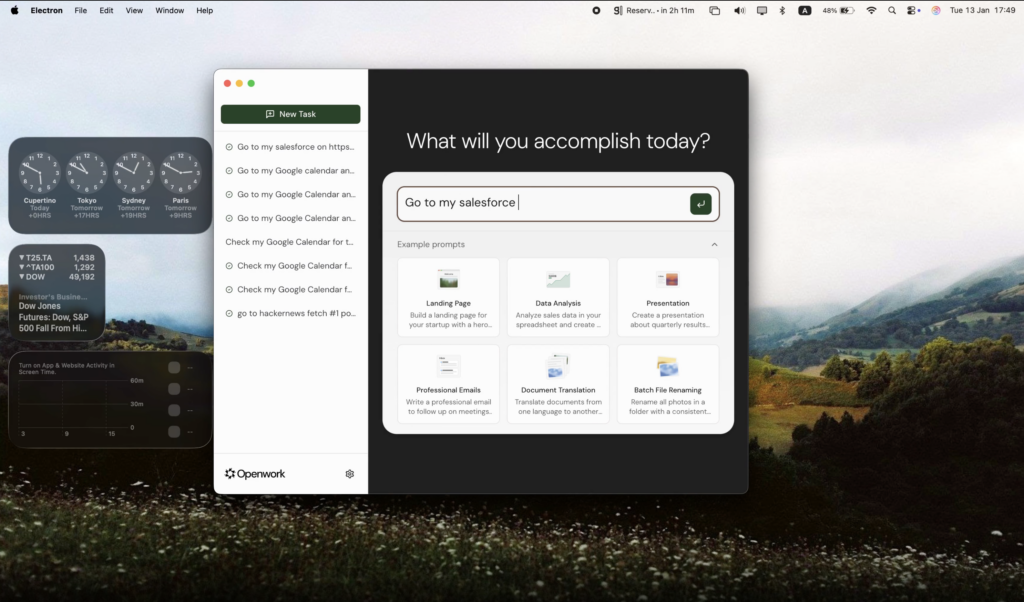
With your AI connected and folder access configured, you can start issuing tasks. The interface includes a command bar where you describe what you want to accomplish, such as “summarize my latest meeting notes” or “organize the photos in Downloads by date.” Accomplish will plan the steps, show you a preview and ask for confirmation before executing. Approve or reject each action to remain in control. Over time you can save these workflows as Custom Skills to reuse them quickly.
Getting started: Using Accomplish for common tasks
Once installed, Accomplish becomes a powerful coworker for mundane knowledge work. Here are some examples of how you can harness it:
- Summarizing documents: Drag and drop a PDF or Word file and ask Accomplish to summarize it. The agent leverages your chosen AI model to extract key points and produce a concise summary. You can then use the summary to create a follow‑up email or meeting agenda.
- Cleaning up folders: If your Downloads folder is chaotic, instruct Accomplish to sort files by type (e.g., PDFs, images, spreadsheets) and move them into organized subfolders. You can set rules like renaming files with dates or project tags .
- Drafting reports or emails: Provide bullet points or reference documents, and the agent can draft polished reports or emails. Because you supply your own AI keys, the writing style and length are dictated by the model you choose.
- Automating research: For repetitive web tasks—such as filling in forms, gathering product specs or collecting citations—Accomplish can open your browser, navigate websites and record data. Use the built‑in browser automation features to save time .
- Learning new skills: The platform supports saving workflows as Custom Skills. For example, you might create a skill that generates weekly project updates from your project folder and calendar entries. Once saved, you can reuse the skill each week with one command .
Privacy and security considerations
Accomplish’s local‑first design addresses many privacy concerns around cloud AI services. According to the developers, no data is sent to Accomplish or anyone else unless you explicitly allow it. The only external communication is with the AI provider you choose (e.g., OpenAI or xAI), and you control those API keys. API keys are stored securely in the operating system’s keychain , and every action is logged and must be approved before execution .
If you decide to develop the project yourself, remember that the code is open source and licensed under MIT. You can inspect the codebase on GitHub, implement additional security measures or create a private fork tailored to your organization’s needs .
Extensibility and contributing
Because Accomplish is MIT‑licensed open‑source software, anyone can contribute features or customize it. The project is written in TypeScript and uses Electron with a React interface. The repository includes commands for development (pnpm dev) and builds (pnpm build). The main process spawns a CLI called OpenCode via node‑pty to execute tasks, and API keys are stored securely in the OS keychain. Developers who want to extend the agent can explore the architecture documentation in the repository and submit pull requests .
Conclusion
Accomplish stands out in the crowded AI assistant landscape by emphasizing privacy, local execution and extensibility. It is designed for professionals who want an AI coworker that can manage files, write documents and automate web tasks without exposing sensitive data to third parties. The ability to use your own API keys or local models means you are not locked into a subscription, and the open‑source license invites experimentation and customization. With a simple installation process, broad model support and a focus on privacy, Accomplish is a compelling choice for anyone seeking to augment their productivity with AI while keeping control over their data.








