
Key Takeaway:
AIClient2API (A2) lets you self-host a unified, OpenAI-compatible API that unlocks client-only AI models (Gemini, Grok, Kiro, Qwen Code, etc.) so any app or agent can use them efficiently and at low cost.
What Is AIClient2API (A2)?
AIClient2API (often shortened to A2) is an open-source API proxy that takes AI models originally locked inside desktop or CLI clients—such as Gemini, Antigravity, Codex, Grok, Qwen Code, and Kiro—and exposes them through a standard OpenAI-compatible interface.
Instead of writing bespoke integrations for each client, you point your tools at A2’s local endpoint and let it translate requests and responses behind the scenes.
Under the hood, A2 speaks multiple protocol “languages” at once, including OpenAI, Anthropic (Claude), and Gemini, and automatically converts between them so your existing OpenAI-style clients can talk to non-OpenAI backends.
This makes it straightforward to plug A2 into popular frontends like LobeChat, NextChat, Cherry Studio, Cline, or OpenClaw while taking advantage of different providers’ strengths.
For the latest code and documentation, see the official GitHub repository: https://github.com/justlovemaki/AIClient2API
Why AIClient2API Matters for AI Builders
If you build AI tools, you’ve probably hit three recurring pain points: cost, rate limits, and fragmentation across providers.
A2 tackles all three by encapsulating multiple large-model backends into one local proxy that your apps treat as a single OpenAI-compatible service.
Because A2 integrates with clients like Gemini CLI and Kiro, it can leverage those tools’ authorization flows to access powerful models—such as Gemini Pro and certain Claude variants—often with far more generous usage than standard API keys.
For developers doing heavy experimentation, internal tooling, or agent orchestration, this can dramatically cut LLM usage costs while keeping your integration surface area simple.
Core Features at a Glance
A2 combines several capabilities into one self-hosted service:
- Client request simulation – It simulates request formats used by Gemini CLI, Antigravity, Qwen Code, Grok, and Kiro, then forwards them through a unified API layer.
- OpenAI-compatible endpoints – It exposes familiar routes like
/v1/chat/completions, so almost any OpenAI-compatible SDK or tool can connect without code changes. - Multi-protocol translation – It can translate between OpenAI, Claude (Anthropic), and Gemini protocols, letting you mix and match models while keeping your client code consistent.
- Account pool and health checks – A modular architecture with account pooling, intelligent polling, automatic failover, and health checks is designed to keep availability high, even under heavy load.
- High-throughput usage – The project is built to handle thousands of Gemini model requests per day from a single deployment.
Installation Options
Below is a practical, SEO-friendly installation guide for getting AIClient2API running on your development machine or server.
The commands follow common Node.js and Docker patterns; always double-check against the project’s README for updates on scripts and environment variables.
Prerequisites
Before installing A2, make sure you have:
- A modern OS (Linux, macOS, or WSL on Windows)
- Git and Node.js (for running from source)
- Docker and Docker Compose (optional but recommended for quick deployment)
You will also need the official repository:
git clone https://github.com/justlovemaki/AIClient2API.git
cd AIClient2API
Install via Docker
Docker is often the easiest way to self-host AIClient2API, especially if you want to run it alongside other AI infra like vector databases or UI dashboards.
A typical setup looks like this:
# From inside the cloned repo
cp .env.example .env   # adjust environment variables as needed
docker compose up -d
Once the containers are up, you’ll usually see:
- A backend service exposing an OpenAI-compatible API (for example, on
http://localhost:3000) - Optionally, a web UI for configuring providers and keys (commonly on
http://localhost:3000or a neighboring port, depending on the compose file)
Install from Source (Node.js)
If you prefer more control or want to hack on the codebase:
# Inside the project directory
npm install    # or: pnpm install / yarn
npm run build  # if the project uses a build step
npm run start  # or: npm run dev for development mode
This pattern lets you:
- Attach a debugger
- Mount a local config directory
- Customize logging and middleware for your own AI platform
Refer to the project’s README or language-specific docs for exact scripts and environment variables.
Basic Configuration: Provider Pools and API Keys
After installation, the critical step is configuring your provider pools—i.e., the accounts and clients A2 will use behind the scenes.
The repo provides an example configuration file under configs/provider_pools.json.example, which you can copy and adapt.
A simplified example (structure only) might look like:
{
  "gemini-cli": [
    {
      "id": "gemini-account-1",
      "cookie": "YOUR_GEMINI_COOKIE",
      "weight": 1
    }
  ],
  "kiro": [
    {
      "id": "kiro-account-1",
      "token": "YOUR_KIRO_TOKEN",
      "weight": 1
    }
  ]
}
You then set a corresponding environment variable (for example, AICLIENT2API_KEY) that acts as the API key your OpenAI-compatible clients will use when calling A2.
Each pool entry can be weighted, enabling smart load balancing and failover if one account is rate-limited or unhealthy.
Web UI and Model Management
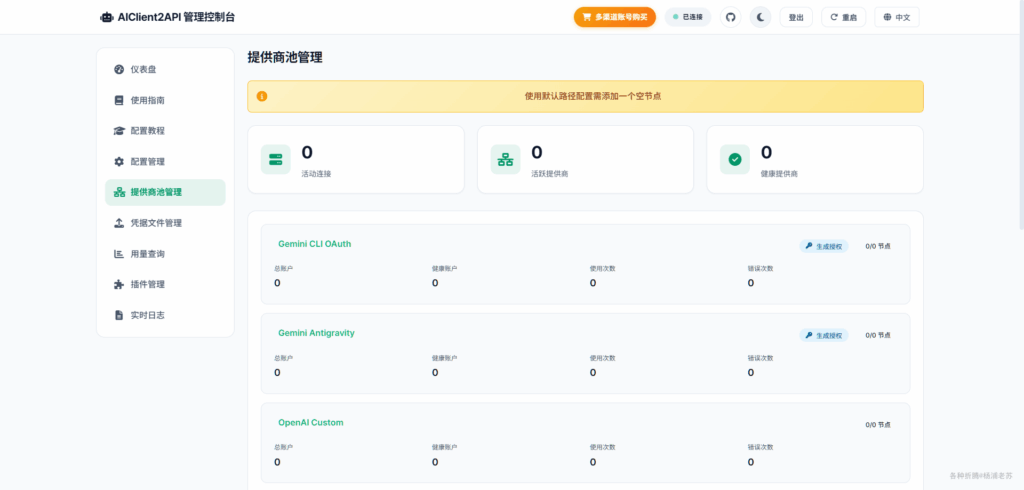
Many setups expose a small web control panel where you can configure providers, inspect health, and copy your local API key.
The documentation frequently refers to a web UI at http://localhost:3000, where you configure at least one provider before using A2 with tools like OpenClaw.
From the web UI, you can:
- Add or modify provider accounts
- Enable/disable specific backends
- View available models registered under names like
aiclient2api/gemini-3-flash-previeworaiclient2api/claude-sonnet-4-5.
Once a provider is configured, restart any dependent gateways (e.g., openclaw gateway restart) and refresh your model list from the client side.
Connecting OpenAI-Compatible Clients to A2
Most modern AI tools that support custom OpenAI endpoints can talk to AIClient2API with only a few settings changes.
The key is to point the client at your local base URL (e.g., http://localhost:3000/v1) and use the API key configured in A2.
For example, a minimal curl request might look like:
curl http://localhost:3000/v1/chat/completions \
  -H "Authorization: Bearer YOUR_AICLIENT2API_KEY" \
  -H "Content-Type: application/json" \
  -d '{
    "model": "aiclient2api/gemini-3-pro",
    "messages": [
      {"role": "user", "content": "Explain AIClient2API in simple terms."}
    ]
  }'
From the client’s perspective, this behaves like a standard OpenAI Chat Completions call.
Behind the scenes, A2 maps the model to a specific backend (e.g., Gemini via gemini-cli, or Claude via Kiro), transforms the payload, and relays the answer back in OpenAI format.
Example: Using A2 with OpenClaw
OpenClaw is one of several tools that integrate nicely with AIClient2API via its OpenAI-compatible or Claude-compatible interfaces.
A quick OpenClaw configuration flow looks like this:
- Ensure AIClient2API is running and at least one provider is configured in the web UI.
- Set OpenClaw’s base URL to your local A2 endpoint, such as
http://localhost:3000/v1for OpenAI protocol orhttp://localhost:3000for Claude protocol. - Export your A2 API key as
AICLIENT2API_KEYso OpenClaw can authenticate.
Then you can run commands like:
# List all models exposed by A2
openclaw models list

# Switch to a Claude model via A2
openclaw models set aiclient2api/claude-sonnet-4-5

# Chat with a Gemini model through A2
openclaw chat --model aiclient2api/gemini-3-flash-preview "your question"
These commands use the OpenClaw CLI as described in the A2 OpenClaw configuration guide while routing traffic through your AIClient2API proxy.
Best Practices and Security Considerations
Because AIClient2API works by integrating with existing clients and services, you should treat its credentials with the same care as any other production API keys.
Store cookies, tokens, and session data in environment variables or secure vaults, not directly in source control or public repositories.
It is also important to respect the terms of service of each upstream provider—Gemini, Grok, Qwen Code, and others may have specific rules about how their clients and models can be used.
Use A2 for legitimate development, research, and internal tooling rather than for abusive or prohibited workloads.
Who Should Use AIClient2API?
AIClient2API is particularly compelling if you are:
- An AI infra engineer building a unified gateway for multiple model providers
- A tooling/agent developer who wants to plug into richer model choices without adding new SDKs every month
- A cost-sensitive team looking to maximize free or low-cost model usage while keeping your codebase focused on a single OpenAI-style interface
For many such teams, A2 becomes a central “AI router” that sits in front of dashboards, agents, and automation workflows.
You configure it once, then keep iterating on your frontends and orchestration layers while swapping backends freely underneath.








