Key Takeaways
Databasus delivers automated, encrypted backups across PostgreSQL, MySQL, and MongoDB with a polished web UI, flexible cloud storage, and zero vendor lock-in, empowering teams to protect production data effortlessly.
What Is Databasus and Why It Stands Out in 2026
Databasus is a free, open-source, self-hosted application focused on making database backups simple, secure, and reliable. Originally developed under the name Postgresus, it has grown into one of the most popular PostgreSQL backup solutions on GitHub, surpassing many traditional CLI-based tools in adoption. The project emphasizes practical production needs rather than complex features like point-in-time recovery for cloud-managed databases, where native provider tools already excel.
Built primarily in Go with a TypeScript frontend, Databasus runs inside Docker containers and provides a clean, mobile-friendly web dashboard. It supports PostgreSQL versions 12 through 18, MySQL 5.7–9, MariaDB 10–12, and MongoDB 4–8. Backups are created using the official native utilities—pg_dump, mysqldump, and mongodump—ensuring compatibility and consistency without introducing custom logic that could break restores.
The tool addresses common pain points for database administrators and DevOps engineers: manual scripting is error-prone, cloud-managed services charge extra for advanced backups, and most open-source alternatives lack a user interface or built-in encryption. Databasus solves these by offering scheduled jobs, multiple storage backends, real-time alerts, and enterprise-grade security features while remaining completely free under the Apache 2.0 license.
Key Features That Make Databasus Essential
Databasus is designed for both solo developers and large teams. Its feature set covers the entire backup lifecycle from creation to long-term retention and recovery.
Supported Databases and Version Compatibility
The platform handles the most widely used relational and document databases in modern stacks.
| Database | Supported Versions | Primary Use Case |
|---|---|---|
| PostgreSQL | 12, 13, 14, 15, 16, 17, 18 | Production transactional systems |
| MySQL | 5.7, 8, 9 | Web applications and e-commerce |
| MariaDB | 10, 11, 12 | Community forks and legacy systems |
| MongoDB | 4, 5, 6, 7, 8 | NoSQL document stores |
Compatibility extends to both self-hosted instances and major cloud providers such as AWS RDS, Google Cloud SQL, and Azure Database for PostgreSQL. The tool deliberately avoids point-in-time recovery for cloud databases because external WAL archiving cannot be restored to managed services; instead, it focuses on hourly and daily full backups that cover 99 percent of real-world recovery scenarios.
Flexible Scheduling and Retention Policies
Users can schedule backups hourly, daily, weekly, monthly, or with custom cron expressions. Precise timing options let administrators choose low-traffic windows, such as 4 AM. Smart compression reduces storage needs by 4–8 times with minimal CPU overhead.
Retention policies are equally sophisticated. Options include keeping backups for a fixed period (7 days, 3 months, 1 year), retaining a specific count of recent backups, or applying the Grandfather-Father-Son (GFS) scheme that independently preserves hourly, daily, weekly, monthly, and yearly snapshots. Size-based limits prevent unexpected storage growth, which is critical for cost control in cloud environments.
Multiple Storage Destinations
Databasus supports a wide range of destinations so backups never remain tied to a single server.
- Local storage on the same VPS or server
- Amazon S3 and any S3-compatible service (including Cloudflare R2)
- Google Drive
- Azure Blob Storage
- Network-attached storage (NAS)
- FTP and SFTP servers
- rclone integration for over 70 additional cloud providers
All transfers happen securely, and backups remain fully portable. Administrators can decrypt and restore files directly from storage using standard command-line tools without needing the Databasus application itself.
Real-Time Notifications and Team Collaboration
Notifications arrive via Email, Slack, Discord, Telegram, or custom webhooks whenever a backup succeeds or fails. These alerts integrate seamlessly into existing DevOps workflows and enable immediate response to issues.
For organizations, workspaces group databases, storages, and notifiers by project or team. Role-based access control lets owners assign viewer, member, admin, or owner permissions. Full audit logs track every change, supporting compliance requirements in regulated industries.
Enterprise-Grade Security and Encryption
Security is built into every layer. Sensitive credentials are encrypted at rest with AES-256-GCM and never exposed in logs or the API. Each backup file receives its own unique encryption key derived from a master secret stored locally. Even if an attacker gains access to cloud storage, the backups remain unreadable without the secret key.
Databasus enforces read-only database access by default. Before accepting credentials, it performs three levels of permission checks—role, database, and table—to ensure the backup user cannot modify data. If any write privilege is detected, the system issues a clear warning. This least-privilege approach prevents accidental or malicious corruption even if the Databasus instance itself is compromised.
How to Install Databasus: Four Proven Methods
System requirements are modest: 1 CPU core, 500 MB RAM, and at least 5 GB of free space plus room for backup files. Docker Engine 20.10 or newer is required for all containerized deployments.
Automated Installation Script (Recommended for Linux)
The one-line script installs Docker if missing, sets up Databasus, and configures automatic startup.
sudo apt-get install -y curl && \
sudo curl -sSL https://raw.githubusercontent.com/databasus/databasus/refs/heads/main/install-databasus.sh | sudo bash
The application lands in /opt/databasus and starts immediately.
Simple Docker Run Command
For quick testing or single-server setups:
docker run -d \
  --name databasus \
  -p 4005:4005 \
  -v ./databasus-data:/databasus-data \
  --restart unless-stopped \
  databasus/databasus:latest
Data persists in the local directory, and the container restarts after reboots.
Docker Compose Setup
Create a docker-compose.yml file:
services:
  databasus:
    container_name: databasus
    image: databasus/databasus:latest
    ports:
      - "4005:4005"
    volumes:
      - ./databasus-data:/databasus-data
    restart: unless-stopped
Then run docker compose up -d. Startup typically completes within two minutes.
Kubernetes Deployment with Helm
Production clusters use the official Helm chart:
helm install databasus oci://ghcr.io/databasus/charts/databasus \
  -n databasus --create-namespace
Options exist for LoadBalancer, Ingress with custom domains, and TLS termination. Port-forwarding works for testing.
After any installation, open http://localhost:4005 (or your configured domain) to reach the dashboard.
Getting Started: Creating Your First Backup Job
The wizard-driven interface makes configuration straightforward.
- Click “New Database” and select the database type.
- Enter connection details (host, port, username, password, database name).
- Choose a schedule and precise start time.
- Select a storage destination and provide credentials if required.
- Define a retention policy.
- Optionally add one or more notification channels.
- Save and let Databasus validate the connection.
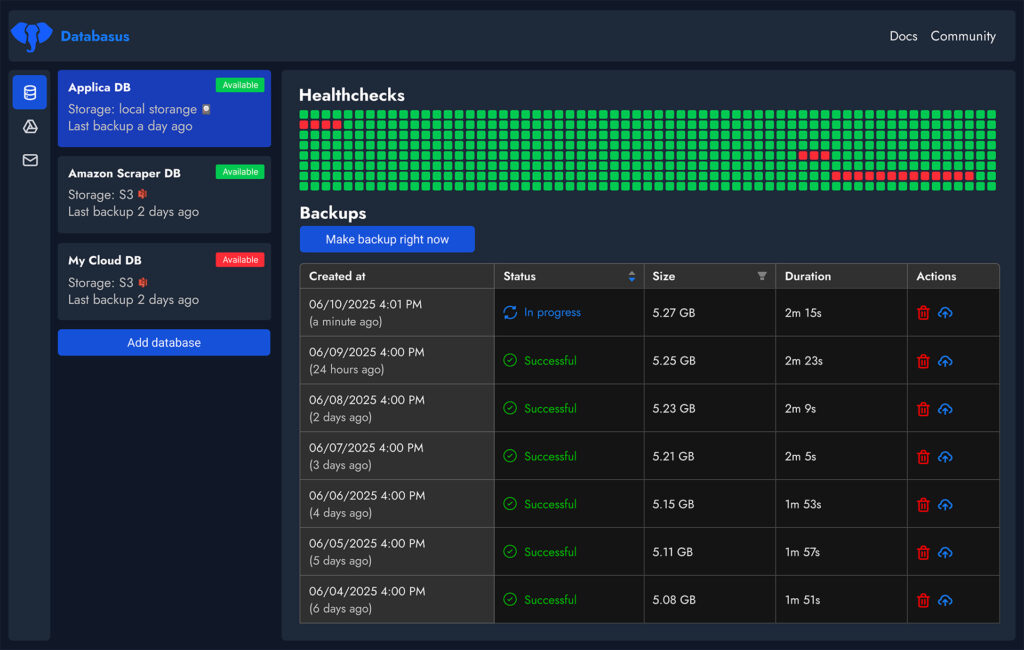
The first backup runs on schedule or can be triggered manually for testing. Progress appears in the dashboard, and notifications confirm success.
Advanced Configuration and Best Practices
For teams, create separate workspaces per project. Enable audit logging and assign roles carefully. Always back up the Databasus data directory or at minimum export the secret.key file; this ensures you can decrypt existing backups if the server fails.
Update procedures are simple. For Docker users, pull the latest image and restart the container. Helm users run helm upgrade. The project maintains 186 releases and frequent updates.
When restoring, use the built-in restore button or extract the encrypted archive manually with the master key for maximum flexibility.
Troubleshooting Common Issues
- Container fails to start: check logs with
docker logs databasus. - Port conflict: change the published port in docker-compose.yml.
- Permission errors on data directory: run
sudo chown -R $USER:$USER ./databasus-data. - Password reset: use the built-in command inside the container with
--new-passwordand the admin email.
Most issues resolve within minutes using the official documentation.
Databasus Compared to Alternative Solutions
| Feature | Databasus | Traditional Cron + pg_dump | Other CLI Tools |
|---|---|---|---|
| Web UI | Yes | No | No |
| Built-in Encryption | AES-256-GCM | Manual | Varies |
| Multiple Storages | S3, Google Drive, rclone +70 | Manual scripting | Limited |
| Notifications | Slack, Telegram, etc. | Custom | Limited |
| Retention Policies | GFS, count, time-based | Manual | Basic |
| Read-Only Enforcement | Automatic checks | None | None |
| Team Workspaces | Yes | No | No |
Databasus consistently ranks as the most starred PostgreSQL backup tool, reflecting its balance of simplicity and power.
Conclusion: Secure Your Databases Today
Databasus removes the complexity and risk from database backups while delivering professional features at zero cost. Its combination of a modern interface, strong security model, broad storage support, and easy deployment makes it the preferred choice for developers, DBAs, and enterprises seeking a self-hosted solution in 2026. Whether you manage a single PostgreSQL instance or dozens of mixed databases, Databasus provides the automation and peace of mind your infrastructure deserves.
Start with the Docker run command or automated script, explore the dashboard, and experience how straightforward reliable backups can be. The project welcomes contributions and maintains an active community for ongoing support.