Key Takeaways:
FinceptTerminal democratizes institutional-grade financial analytics by packaging deep market data, economic research, and AI-ready tools into a free, open-source terminal that anyone can install and extend.
Introduction: What Problem Does FinceptTerminal Solve?
Traditional financial terminals offer powerful analytics, but they are expensive, closed, and often locked behind restrictive licenses that keep advanced tools out of reach for independent analysts and smaller firms. At the same time, ad‑hoc Python scripts and scattered web dashboards make it hard to build a cohesive, repeatable research workflow across markets and macro data.
FinceptTerminal is a modern, open-source financial intelligence platform that bridges this gap, delivering a Bloomberg-style experience without the proprietary constraints. It combines real-time market analytics, fundamental and technical research, and rich economic data coverage in a user-friendly environment designed for interactive exploration and data‑driven decision-making. Under the hood, it leverages native performance plus embedded Python analytics to support quantitative workflows, portfolio research, and deep macro analysis in a single, integrated application.
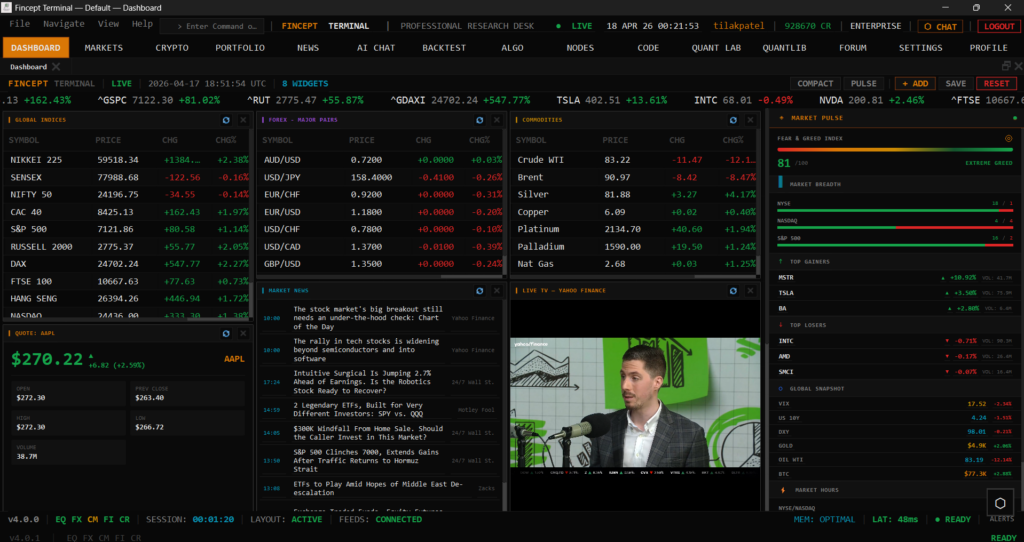
Core Features at a Glance
FinceptTerminal brings together several capabilities that typically live in separate tools:
- Advanced market analytics for equities, crypto, forex, and more, with charting and technical indicators.
- Fundamental research tools for valuation, portfolio analysis, and institutional-grade metrics.
- Economic data access across multiple providers such as FRED, DBnomics, IMF, and World Bank.
- AI-friendly architecture with embedded Python and scripting capabilities for quant workflows.
- Cross-platform desktop experience built with native technologies for speed and responsiveness.
For quantitative analysts, retail traders, financial developers, and data scientists, that combination means less time wiring data sources together and more time actually interpreting signals.
Installation Overview: Desktop App vs Python Package
FinceptTerminal can be installed in two main ways, depending on your preference and environment:
- As a native desktop application (recommended for most users).
- As a Python package, which is convenient for those who already live in virtual environments.
In both cases, you interact with the same conceptual terminal: a rich UI with dashboards, analytics modules, and data connectors. The official GitHub repository at https://github.com/Fincept-Corporation/FinceptTerminal provides detailed documentation, build instructions, and release binaries.
Step‑by‑Step Installation via Python (Quick Start)
If you want the fastest way to try FinceptTerminal and already have Python installed, the PyPI package offers a straightforward path.
Step 1: Create and activate a virtual environment
Using a dedicated virtual environment keeps dependencies isolated from the rest of your system.
# Create a new virtual environment
python -m venv fincept-env

# Activate on macOS / Linux
source fincept-env/bin/activate

# Activate on Windows (PowerShell)
.\fincept-env\Scripts\activate
Step 2: Install FinceptTerminal from PyPI
Once the environment is active, install the package:
pip install "fincept-terminal"Depending on your platform and version, the command may also accept a pinned version, for example:
pip install fincept-terminal==2.0.3This pulls in the terminal and its core dependencies so you can launch the application from the command line.
Step 3: Launch the terminal
After installation, starting FinceptTerminal is as simple as running:
finceptThis command opens the graphical interface and connects to default data providers, giving you immediate access to dashboards and analytics modules.
Installing the Native Desktop Application
For users who prefer a fully native experience with optimized performance and no Python prerequisite, FinceptTerminal offers a desktop build using C++20 and Qt. This path is ideal for traders and analysts who want a fast, single-binary terminal with minimal runtime overhead.
Step 1: Download the latest release
Visit the GitHub releases page or official website and download the installer or binary for your platform (Windows, macOS, or Linux).
- GitHub releases: browse to the latest tagged version and pick the appropriate asset.
- Microsoft Store (Windows): search for “FinceptTerminal” and install directly.
Step 2: Run the installer or binary
On Windows, the installer will register FinceptTerminal like any other desktop application, adding start menu entries and optional desktop shortcuts. On macOS and Linux, you may receive a .dmg, .AppImage, or similar packaging that you can mount or mark as executable.
Once installed, you can launch FinceptTerminal from your system menu or application launcher without needing Python on the system path.
Navigating the FinceptTerminal Interface
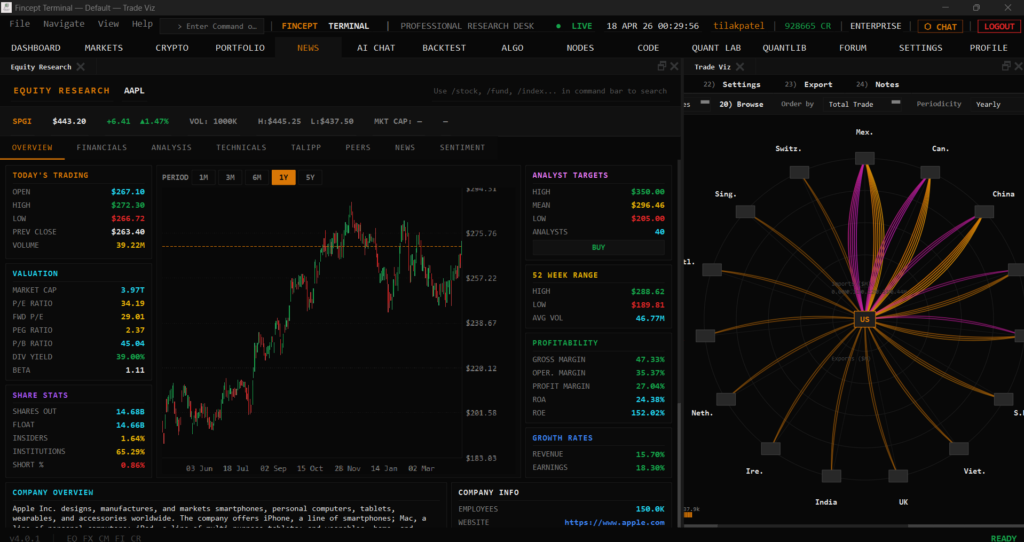
FinceptTerminal’s UI is organized into modules that reflect common research workflows, typically accessible through a sidebar or top navigation. While the exact layout may evolve across versions, you can expect high-level sections such as:
- Dashboard: market overview, indices, and watchlists.
- Equities / Crypto / FX: instrument-specific analytics and charting modules.
- Research: fundamental data, valuation tools, and screening.
- Macro / Economics: access to global economic indicators and time series.
From the dashboard, you can quickly jump into detailed views and drill down into tickers, sectors, or macro data series. Many panels are interactive, allowing you to zoom, filter by date ranges, and switch indicators in real time.
Running Market Analytics Queries
At the heart of FinceptTerminal is the ability to quickly answer market questions: “How did this stock perform over the last year?”, “What is the implied volatility on this option?”, or “Which sectors are outperforming today?”.
A typical equity analysis workflow looks like:
- Open the Equities or Stocks module from the main navigation.
- Enter a ticker symbol (for example,
AAPL,MSFT,TSLA) in the search bar. - Load the instrument’s overview, which may include price charts, volume, and basic fundamentals.
- Switch to advanced tabs for technical indicators (moving averages, RSI, MACD) and risk metrics.
- Use built‑in tools for valuation (DCF, multiples) or portfolio impact analysis if your version exposes them.
FinceptTerminal’s embedded Python analytics modules support deeper quantitative workflows, such as backtesting strategies, computing risk metrics like VaR and Sharpe ratio, or running factor models across baskets of securities.
Exploring Economic and Macro Data
For macro analysts and data scientists, FinceptTerminal’s economic data interfaces are a major differentiator. Instead of manually pulling CSVs from FRED or DBnomics, you can browse, visualize, and export series from within a single environment.
A typical macro workflow might be:
- Open the Economics or Macro module.
- Choose a data provider (for example, FRED, World Bank, IMF).
- Search for a series (for example, “US CPI”, “EU unemployment”, “Global GDP growth”).
- Load the time series chart and adjust date ranges, frequency (monthly, quarterly), and transformations (log, percent change).
- Export the series to CSV or send it into an embedded Python notebook for further quantitative analysis.
This tight integration between market and macro data allows you to build narratives that link micro-level price action with macroeconomic conditions, all inside the same tool.
Leveraging FinceptTerminal for Quantitative Workflows
Beyond point‑and‑click analysis, FinceptTerminal is designed to support programmatic and semi‑automated workflows. Depending on the version and configuration, you can:
- Use embedded Python modules to script custom analytics, from factor regressions to event studies.
- Create reusable templates for portfolio reports and risk dashboards.
- Integrate alternative data sources (for example, sentiment feeds) via connectors and APIs.
Because FinceptTerminal is open source, financial developers can extend existing modules or build new ones targeting their specific strategies and datasets. That makes it attractive not only as a tool to use, but also as a platform to build on.
Best Practices for Using FinceptTerminal Effectively
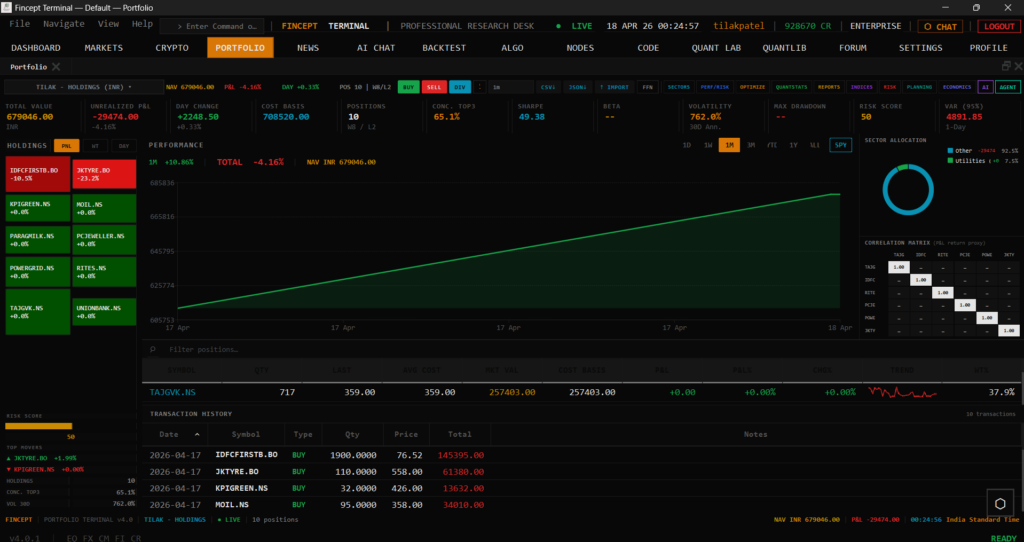
To get the most out of FinceptTerminal in a professional or research setting:
- Standardize environments: use virtual environments or managed desktop deployments so the team runs consistent versions.
- Organize watchlists: group instruments by strategy, sector, or region for faster navigation.
- Combine market and macro views: juxtapose equity moves with relevant economic indicators in your dashboards.
- Automate where possible: push repetitive calculations into embedded Python scripts and templates.
- Contribute back: if you build useful modules or fix issues, consider contributing to the GitHub repository to benefit from community review and improvements.
FinceptTerminal sits at an interesting intersection between professional trading platforms and open-source research tooling, giving you deep analytics while remaining transparent and extensible. To explore the latest features, releases, and documentation—or to star and clone the project—head to the official repository at https://github.com/Fincept-Corporation/FinceptTerminal.