
Key Takeaway: FreeLLMAPI turns the scattered free tiers of 14+ AI providers into one secure, OpenAI‑compatible endpoint with around 1.3 billion free tokens per month for your apps and agents.
What Is FreeLLMAPI?
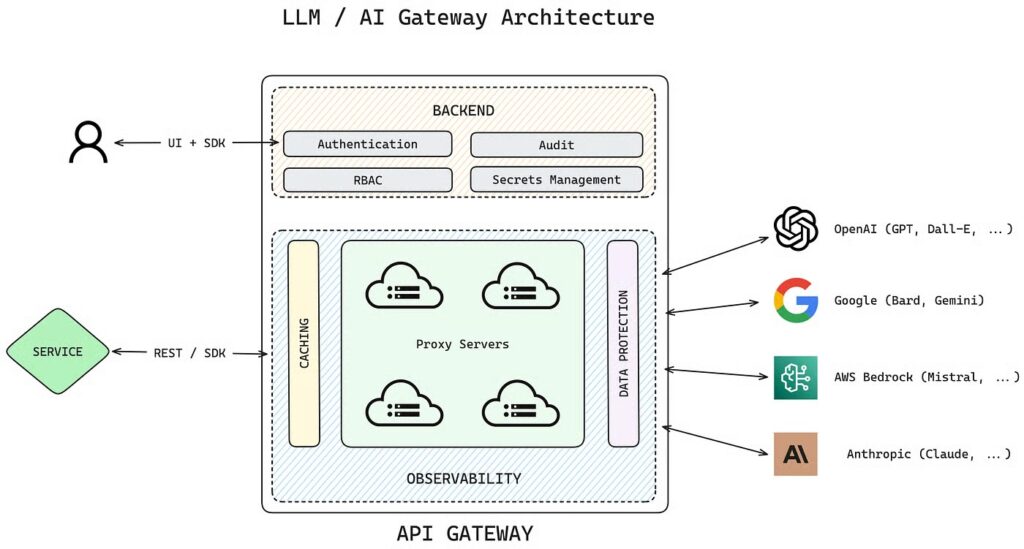
FreeLLMAPI is an open‑source proxy that aggregates the free tiers from roughly 14 different LLM providers and exposes them via a single, OpenAI‑compatible API. Instead of juggling a dozen SDKs, base URLs, and rate limits, you plug in your provider API keys once and get back one unified key and endpoint you can use everywhere. producthunt
When you send a request, FreeLLMAPI routes it to an appropriate provider, automatically failing over if one hits a rate limit, so your agents and apps can keep running without manual provider juggling. Stacking all those free quotas yields roughly 1.3 billion tokens of inference capacity per month—ideal for prototyping, personal projects, and early‑stage AI products without a cloud bill.
Official GitHub repo: https://github.com/tashfeenahmed/freellmapi.
Developer‑friendly overview: FreeLLMAPI — Aggregate 14 Free AI Providers.
Why FreeLLMAPI Exists
Most major AI providers offer generous free tiers, but each comes with separate rate limits, credentials, and client libraries. For a single developer, keeping track of all that friction is annoying; for autonomous agents calling models constantly, it is a deal‑breaker.
FreeLLMAPI solves this by acting as a “meta‑provider” sitting in front of all those free tiers, giving you:
- One OpenAI‑compatible endpoint, so your existing clients and SDKs “just work.”
- One unified API key, while your individual provider keys stay encrypted at rest.
- Automatic failover and routing, so when one provider’s free quota is exhausted or rate‑limited, requests transparently shift to another.
For personal experimentation, hackathon projects, local tools, and agent frameworks, this can offset a substantial portion of your inference costs.
How FreeLLMAPI Works Under the Hood
Conceptually, FreeLLMAPI is a local Node.js proxy and router. You configure it through a simple web UI, entering the API keys for each free‑tier provider you want to tap.
Under the hood, it:
- Stores those provider keys encrypted using AES‑256‑GCM, decrypting only in memory when needed.
- Maintains a fallback chain and priority order to decide which provider to call first and which ones to fall back to.
- Exposes a single OpenAI‑compatible base URL, so any client using
/v1/chat/completions(or similar) will work by just changing the base URL and key.
From your app’s perspective, it is just “an OpenAI‑like API running on localhost” that happens to be backed by many providers at once.
Supported Providers and Free Capacity
FreeLLMAPI focuses on providers with either permanent free tiers or large free quotas suitable for development and light production testing. The commonly supported providers include:
- Google Gemini (Pro / Flash)
- Groq
- Cerebras
- SambaNova
- NVIDIA NIM
- Mistral
- OpenRouter (for GPT‑4o‑level and other models)
- GitHub Models (e.g., GPT‑4o via GitHub’s hosted models)
- Hugging Face Inference API
- Cohere
- Cloudflare Workers AI
- Zhipu GLM‑4 series
- Moonshot Kimi
- MiniMax
By stacking the free quotas from this set, FreeLLMAPI can reach about 1.3 billion free tokens per month, depending on how you configure and use it. That is more than enough to power a fleet of autonomous agents, dev environments, or heavy personal usage before you ever touch a paid tier.
When to Use (and Not Use) FreeLLMAPI
FreeLLMAPI is designed primarily for personal experimentation and development, not mission‑critical production systems. Providers can change limits, models, or free‑tier policies at any time, so stability over months or years is not guaranteed.
Use it when you:
- Want to prototype AI agents or tools without worrying about cost.
- Need a single API surface to test models from many vendors.
- Run experiments from your laptop or dev server and are fine with occasional provider throttling.
Avoid it for:
- Hard SLA production workloads that require predictable latency and capacity.
- Compliance‑heavy settings where you need a formal contract with each provider.
For those cases, treat FreeLLMAPI as a testing harness before you commit to, and pay for, specific providers.
Installation Guide: Getting FreeLLMAPI Running
FreeLLMAPI is built as a Node.js app with a browser UI for configuration. Installation follows a familiar pattern: clone the repo, install dependencies, set environment variables, and start the dev server.
Prerequisites
You will need:
- A recent Node.js LTS (e.g., Node 18+).
- npm or pnpm.
- Git.
On most developer machines (macOS, Linux, WSL2), this stack is standard.
Step 1: Clone the Repository
git clone https://github.com/tashfeenahmed/freellmapi.git
cd freellmapi
npm install
This pulls the latest source code and installs the node dependencies.
Step 2: Create Your .env File
The project ships with an example environment file that you copy and customize.
cp .env.example .envIn the new .env file, you will typically configure:
- A server port (default often fine).
- A JWT or session secret for the app.
- An encryption key used to encrypt your provider API keys with AES‑256‑GCM at rest.
The docs recommend generating a strong, random key and never checking .env into version control.
Step 3: Generate Your Encryption Key
FreeLLMAPI encrypts provider API keys at rest using AES‑256‑GCM, which requires a robust encryption key.
You can generate a base64‑encoded 32‑byte key via Node:
node -e "console.log(require('crypto').randomBytes(32).toString('base64'))"Copy this output into the relevant variable in your .env file as documented (for example, an ENCRYPTION_KEY‑style entry). On startup, the proxy will use this key to decrypt provider tokens only in memory when needed.
Step 4: Start the Development Server
With .env configured, start the app:
npm run devBy default, the web UI typically runs on http://localhost:5173, where you will do all your configuration. The OpenAI‑compatible API endpoint is presented in the UI along with the unified key you will use in clients.
Initial Configuration in the Web UI
Open http://localhost:5173 in your browser to access the FreeLLMAPI dashboard.
The usual setup flow is:
- Create an admin account (email/password) if prompted.
- Navigate to the Providers or API Keys section.
- For each provider (Gemini, Groq, Mistral, etc.), paste in your existing free‑tier API key.
- Configure the Fallback Chain or priority order: for example, prefer one provider for coding, another for chat, etc.
- Save changes and go to the Unified Key section to generate an all‑in‑one API key that your apps will use.
From that point on, you rarely touch the individual provider keys; you just treat FreeLLMAPI as “your free OpenAI proxy.”
Using FreeLLMAPI from Your Applications
Once configured, using FreeLLMAPI is similar to using the official OpenAI API: you set the base URL to your proxy and use the unified key.
Base URL and Authentication
You will typically configure your client like this:
- Base URL: something like
http://localhost:8787/v1(check the UI/docs for the exact port and path). - API key: the unified key you generated in the dashboard.
Many clients only need two changes in their config: the base URL and the key.
Example: curl Chat Completion
curl http://localhost:8787/v1/chat/completions \
  -H "Authorization: Bearer YOUR_UNIFIED_KEY" \
  -H "Content-Type: application/json" \
  -d '{
    "model": "auto",
    "messages": [
      {"role": "user", "content": "Explain FreeLLMAPI in simple terms."}
    ]
  }'
Here’s what is happening:
"model": "auto"lets FreeLLMAPI pick an appropriate provider based on your fallback chain and rate limits.- The proxy chooses a provider, forwards the request to that provider’s API, and returns the response in OpenAI‑compatible JSON format.
Example: Node.js / TypeScript Client
If you are already using the official OpenAI Node SDK or similar libraries, you can point them to FreeLLMAPI:
import OpenAI from "openai";

const client = new OpenAI({
  apiKey: process.env.FREELLMAPI_KEY,
  baseURL: "http://localhost:8787/v1", // FreeLLMAPI endpoint
});

async function main() {
  const completion = await client.chat.completions.create({
    model: "auto",
    messages: [
      { role: "user", content: "Give me 3 startup ideas using free LLM APIs." },
    ],
  });

  console.log(completion.choices[0].message);
}

main();
Your existing tooling—CLI scripts, agents, or dashboard backends—can often be switched over by updating environment variables rather than rewriting logic.
Best Practices, Pitfalls, and Limitations
To get the most out of FreeLLMAPI, keep these points in mind:
- Security of provider keys – While keys are encrypted at rest with AES‑256‑GCM, anyone with access to the running machine and
.envcan potentially misuse them, so treat the host as sensitive. - Usage scope – The project is intended for personal experimentation only; using it for large‑scale commercial workloads may violate provider terms or free‑tier policies.
- Model quality variance – Free tiers often expose slightly lower‑tier or preview models; expect quality differences vs top paid models like the newest GPT‑4 variants.
- Changing quotas – Providers can tighten or revoke free tiers; your effective 1.3B tokens per month is an approximate upper bound, not a guaranteed contract.
To be safe, log which provider is being used for each request and design your applications to tolerate occasional timeouts or provider switches.








