

Hermes Agent: The Self-Improving Open-Source AI Agent That Grows With You

Key Takeaway: Hermes Agent is a self-improving, open-source AI agent from Nous Research that runs on your own infrastructure, remembers what it learns, and becomes more capable the longer you use it.
What Hermes Agent Is And Why It Matters
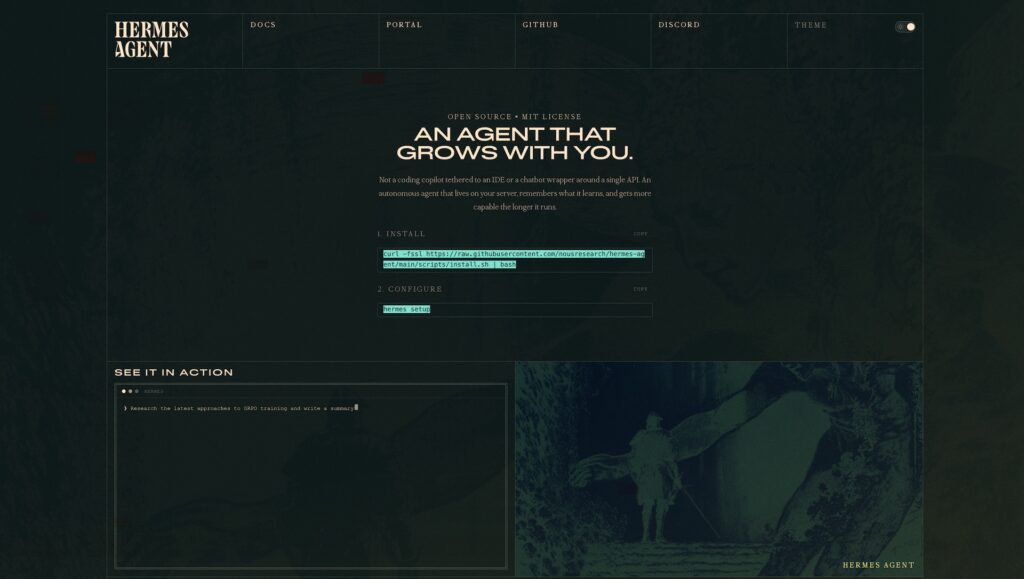
Hermes Agent is an open-source, self-improving AI agent built by Nous Research, designed to run persistently on your infrastructure while accumulating memory and skills over time. Unlike static chat-style assistants that start from zero context on every session, Hermes maintains a long-lived state that spans conversations, projects, and even messaging channels. It is explicitly architected as “the agent that grows with you,” meaning its capabilities deepen the more you expose it to your code, tools, and day-to-day workflows.
At its core, Hermes is not just a chatbot wrapper around a single API; it is an autonomous agent loop with a terminal backend, tool orchestration, and a rich memory system that lives on a server, VPS, or container rather than inside a browser tab. You can talk to the same running agent from a terminal, from Telegram on your phone, or from Discord, while it continues long-running tasks on a remote machine you never need to SSH into directly. This makes Hermes particularly appealing to AI developers and self-hosters who want an always-on, infrastructure-aware agent rather than a purely conversational assistant.
Architecture, Hermes Models, And Local-First Design
Built On The Hermes Model Family, But Model-Agnostic
Hermes Agent is tightly connected to the Hermes model family (for example Hermes 3, based on recent Llama generations) and is used internally by Nous Research as the control plane for reinforcement learning and trajectory collection. However, the framework itself is model-agnostic: you can point it at Nous Portal, OpenRouter (with hundreds of models), OpenAI, Anthropic, zhipu’s GLM, Kimi/Moonshot, or a fully self-hosted endpoint such as vLLM or SGLang. Model selection and switching happen via simple commands like hermes model or /model provider:model in the interface, so you can iterate without touching code or reconfiguring your skills.
Under the hood, Hermes uses an orchestration loop that handles provider selection, prompt construction, tool calling, retries, and context compression in a unified way. This separation between agent logic and model provider is critical for long-term maintainability: as models improve, you can upgrade or swap providers while keeping your skill library, memory, and gateway configuration intact. For teams operating in regulated or cost-sensitive environments, this also gives leverage to chase better pricing or latency characteristics without re-architecting the agent.
Closed Learning Loop: Memory, Skills, And User Modeling
The defining feature of Hermes Agent is its closed learning loop built around multi-level memory and autonomous skill creation. Session histories, summarized with LLMs and indexed using SQLite’s FTS5, become searchable across time so the agent can recall prior conversations, decisions, and project context instead of treating each turn as ephemeral. On top of this, Hermes builds a user model (via the Honcho dialectic system) that captures persistent preferences such as how you like pull requests reviewed or which observability tools you rely on.
Hermes converts recurring workflows into “Skill Documents” – markdown-based procedural memories that follow the agentskills.io open standard and live in a local skill library. When a new task looks similar to a prior one, the agent uses full-text search to retrieve the relevant skill, reuses or refines it, and can update the document as it discovers better patterns. This is fundamentally different from traditional vector-only memory: instead of just recalling snippets of text, the agent is curating and evolving its own how-to manuals for your environment.
Local-First, Tool-Centric Execution Backends
Hermes Agent’s execution model is explicitly local-first: commands run in your chosen terminal backend, which can be your local machine, a Docker container, an SSH-connected server, a Daytona dev environment, a Singularity/Apptainer container, or a Modal cloud sandbox. The terminal backend determines where shell commands execute and how much isolation you want, ranging from zero isolation on local hosts to hardened container isolation in Docker and cloud sandboxes. This gives self-hosters a straightforward way to keep the agent away from critical hosts while still granting it enough capability to manage code, services, and data pipelines.
On top of the terminal, Hermes exposes 40+ built-in tools and toolsets for web search, browser automation, code execution, file operations, and more, with a configuration system that lets you enable, disable, and group tools per profile. Scheduled automations use a cron-like scheduler with natural-language triggers and can deliver reports, alerts, and summaries to any configured messaging platform. Because everything persists in ~/.hermes, including memory databases, skills, and config, you can treat the agent as an evolving service rather than a throwaway playground.
Step-By-Step Installation And Setup
Prerequisites And Platform Support
The quickest way to install Hermes Agent is via the official shell installer, which supports Linux, macOS, and WSL2 and bootstraps Python, Node.js, dependencies, and the hermes CLI in one step. The only hard prerequisite for this path is git; the installer handles the rest, including setting up a suitable runtime stack. Native Windows is not supported; for Windows machines, the recommended path is to enable WSL2 and run the same installer from an Ubuntu (or similar) distribution.
For developers who want to hack on the codebase or run Hermes in a CI pipeline, a more traditional workflow is supported: clone the GitHub repository, create a Python 3.11 virtual environment, and install the project (and optional submodules) in editable mode. There are also first-class Docker images and Docker Compose examples if you prefer to containerize the agent and isolate it from the host filesystem.
Option 1: 60-Second Install (Recommended)
- Run the official installer from a shell on Linux, macOS, or WSL2:
curl -fsSL https://raw.githubusercontent.com/NousResearch/hermes-agent/main/scripts/install.sh | bashThis script installs Hermes Agent, sets up dependencies, and registers the hermes command in your shell profile.
- Reload your shell configuration so the new
hermesbinary is on thePATH:
source ~/.bashrc # or: source ~/.zshrcAfter this step, typing hermes should start the interactive terminal UI.
- Start Hermes and run the guided setup:
hermes          # launch the TUI
hermes setup    # optional one-shot setup wizard
The setup wizard walks through provider selection (Nous Portal, OpenRouter, OpenAI, Anthropic, etc.), API key configuration, default model choice, and terminal backend preferences.
Option 2: Developer Install With Python Virtual Environment
If you prefer to work directly from the Git repository, for example to contribute or to pin a specific version, you can follow the contributor quick-start.
- Clone the repository and fetch required submodules:
git clone https://github.com/NousResearch/hermes-agent.git
cd hermes-agent
git submodule update --init mini-swe-agent
The mini-swe-agent submodule provides the terminal backend engine used by Hermes.
- Install the
uvtool and create a Python 3.11 virtual environment:
curl -LsSf https://astral.sh/uv/install.sh | sh
uv venv .venv --python 3.11
source .venv/bin/activate- Install Hermes Agent and dependencies in editable mode:
uv pip install -e ".[all,dev]"
uv pip install -e "./mini-swe-agent"
At this point, you can run the test suite via python -m pytest tests/ -q and launch Hermes via the hermes entrypoint provided by the editable install.
Option 3: Running Hermes Agent In Docker
For maximum isolation, run Hermes inside a container and mount only the ~/.hermes directory as persistent state.
- Ensure Docker is installed and working:
docker versionIf this command fails, fix your Docker installation before proceeding.
- Start Hermes Agent as a long-running gateway container:
docker run -d \
 --name hermes \
 --restart unless-stopped \
 -v ~/.hermes:/opt/data \
 nousresearch/hermes-agent gateway run
This runs the messaging gateway inside Docker and persists Hermes state under ~/.hermes on the host.
- For interactive CLI usage in a one-off container, you can run:
docker run -it --rm \
 -v ~/.hermes:/opt/data \
 -e OPENAI_API_KEY="sk-..." \
 -e ANTHROPIC_API_KEY="sk-ant-..." \
 nousresearch/hermes-agent
API keys are supplied via environment variables, and the CLI runs inside the container while reusing the same persistent state volume.
- For persistent deployments, a
docker-compose.yamlsimilar to the following is recommended:
services:
 hermes:
   image: nousresearch/hermes-agent:latest
   container_name: hermes
   command: gateway run
   restart: unless-stopped
   volumes:
     - ~/.hermes:/opt/data
   deploy:
     resources:
       limits:
         memory: 4G
         cpus: "2.0"
Apply it with docker compose up -d and inspect logs via docker compose logs -f hermes.
Using Hermes Agent In Practice
First-Run Configuration And Provider Setup
Once Hermes is installed, the quickest way to get productive is to run hermes and follow the interactive prompts or hermes setup for the full wizard. During setup you choose an LLM provider and model (for example a Hermes model on Nous Portal, a model exposed via OpenRouter, or a proprietary API on OpenAI or Anthropic) and optionally configure fallbacks. Hermes stores these selections in ~/.hermes/config.yaml, so subsequent sessions reuse them without re-entering keys.
Hermes can be used purely from the terminal UI or via the messaging gateway that connects to Telegram, Discord, Slack, WhatsApp, Signal, Matrix, and other platforms from a single process. In either interface, you use slash commands such as /model, /skills, /usage, /compress, /retry, and /personality to steer the agent, inspect memory usage, and browse installed skills. For multi-device workflows, a common pattern is to keep Hermes running in a Docker or SSH backend on a server while sending instructions and receiving results via Telegram.
Assigning Tasks And Letting The Agent Grow
A typical developer workflow starts by pointing Hermes at a project and giving it a high-level objective, such as “harden this service’s authentication path” or “prepare a weekly report of failing CI jobs.” The agent then decomposes the task, runs commands in the configured terminal backend, uses tools like web search and browser automation as needed, and asks for approval on dangerous operations depending on your security settings. Because the terminal backend can be Docker or SSH, you can safely give Hermes root-like capabilities inside a sandbox while keeping the host system locked down.
As you iterate, Hermes records trajectories, summarises sessions, and synthesizes Skill Documents that capture the sequence of steps that worked well for complex tasks. When you later ask it to “do the same cleanup you ran on the analytics microservice last month,” the agent searches its skill and memory databases, reloads the relevant procedures, and replays or adapts them instead of starting from scratch. Over weeks and months, this creates a bespoke library of repeatable workflows tailored to your repos, infrastructure, and preferences.
Examples: From Coding Copilot To Operations Partner
In practice, Hermes can serve as both a coding companion and an operations sidekick.
- As a coding assistant, you might use the CLI to let Hermes run test suites, refactor modules, and open pull requests, while its memory keeps track of architectural decisions and trade-offs discussed earlier in the project.
- As an operations partner, you could configure cron-style automations that run nightly security scans, summarize log anomalies, and push a report into a dedicated Slack or Telegram channel.
- As a research tool, you can enable browser and web tools, let Hermes gather data from APIs or documentation, and export conversations or trajectories for fine-tuning or offline analysis.
Because Hermes is open source under the MIT license and lives in your environment, it fits naturally into self-hosted stacks where compliance or data residency policies make cloud-only assistants difficult to adopt. Combined with the Hermes model family and Nous Research’s broader work on open reinforcement learning pipelines, Hermes Agent gives practitioners a concrete, production-ready embodiment of “agentic” AI that can grow with both individual developers and teams.
Where To Learn More
The official Hermes Agent GitHub repository provides the source code, release notes, and contributor guidelines, and is the best place to track rapid development of new backends, tools, and skills.
Nous Research’s homepage highlights the Hermes model series and the lab’s broader open-source AI strategy, including distributed training infrastructure and reinforcement learning research that directly informs Hermes Agent’s capabilities.








