
Key Takeaway:
Magika uses a compact deep learning model to identify file content types in milliseconds with ~99% accuracy, dramatically outperforming legacy tools like
libmagicfor modern security and DevOps workflows.
Magika is an open-source AI-powered file content type detection system from Google that replaces brittle magic-byte and extension-based heuristics with a compact deep learning model. It is designed to determine what a file actually contains—code, document, media, archive, binary, and more—rather than guessing from the name or header alone.
Under the hood, Magika uses a custom, highly optimized model (around a few megabytes) trained on roughly 100 million samples spanning more than 200 content types, achieving about 99% accuracy on internal test sets while running in milliseconds on a single CPU. This makes it suitable for latency-sensitive environments such as email gateways, malware sandboxes, CI pipelines, and large-scale storage scanning.
Traditional tools like file/libmagic rely on hand-written signatures and shallow rules that can break on truncated, obfuscated, or novel formats, and they require constant manual updates to keep pace with new file types. Magika overcomes these limitations by learning patterns directly from data, supporting over 200 content types and maintaining near-constant inference time regardless of file size.
How Magika’s deep learning engine works
Magika’s CLI and language bindings are thin wrappers around a compact deep learning model optimized for efficient inference on standard CPUs. Instead of reading entire files into memory, Magika reads only a few chunks—typically up to around 2 KB of bytes—making its runtime essentially independent of the total file size.
The detection pipeline follows four main steps:
- Magika reads small chunks from the file or byte stream, which keeps memory use low even for very large files.
- It extracts features from these bytes and passes them through the deep learning model to predict the content type label.
- The model’s confidence score is evaluated; if it exceeds a threshold, the prediction is accepted as a specific type (for example
python,pdf, orelf). - If confidence is low, Magika falls back to generic labels like
txtorunknown, and in special cases returnsempty,directory, orsymlinkwithout running the model at all.
Internally, Magika distinguishes between the model’s raw content type and the processed label exposed by the tool, which lets it handle edge cases gracefully while still allowing advanced users to inspect low-level predictions for debugging. Current models such as standard_v3_3 support over 200 content types with similar speed and accuracy to earlier versions, and model changes are documented in a dedicated changelog.
Why Magika matters for security and DevOps
Magika is already used at scale inside Google to route Gmail, Drive, and Safe Browsing files to appropriate security and content-policy scanners, acting as a fast pre-filter before deeper analysis runs. For defenders and SREs, having an accurate, AI-powered view of file types reduces blind spots where malicious payloads are disguised with misleading names or container formats.
Because Magika’s inference time is roughly constant and typically around a few milliseconds on CPU after model loading, it can be embedded into latency-sensitive pipelines such as CI/CD artifact validation, email security gateways, and web upload filters without becoming a bottleneck. The tool is open-source under the Apache 2.0 license, with the code and models available on the official Magika GitHub repository.
Installing Magika
Magika is distributed as a Python package on PyPI and includes a Rust-based CLI binary starting from version 0.6.0, so a single installation covers both CLI and Python usage. You can also install it via pipx for a more isolated, global CLI setup.
Prerequisites
You will need:
- Python 3 (Magika’s PyPI package targets modern Python versions).
piporpipxfor installation.
Verify that python/pip are available:
python --version
pip --version
Install Magika with pip (recommended for most users)
To install the latest stable release of Magika:
pip install magikaIf you want to test a release candidate:
pip install --pre magikaAfter installation, you should have both the magika CLI and the magika Python module available in your environment.
Install Magika as a global CLI with pipx
If you mainly want the CLI and prefer to keep it isolated from your Python environments, use pipx:
# Install pipx if you do not have it yet
python -m pip install --user pipx
python -m pipx ensurepath

# Then install Magika
pipx install magika
This makes the magika command available globally, while keeping its dependencies in a dedicated virtual environment.
Using Magika from the command line
Once installed, the CLI provides a rich set of options for scanning individual files, directories, or streams.
Basic CLI usage
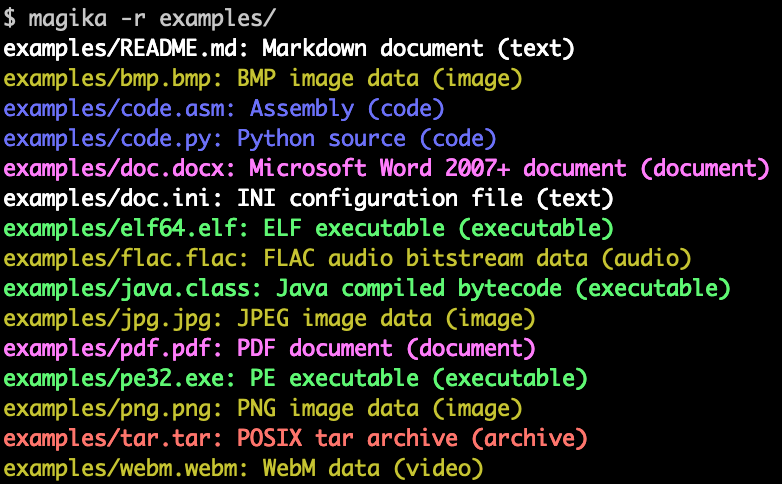
To analyze one or more files:
magika examples/*Example output (simplified):
code.py: Python source (code)
doc.docx: Microsoft Word 2007+ document (document)
png.png: PNG image data (image)
README.md: Markdown document (text)
tar.tar: POSIX tar archive (archive)
webm.webm: WebM video (video)
To recursively scan a directory (very useful for security audits and data inventories):
magika -r /path/to/directoryGetting MIME types, labels, and scores
Magika can output different representations of the detected type:
# Show simple labels (e.g., python, pdf, elf)
magika --label sample.bin

# Show MIME types (e.g., text/x-python, application/pdf)
magika --mime-type sample.bin

# Include the confidence score
magika --output-score sample.bin
For machine-readable output, use JSON or JSONL:
magika --json sample.bin
magika --jsonl /path/to/files/*
A JSON result from scanning a Python file might look like:
{
  "path": "./code.py",
  "result": {
    "status": "ok",
    "value": {
      "dl": {
        "description": "Python source",
        "extensions": ["py", "pyi"],
        "group": "code",
        "is_text": true,
        "label": "python",
        "mime_type": "text/x-python"
      },
      "output": {
        "description": "Python source",
        "extensions": ["py", "pyi"],
        "group": "code",
        "is_text": true,
        "label": "python",
        "mime_type": "text/x-python"
      },
      "score": 0.996999979019165
    }
  }
}
This structure includes both raw model output (dl) and the final tool output (output), plus a confidence score, which is invaluable for logging and threat hunting workflows.
Using Magika as a Python library
Magika’s Python API exposes the same detection capabilities in a clean, object-oriented interface, allowing you to embed file type classification into your own tools and services.
Instantiating the Magika detector
The typical pattern is to create a Magika instance once and reuse it:
from magika import Magika

m = Magika()
The constructor accepts optional arguments such as model_dir (for custom models), prediction_mode (e.g., high confidence vs best guess), and no_dereference (to avoid following symlinks), mirroring CLI options.
Detecting content from bytes, paths, and streams
Magika provides multiple methods depending on your data source:
From bytes:
from magika import Magika

m = Magika()
result = m.identify_bytes(b"# Example\nThis is an example of markdown!")

print(result.output.label)  # e.g. "markdown"
From a file path:
from magika import Magika

m = Magika()
result = m.identify_path("./script.py")

print(result.output.label)        # "python"
print(result.output.description)  # "Python source"
print(result.output.mime_type)    # "text/x-python"
print(result.output.group)        # "code"
print(result.output.extensions)   # ["py", "pyi"]
print(result.output.is_text)      # True
print(result.score)               # confidence score as float
From an open file stream:
from magika import Magika

m = Magika()
with open("./document.pdf", "rb") as f:
    result = m.identify_stream(f)

print(result.output.label)  # "pdf"
Note that Magika may seek within the stream but does not close it for you, which gives you full control in more complex pipeline code.
Scanning entire projects programmatically
For DevOps use cases, it is common to walk a repository or artifact directory and classify every file:
from magika import Magika
import os

m = Magika()

for root, dirs, files in os.walk("./project"):
    for name in files:
        path = os.path.join(root, name)
        result = m.identify_path(path)
        print(f"{path}: {result.output.description}")
This pattern can be integrated into CI jobs to enforce policies (for example, blocking unexpected binaries in source trees) or to drive routing logic in malware analysis and data governance pipelines.
Where to go next
Magika’s official documentation and blog posts from Google’s security research team provide deeper dives into the model design, benchmarks, and real-world use cases. For full technical details, new releases, and advanced options—including Docker images and JavaScript bindings—refer to the official Magika site at Google Security Research and the Magika repository on GitHub.
By replacing brittle signature-based detection with a fast, compact deep learning model, Magika gives developers, security engineers, and SREs a robust foundation for understanding what files truly are—at scale, and in real time.opensource.








