
Key Takeaways: Odysseus is a fully self-hosted, local-first AI workspace that bundles chat, autonomous agents, deep research, a hardware-aware model “Cookbook,” documents, email, calendar, notes, and tasks into a single Docker container, giving you a ChatGPT- or Claude-style UI while every byte of data stays on your own hardware.
If you have ever wanted the polish of ChatGPT, the agentic muscle of Claude, and the “owns my own data” warm fuzzies of a self-hosted setup all in one place, Odysseus is built for you. It is an open-source, MIT-licensed AI workspace whose stated goal is blunt: be the self-hosted version of the ChatGPT or Claude UI experience, with “more jank and fun,” running entirely on your own hardware, with your own data, no trojan.
In this guide we will walk through what Odysseus actually does, how to install it (Docker, Linux, macOS, Apple Silicon, and Windows), and how to get real work out of it on day one.
What Is Odysseus
Odysseus is a FastAPI-based, local-first workspace that wraps a remarkable number of features behind one login. Rather than being “yet another chat UI,” it tries to be the single tab you keep open all day.
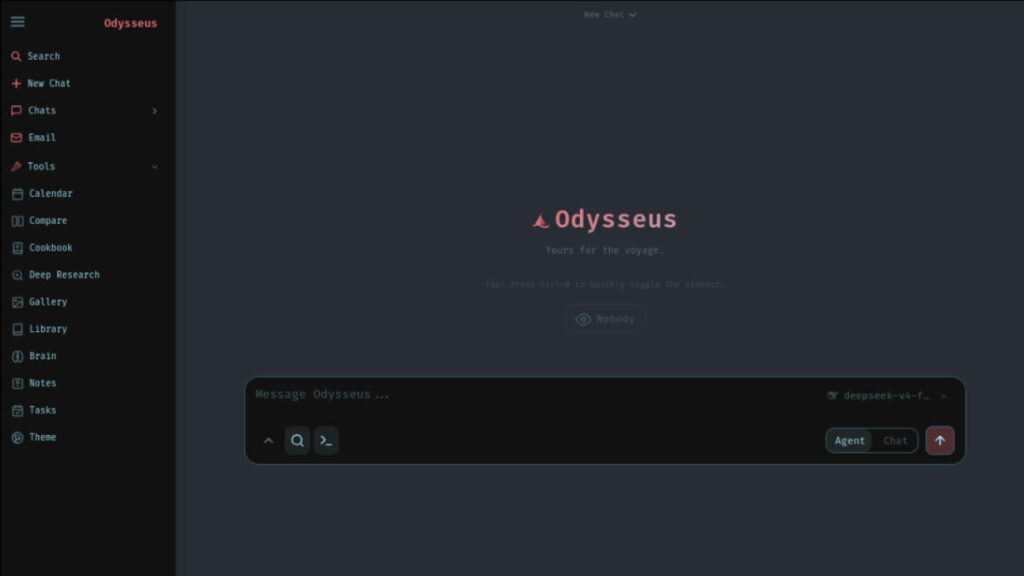
Headline features include:
- Chat. Talk to any local or remote model. Out of the box it speaks to vLLM, llama.cpp, Ollama, OpenRouter, and OpenAI. Adding a new provider is a settings form, not a config-file expedition.
- Agent. Hand the agent tools (MCP, web, files, shell, skills, memory) and let it execute multi-step tasks autonomously. The agent runtime is built on opencode.
- Cookbook. Scans your hardware, recommends models that will actually fit, and one-click downloads and serves them via vLLM or llama.cpp. It is VRAM-aware and scores GGUF, FP8, and AWQ candidates for fit.
- Deep Research. Multi-step research runs that gather, read, and synthesize sources into a visual report. The pipeline is adapted from Tongyi DeepResearch.
- Compare. Run blind, side-by-side model evaluations, no bias from logos or names.
- Documents. A multi-tab editor for Markdown, HTML, and CSV with syntax highlighting and AI edit suggestions, designed around the idea that you write, the AI assists, not the other way around.
- Memory and Skills. Persistent vector and keyword retrieval through ChromaDB with fastembed (ONNX), so the agent improves at understanding you over time.
- Email. IMAP and SMTP inbox with AI triage: urgency reminders, auto-tags, summaries, reply drafts, and spam handling.
- Notes, Tasks, and Calendar. Quick notes, a todo list, cron-style scheduled tasks the agent can act on, and a local-first calendar with CalDAV sync to Radicale, Nextcloud, Apple, or Fastmail.
- Mobile. Responsive, installable as a PWA, with touch gestures.
There are also smaller niceties such as an image editor, theme editor, file uploads with vision and PDF support, web search via SearXNG, sessions, 2FA, and ntfy notifications.
Why Local-First Matters Here
A lot of “self-hosted AI” projects still leak your data into hosted APIs the moment you turn on a feature. Odysseus is opinionated about the opposite: Docker Compose binds Odysseus and the bundled services (ChromaDB, SearXNG, ntfy) to 127.0.0.1 by default, your model downloads live in a local ./data/huggingface cache, and admin-only routes (shell, MCP management, API tokens, webhooks, backups) are gated behind explicit privileges. Treat the deployment like an admin console and you are in the right mindset.
How to Install Odysseus
The project supports Docker, native Linux, native macOS, Apple Silicon, and native Windows. Pick the closest match.
Option 1: Docker (Recommended)
git clone https://github.com/pewdiepie-archdaemon/odysseus.git
cd odysseus
cp .env.example .env       # optional but recommended
docker compose up -d --build
Once the containers are healthy, open http://localhost:7000. Docker Compose binds the web UI to 127.0.0.1 by default; set APP_PORT=7001 in .env if 7000 is taken, and only set APP_BIND=0.0.0.0 when you intentionally want LAN access through a reverse proxy.
On first boot Odysseus creates an admin account (default username admin) and prints a temporary password in the container logs:
docker compose logs odysseusUse it to log in, then immediately change the password in Settings.
Option 2: Native Linux or macOS
git clone https://github.com/pewdiepie-archdaemon/odysseus.git
cd odysseus
python3 -m venv venv
source venv/bin/activate
pip install -r requirements.txt
python setup.py
python -m uvicorn app:app --host 127.0.0.1 --port 7000
Requirements: Python 3.11+. The Cookbook background downloader also needs tmux.
Option 3: Apple Silicon (M1/M2/M3/M4)
Docker on macOS cannot use the Metal GPU, so if you want GPU-accelerated Cookbook on an M-series Mac, run natively:
git clone https://github.com/pewdiepie-archdaemon/odysseus.git
cd odysseus
./start-macos.sh
It launches on http://127.0.0.1:7860 (port 7000 is often held by AirPlay) and uses llama.cpp or Ollama for Metal acceleration. To wrap it as a clickable app, run ./build-macos-app.sh.
Option 4: Native Windows
A one-command launcher handles the venv, dependencies, setup, and server start:
git clone https://github.com/pewdiepie-archdaemon/odysseus.git
cd odysseus
powershell -ExecutionPolicy Bypass -File .\launch-windows.ps1
For local model serving on Windows, the easiest path is Ollama; point Odysseus at http://localhost:11434/v1 in Settings. Local GPU serving of vLLM or SGLang requires Linux or WSL2.
NVIDIA GPU Passthrough (Docker)
If you have an NVIDIA card and want Cookbook to actually see it from inside the container, a helper script does the diagnostic and the wiring:
# Read-only check
scripts/check-docker-gpu.sh

# Full assisted setup
scripts/check-docker-gpu.sh --install-nvidia-toolkit --enable-nvidia-overlay
The script never edits .env automatically; the overlay is only written when GPU passthrough is confirmed working. Verify after enabling:
docker compose exec odysseus nvidia-smi -LAMD users add the ROCm overlay manually:
COMPOSE_FILE=docker-compose.yml:docker/gpu.amd.ymlUsing Odysseus: A Sensible First Hour
Once you have the login working, here is a productive path through the workspace.
Step 1: Wire Up a Model
Open Settings -> Providers. If you already run Ollama on the host, add the endpoint:
http://host.docker.internal:11434/v1Make sure Ollama itself listens beyond loopback:
OLLAMA_HOST=0.0.0.0:11434 ollama serveIf you do not have a local model yet, jump straight to Cookbook.
Step 2: Let Cookbook Choose a Model
Open Cookbook. It scans your CPU, RAM, and VRAM, then ranks compatible models (GGUF, FP8, AWQ) by a fit score. Click a recommendation to download and serve it through vLLM or llama.cpp. For remote inference boxes, generate the Odysseus SSH key in Cookbook -> Settings -> Servers and add it to the remote machine’s ~/.ssh/authorized_keys.
Step 3: Run Your First Agent Task
Switch to the Agent tab. The agent has tools for web search (via the bundled SearXNG), file access, shell, MCP servers, memory, and skills. Try something concrete like “Read every README in ./projects, summarize each, and write the summaries into a new Markdown document.” Watch it use the file and document tools end-to-end.
To enable the optional browser MCP for page navigation, screenshots, and vision, prime the cache once:
npx -y @playwright/mcp@latest --versionRestart Odysseus and the server auto-registers at startup.
Step 4: Try Deep Research and Compare
Drop a question into Deep Research and let the multi-step pipeline gather, read, and synthesize sources into a visual report. Then open Compare, paste the same prompt, pick two or three models, and run a blind side-by-side test. It is genuinely useful for picking the right local model for the right job.
Step 5: Plug In the Rest of Your Life
Add your IMAP and SMTP credentials in Email to get AI triage, urgency reminders, and reply drafts. Point Calendar at your CalDAV server (Radicale, Nextcloud, Apple, Fastmail). Create scheduled tasks in Notes and Tasks that the agent can act on, with notifications through ntfy, the browser, or email.
Security Reminders Before You Expose It
Odysseus has shell access, file uploads, model downloads, web research, and email integrations. That is admin-console-level power. Before opening it beyond loopback:
- Keep
AUTH_ENABLED=true,LOCALHOST_BYPASS=false, and setSECURE_COOKIES=truebehind HTTPS. - Terminate TLS at a trusted reverse proxy (Caddy, nginx, Traefik) or a private access layer (Tailscale, Cloudflare Access).
- Keep ChromaDB, SearXNG, ntfy, Ollama, vLLM, llama.cpp, and raw model APIs internal-only; only expose the authenticated Odysseus entrypoint.
- Review
data/auth.jsonafter first boot to disable open signup and demote demo accounts.
Final Thoughts
Odysseus is one of the most ambitious self-hosted AI projects shipping today, not because it invents a new model, but because it stitches the pieces you actually use, chat, agents, research, documents, email, calendar, into a single, coherent, privately hosted surface. The Docker quickstart genuinely is three commands; the Cookbook removes the worst part of running local models (picking one that fits your VRAM); and the local-first defaults mean you can experiment without quietly leaking data to anyone.
If you have spare hardware and ten free minutes, clone the repo, run docker compose up -d --build, log in, and let Cookbook recommend you a model. By the end of the afternoon, you will have a private AI workspace that does most of what your subscriptions do, on a port only you can reach.








