
Key Takeaways: OpenMontage transforms your AI coding assistant into a complete video production studio with 12 pipelines, 52 tools, and a genuine zero-cost local path using Piper TTS, Remotion, FFmpeg, and free archives.
OpenMontage is the world’s first open-source, agentic video production system. It transforms an AI coding assistant such as Claude Code, Cursor, Copilot, or Codex into a complete video studio capable of research, scripting, asset generation, editing, and rendering finished videos.
The project provides 12 production pipelines, 52 tools, and over 500 agent skills. Instead of generating a single clip from a text-to-video endpoint, OpenMontage orchestrates an entire production workflow. The agent researches the topic, writes a script, plans scenes, sources or generates assets, edits them into a timeline, adds narration and music, and produces a final video file.
OpenMontage supports a genuine zero-cost path using offline Piper text-to-speech, Remotion or HyperFrames for composition, FFmpeg for post-production, and free archival and stock footage from sources such as Archive.org, NASA, Wikimedia Commons, Pexels, and Pixabay. Premium providers such as Kling, Runway, Veo, and others can be added for higher-fidelity generation when budgets allow.
Visit the OpenMontage GitHub repository for the latest code, documentation, and prompt gallery. The repository includes detailed guides for providers, pipelines, and agent configuration.
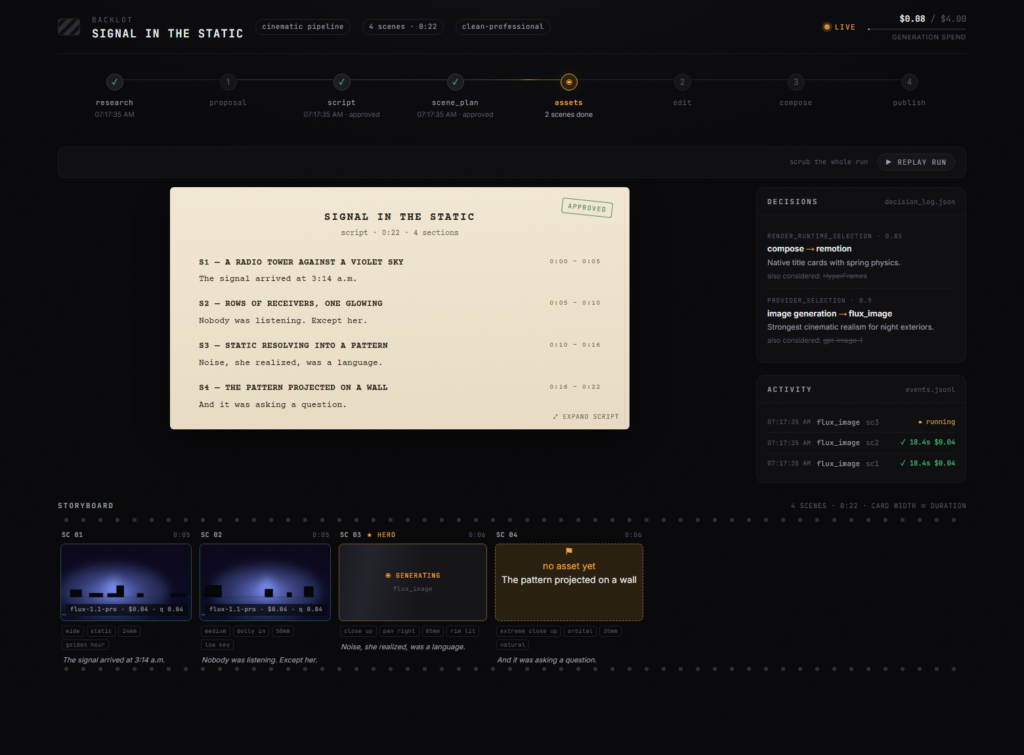
Core Architecture and Capabilities
OpenMontage is built around a pipeline-driven architecture. Each pipeline defines a sequence of stages, required skills, and artifact schemas. The agent matches a user request to a pipeline, discovers available tools and providers, proposes a plan with cost estimates, and then executes the production stages with approval checkpoints.
The standard production flow includes:
- Research or idea mapping
- Proposal with provider choices and budget
- Scriptwriting with narration direction
- Scene planning and shot list
- Asset generation or retrieval
- Timeline editing and composition
- Compile and render with post-production review
This structure enables explainers, talking heads, screen demos, trailers, animations, documentary montages, podcast repurposing, and localization workflows. The system can produce image-based videos with animated text cards and stat reveals, or real-footage montages cut from indexed corpora of stock and archival clips.
Composition is handled by Remotion for React-based motion graphics or HyperFrames for HTML, CSS, and GSAP animations rendered via headless Chrome and FFmpeg. Post-production uses FFmpeg for encoding, subtitle burn-in, audio mixing, color grading, and quality checks.
System Requirements
OpenMontage runs on Windows, macOS, and Linux. It requires a modern development environment with Python, Node.js, and FFmpeg.
Minimum requirements:
- Python 3.10 or newer
- Node.js 18 or newer
- FFmpeg installed and available in PATH
- Git for cloning the repository
- An AI coding assistant (Claude Code, Cursor, Copilot, or Codex)
Recommended for comfortable use:
- 8 GB of RAM or more
- SSD storage for faster asset caching and rendering
- Modern CPU with multiple cores for parallel processing
- GPU acceleration optional but helpful for heavy composition tasks
The system is designed to work with modest hardware when using the free local path. Cloud-based video generation providers can offload intensive tasks but introduce API costs and usage limits.
Installation Steps
OpenMontage installation is straightforward once prerequisites are in place. The project provides a Makefile target for Unix-like systems and manual instructions for Windows or environments without Make.
Clone the Repository
Open a terminal and clone the project:
git clone https://github.com/calesthio/OpenMontage.git
cd OpenMontage
This creates a local copy of the codebase and moves into the project directory.
Run the Setup Target
On macOS, Linux, or Windows with a Unix-like shell and Make installed:
make setupThis target installs Python dependencies, prepares the Remotion composer, and attempts to install Piper TTS for offline narration.
Manual Installation Without Make
If Make is unavailable, run the setup steps manually.
On macOS or Linux:
python3 -m venv .venv
source .venv/bin/activate
python -m pip install -r requirements.txt
cd remotion-composer
npm install
cd ..
python -m pip install piper-tts
cp .env.example .env
On Windows PowerShell:
py -3 -m venv .venv
.\.venv\Scripts\Activate.ps1
python -m pip install -r requirements.txt
cd remotion-composer
npm install
cd ..
python -m pip install piper-tts
Copy-Item .env.example .env
If npm install fails on Windows with an argument type error, use npx --yes npm install instead.
Configure Environment and Providers
After setup, open the .env file in the project root. This file holds API keys and configuration for optional providers.
For a completely free local workflow, you can skip paid providers. Add keys only for services you intend to use, such as Pexels or Pixabay for stock footage. Obtain developer keys from their websites and paste them into .env.
Example entries:
PEXELS_API_KEY=your_pexels_key
PIXABAY_API_KEY=your_pixabay_key
Premium video generation, image generation, or advanced TTS providers are optional. The system supports scored fallbacks across multiple providers, allowing the agent to choose based on capability, cost, and availability.

Production Pipelines Overview
OpenMontage includes 12 production pipelines tailored to different content types. Each pipeline specifies the stages, tools, and skills required for that workflow.
Key pipelines include:
- Animated Explainer: Research-first pipeline for fully AI-produced explainers with narration, music, and motion graphics.
- Talking Head: Automated editing of raw speaker footage with transcription-led jump cuts, dynamic overlays, and face-aware reframing.
- Documentary Montage: Thematic montage cut from a CLIP-indexed corpus of free stock footage and open archives.
- Screen Demo: Tutorial-style videos combining screen captures, annotations, and narration.
- Trailer and Teaser: Cinematic sequences with kinetic typography and dramatic pacing.
- Podcast Repurposing: Conversion of long-form audio into short video segments with captions and highlights.
The agent selects a pipeline based on the user’s request and available tools. For example, a request to explain a complex topic maps to the animated explainer pipeline with diagram generation and stat cards.
Generate Your First Video
Once installed, open the OpenMontage project in your AI coding assistant. Describe the video you want in plain language.
Example prompt:
Make a 60-second animated explainer about how neural networks learn.The agent will:
- Match the request to the animated explainer pipeline
- Run preflight checks to discover installed tools and configured providers
- Propose a plan with provider choices, estimated costs, and production stages
- Conduct research, write a script, and plan scenes
- Generate or retrieve assets such as diagrams, text cards, and background music
- Compose the timeline in Remotion or HyperFrames
- Render the final video with FFmpeg and perform a self-review
You can review intermediate artifacts such as the script, scene plan, and asset list before rendering. Budget gates and approval thresholds help control costs when using paid providers.
Free Local Path vs Paid Providers
OpenMontage supports multiple production paths with different cost profiles.
The free local path uses:
- Piper TTS for offline, human-sounding narration
- Free archival footage from Archive.org, NASA, Wikimedia Commons
- Stock footage from Pexels and Pixabay with free developer keys
- Remotion or HyperFrames for local composition
- FFmpeg for encoding and post-production
This path requires no paid APIs and is suitable for explainers, documentary-style montages, and image-based videos.
Paid providers expand capabilities:
- Video generation from Kling, Runway Gen-4, Veo, Grok, Higgsfield, MiniMax, HeyGen, and others
- Image generation from FLUX, DALL-E 3, and similar models
- Advanced TTS from ElevenLabs or cloud providers
- Specialized avatar and lip-sync services
The agent uses scored fallbacks to select providers based on quality, cost, and availability. You can set budget caps and per-action approval thresholds to keep spending under control.
Customize and Extend Workflows
OpenMontage is designed for extension. You can add new tools, skills, and pipelines to support additional workflows.
The repository includes:
- Pipeline definitions in YAML
- Tool implementations in Python
- Agent skill files describing capabilities and constraints
- Remotion and HyperFrames composition components
To add a new pipeline, define the stages, required skills, and artifact schemas. Implement or reuse existing tools for each stage. Register the pipeline so the agent can match relevant requests.
Customization is particularly valuable for niche content types, brand-specific styles, or integration with internal asset libraries and review systems.
Troubleshooting Common Issues
If setup fails, verify that Python 3.10+, Node.js 18+, and FFmpeg are installed and available in your PATH. Run version commands to confirm:
python --version
node --version
ffmpeg -version
git --version
On Windows, ensure you are using a compatible Python launcher and PowerShell execution policy allows script execution. If npm install fails, try npx --yes npm install as a workaround.
If narration or composition fails, check that Piper TTS and Remotion dependencies are correctly installed. Review the .env file for syntax errors and confirm that any configured API keys are valid.
For provider-related errors, consult the provider documentation and verify rate limits, quotas, and account status. The agent logs decisions and costs, which can help diagnose issues in the production flow.
Who Should Use OpenMontage?
OpenMontage is well suited for developers, content creators, educators, and teams who want programmatic control over video production. It is especially valuable for those who prefer open-source tools, local processing, and auditable workflows over closed, hosted platforms.
The system requires comfort with command-line tools, environment configuration, and AI coding assistants. It is less appropriate for users who want a purely graphical, click-based editor without any scripting or agent interaction.
For the latest installation instructions, pipeline details, and prompt examples, refer to the OpenMontage GitHub repository and the included documentation files.









The render-and-review stage would benefit from keeping captions as a separate deliverable, alongside the clean master and the project timeline. That makes localization a new render rather than a repair job. For imported footage you are authorized to edit, inspect whether text is a separate track or burned into the picture before choosing a cleanup step. Disclosure: I represent Text Remover; I am not claiming an OpenMontage integration. I would also review repaired motion at playback speed before adding the new captions.