Key Takeaways: OpenPanel brings Mixpanel-level product analytics, session replay, A/B testing, and an AI assistant under a single open-source, self-hostable roof – with cookieless tracking, transparent pricing, and full ownership of your data.
What is OpenPanel?
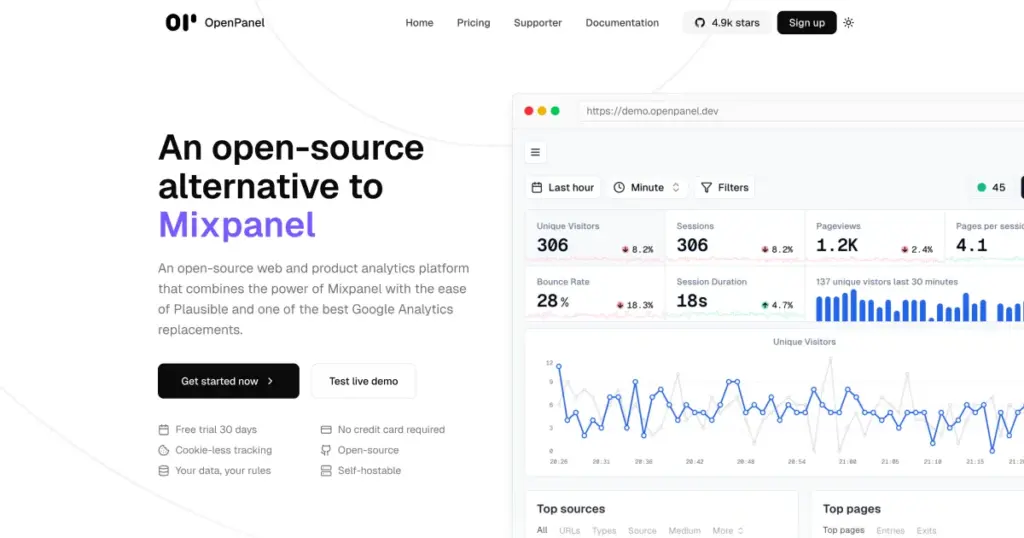
If you have ever stared at the bill from Mixpanel, the cookie banner Plausible cannot quite eliminate, or the BigQuery export GA4 forces on anyone who wants raw events, you already understand the gap OpenPanel was built to fill. It is an open-source web and product analytics platform that combines the power of Mixpanel with the simplicity of Plausible – and can run entirely on your own infrastructure with no event-volume caps.
The project lives on GitHub at Openpanel-dev/openpanel with a hosted dashboard and documentation at openpanel.dev. The cloud tier starts at $20 per month with a 30-day free trial, but the self-hosted path is genuinely free and unlimited – and the focus of this guide.
Why OpenPanel stands out
There are a dozen open-source analytics tools in the market. OpenPanel has carved out a clear niche by being the first one to take both halves of the problem – web analytics and product analytics – seriously in a single, self-hostable product.
Funnels, cohorts, and user profiles by default. This is the Mixpanel half of the equation. You get real per-user session history, funnel drop-off analysis, retention cohorts, and revenue tracking that follows the same user across web, iOS, Android, and your backend.
Session replay with privacy controls built in. Record what users actually did, scrub through it, and respect masking rules out of the box. Unlike Mixpanel’s 5K-session-per-month free cap and 20K cap on paid plans, the self-hosted OpenPanel has no replay limit at all.
A/B testing with detailed breakdowns. Built-in variant testing is wired into the same events and funnels, so you can compare conversion lifts without bolting on a third tool.
Cookieless and GDPR-compliant. No cookies, no IP storage shenanigans, no data flights to US servers. This is the Plausible half of the equation, and it solves the regulatory headache that GA4 has triggered in several EU countries.
An MCP server with 38 tools. Ask Claude, Cursor, or any MCP client questions about your users – “which signup steps lost the most users last week?” – and get answers grounded in your real analytics data. The MCP integration is hosted, with nothing to install client-side.
Smart notifications, custom dashboards, real-time updates. Event-based and funnel-based alerts, interactive chart builder, and live data streaming on every dashboard.
Transparent pricing. The cloud tier charges by event volume only; everything else (websites, users, dashboards, tracked profiles) is unlimited. The self-hosted tier is free.
The stack reflects the seriousness of the product: Next.js for the dashboard, Fastify for the event API, Postgres for metadata, ClickHouse for events (the same database that powers most modern analytics platforms at scale), Redis with BullMQ and GroupMQ for queues, tRPC for the API layer, and Shadcn UI on Tailwind for the front end.
Installing OpenPanel: self-hosting in minutes
The self-hosting flow has been refined to be genuinely simple. You need a VPS, Docker, Node, and pnpm – and a single setup script does the rest.
Prerequisites
The recommended (and tested) target is Ubuntu 24.04 on a small VPS. The team specifically calls out Hetzner as a known-good provider, but anything with Docker support will work. If you already have Docker, Node, and pnpm installed, you can skip the prompts in the setup script.
Quickstart on a fresh VPS
SSH into your VPS and run two commands:
git clone -b self-hosting https://github.com/Openpanel-dev/openpanel.git
cd openpanel/self-hosting
./setup
The setup script will offer to install Node and Docker if they are missing, then run an interactive npm run quiz step that asks about your domain, ports, and admin credentials. The whole thing takes 30 seconds to two minutes on a modest VPS.
When the setup finishes, start the stack:
./startThat brings up the dashboard, event API, ClickHouse, Postgres, Redis, and the queue workers as Docker containers. Point your domain at the server, and you are live.
Useful management scripts
OpenPanel ships several utility scripts inside the self-hosting/ directory:
./start                       # Start all OpenPanel services
./stop                        # Stop all OpenPanel services
./logs                        # Tail real-time logs from every service
./rebuild op-dashboard        # Rebuild and restart one service
./update                      # Pull the latest release and migrate
./danger_wipe_everything      # Nuclear option: deletes all data
For ongoing maintenance, ./update is the only command you usually need. Read the changelog before each update in case any environment-variable changes are required.
Optional configuration
A few .env settings unlock advanced features:
- Email – set
RESEND_API_KEY(orSMTP_HOST,SMTP_PORT,SMTP_USER,SMTP_PASS) to enable password resets and team invitations. Without either, emails get logged to the console. - AI assistant – set
OPENAI_API_KEYorANTHROPIC_API_KEY(or both) to enable the in-product AI chat for analyzing dashboards. Supported models include GPT-4.1 family and Claude Haiku 4.5, Sonnet 4.6, and Opus 4.6. - Registration controls –
ALLOW_REGISTRATION=truekeeps signups open after the first admin;ALLOW_INVITATION=falsedisables invitations.
Local development setup
If you want to contribute or run OpenPanel locally for testing rather than production, the dev flow is:
pnpm install
cp .env.example .env
echo "API_URL=http://localhost:3333" > apps/start/.env
pnpm dock:up
pnpm codegen
pnpm migrate:deploy
pnpm dev
The dashboard runs at localhost:3000, the API at localhost:3333, and a Bull Board for queue inspection at localhost:9999.
Using OpenPanel day to day
Once your instance is running, the workflow is the same as any modern analytics tool – with a few thoughtful twists.
Step 1 – Create a project and grab your client ID
Log in to your self-hosted dashboard, create a project (a website, an app, or both), and copy the client ID. This is the only credential the SDK needs.
Step 2 – Install the SDK on your site
For a plain HTML site, drop in the snippet:
<script>
  window.op = window.op || function () { /* deferred queue */ };
  window.op('init', {
    apiUrl: 'https://your-domain.com/api',
    clientId: 'YOUR_CLIENT_ID',
    trackScreenViews: true,
    trackOutgoingLinks: true,
    trackAttributes: true,
  });
</script>
<script src="https://openpanel.dev/op1.js" defer async></script>
For a Node, Next.js, or Bun project:
npm install @openpanel/sdkimport { OpenPanel } from '@openpanel/sdk';
const op = new OpenPanel({
apiUrl: 'https://your-domain.com/api',
clientId: 'YOUR_CLIENT_ID',
trackScreenViews: true,
trackOutgoingLinks: true,
trackAttributes: true,
});
op.track('signup_completed', { plan: 'pro' });
op.identify('user-123', { email: '[email protected]', plan: 'pro' });OpenPanel also ships official SDKs for Swift (iOS), Kotlin (Android), and React Native, so the same project can track web, mobile, and server-side events with consistent user profiles.
Step 3 – Build the dashboards that matter
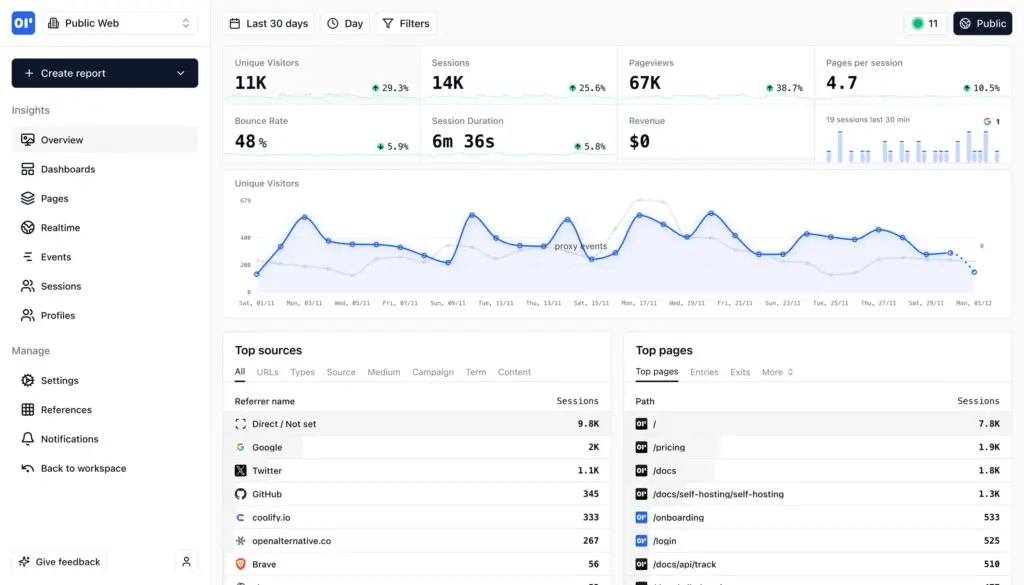
Out of the box you get pageviews, sessions, sources, top pages, and devices. From there, build a funnel for your core conversion path, a cohort for week-one retention, and a custom chart for any high-signal event – say, “first project created within 24 hours of signup.” Charts are real-time and interactive.
Step 4 – Enable session replay and A/B testing
Toggle session replay in the project settings and configure masking rules for sensitive form fields. For experiments, define a variant in the dashboard, pass the variant key into your SDK, and watch the funnel split automatically.
Step 5 – Wire it into your AI tools via MCP
Add the OpenPanel MCP server to Claude Desktop, Cursor, or any MCP client. With 38 tools available, you can ask questions like “what is my week-over-week sign-up conversion on the pricing page?” and get answers grounded in your actual data, with no SQL.
Who OpenPanel is for
OpenPanel is a strong fit for SaaS founders and indie hackers who want Mixpanel-grade insight without the bill, EU-based teams who need GDPR-clean analytics without flying data to the US, and engineering teams that already run Docker and prefer to own their data layer. It is less ideal if you need a hosted enterprise SLA, deep marketing-attribution integrations across dozens of ad networks, or are already heavily invested in a different stack.
Final thoughts
The open-source analytics space is finally catching up to the closed tools that defined the last decade. OpenPanel succeeds because it does not pick a side: it gives you Plausible-style simplicity and cookieless tracking when that is enough, and Mixpanel-style funnels, cohorts, and replay when you need to go deeper – all from a single Docker stack you control.
Star the GitHub repository, visit openpanel.dev for the docs, spin up a VPS, and run ./setup. In under five minutes, you can be tracking real users on infrastructure you fully own.