
Key Takeaways: QM is a multiplayer AI agent harness that brings Slack- and web-native automation, scoped memory, and internal apps into one secure, self-hosted platform built for startups.
What is QM?
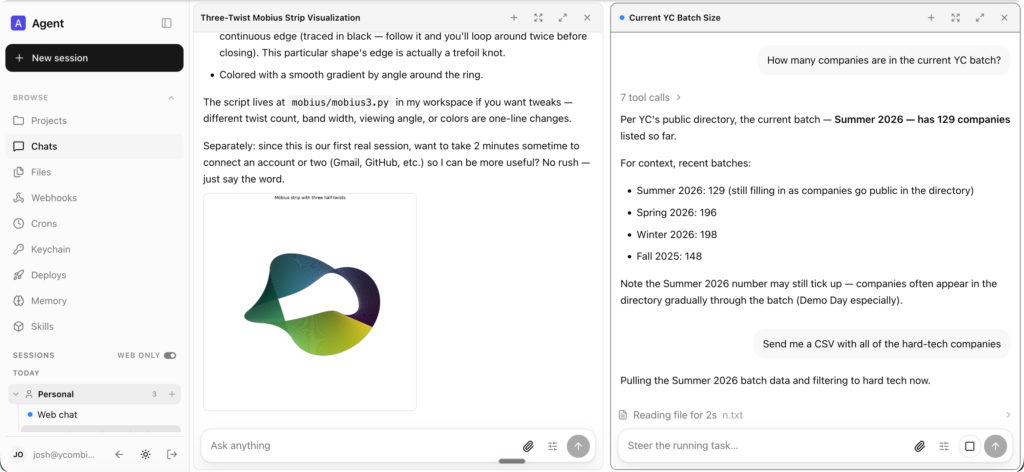
QM is an open-source “multiplayer” agent harness designed to help startup teams work with AI agents across Slack and the web. Unlike typical personal-assistant-style agents, QM is built so every employee and every room has its own isolated workspace, letting people work independently while still collaborating with the agent in channels, group messages, and projects.
Each person and room gets scoped memory, files, keychain views, permissions, crons, web apps, and a durable sandbox, giving your agent a persistent per-scope “computer” that keeps installed tools around between tasks. Under the hood, QM supports multiple harnesses and models (Pi, OpenCode, Codex, Claude Code) on the same core so your deployment is not tied to a single vendor.
For the official code and documentation, see:
- QM on GitHub: https://github.com/yc-software/qm
- QM homepage: https://qm.ycombinator.com
Why QM matters for startups
Startups rarely have the luxury of building custom agent infrastructure from scratch, but still need agents that understand internal context, code, and workflows. QM focuses on that reality by giving each organization a configurable deployment directory, scoped skills, and tools that can safely act as individual users with their credentials.
This design lets you:
- Search internal notes, email, documents, databases, and the web in a single conversation.
- Use the agent as a company brain that can retrieve context and past decisions across scopes.
- Run tests, open PRs, monitor CI, and inspect logs directly on existing repositories.
Because QM is open source and self-hosted, you keep your data in your own infrastructure while still benefiting from powerful agent workflows.
Core features you should know
Personal and shared scopes
QM separates work into personal and shared scopes so individuals can customize the agent while still collaborating in Slack channels and projects. Personal scopes hold private memory, files, and tools, while shared scopes (like rooms and project channels) host common skills and artifacts.
Slack and web surfaces
The same agent identity and configuration applies across Slack and the web app, meaning users can jump between chat and browser without losing context. Slack integration runs in-process via a direct service client, while the web UI is built as an optional plugin over the core HTTP API.
Admin control and policy
Admins can define org-level configuration, pick available harnesses and models, and set a global security posture. Shared skills are scope-owned, shareable by grant, and can be promoted to the whole org with admin gating, including importing skill packs from git repositories.
Background work: Crons and watches
QM supports crons and watches that let agents run background jobs even when nobody is watching. This makes it straightforward to schedule inbox triage, monitoring tasks, or data-refresh jobs on internal apps.
Architecture overview
QM’s architecture centers on a headless core, a Postgres persistence layer, and per-scope sandboxes. The core exposes an HTTP API that handles identity, policy, and scheduling, and orchestrates the agent loop which can be driven by harnesses like Pi, OpenCode, Codex, and Claude Code.
Postgres stores sessions, memory, and queue state so agents can resume context and track durable workflows across turns. Each scope has its own sandbox, which keeps files, tools, and logged-in services available, ensuring that when the agent runs execute, it acts within that isolated environment.
The core runs TypeScript directly on Node using Fastify for HTTP, the Slack plugin uses Bolt, and the web UI is built with Vite and Lit, all wired through the plugin surfaces documented in plugins/.
Security posture and secrets
QM’s security model follows local coding agents such as OpenCode, Codex, and Claude Code: the agent acts as the person it works for, using their credentials, with all actions audited. Organizations choose one of three security postures, which narrower scopes can only tighten:
- Strict – Every harness tool call pauses for human approval, except two no-effect turn enders.
- Auto (default) – A classifier screens provenance-labeled external data and tool results before they reach the model, and deployments can plug in their own screening proxy.
- Dangerous – No content screening and no pauses between tool calls, but the command policy still applies.
A predeclared command policy sets approval rules and hard denials for destructive operations like recursive deletes or damaging SQL, and it applies even in Dangerous mode. For a full threat model and assumptions, refer to SECURITY.md in the repository.
Deploying QM for your organization
Deployment starts from an organization-owned repository that depends on @yc-software/qm. The README shows an initialization flow using the QM CLI:
npm exec --yes --package=@yc-software/qm@latest -- \
  qm init . --org <slug> --target <fly-or-aws>
npm install
Initialization materializes a deployment skill for the agent and guides you through infrastructure setup, web sign-in, connector credentials, optional Slack access, deployment, and live verification. Each deployment runs in your own cloud account, and the upstream QM repository intentionally does not ship a production CI workflow, leaving that design up to operators.
Key deployment details, including layers and infrastructure assumptions, are documented in deployment.md and docs/deploy-directory.md.
Working with the deployment directory
Everything specific to one company—org config, custom tools and skills, sandbox image, infrastructure—is kept in a deployment directory validated and deployed by the QM CLI. Each substrate (harness, session store, sandbox, memory) sits behind an interface, so you can swap in production implementations via a single wiring file.
Within deploy/layers/<org>/ you store configuration, sandbox tools, skills, plugin images, and infra definitions in the same structure produced by qm init. Core stays byte-identical to upstream, which keeps merges small and limits the chance of subtle divergence issues.
This layout makes it straightforward for agents and engineers alike to understand how the deployed environment maps onto the core abstractions.
Private forks and upstream sync
For organizations that want the entire codebase in one private place—so engineers and coding agents can read core and customizations together—QM recommends maintaining a private fork. This is a standalone private repository whose history begins as a clone of QM and whose core stays identical to upstream.
The recommended workflow is to:
gh repo create <org>/qm-private --private

git clone --bare [email protected]:yc-software/qm qm-seed.git
git -C qm-seed.git push --mirror [email protected]:<org>/qm-private
rm -rf qm-seed.git

git clone [email protected]:<org>/qm-private
git -C qm-private remote add upstream [email protected]:yc-software/qm
QM explicitly discourages using GitHub’s Fork button for this purpose because forks inherit public visibility and share object networks, which can leak commits by SHA from the public side. Instead, a plain clone ensures your private fork is fully isolated, with CI workflows running live in your account where you manage the required secrets.
Two built-in skills keep the boundary clean: update-qm merges upstream QM into the private fork and opens a sync PR, while upstream-pr prepares organization-agnostic fixes to send upstream with checks to avoid leaking identifiers.
What you can do with QM in practice
Once deployed, QM becomes an internal agent platform that can drive a range of workflows across your startup. Example use cases described in the README include:
- Searching internal notes, email, documents, databases, and the web in one place, turning the agent into a company-wide knowledge interface.
- Building internal web apps that live inside the QM sandbox, publishing them to the right people, and keeping their data current.
- Learning your writing voice from past emails and messages, then triaging your inbox on a schedule with labels and reply drafts.
- Working directly in existing repositories by running tests, opening PRs, checking CI status, and monitoring system logs.
- Tracking projects inside shared channels and posting updates and follow-ups automatically.
Because scopes are durable and tools stay installed, you can treat QM as a long-lived “agent workstation” that evolves with your organization.
Getting started: A practical checklist
If you want to experiment with QM or prepare a deployment for your startup, a practical high-level checklist looks like this:
- Review the README and docs
ReadREADME.md,docs/getting-started.md, and.env.exampleto understand core concepts, configuration knobs, and required services. - Plan your infrastructure target
Decide whether you will deploy on Fly or AWS (as supported byqm init --target), and ensure you have Postgres and necessary secrets ready. - Initialize a deployment repository
Use thenpm exec ... qm initflow to bootstrap a deployment directory, then runnpm installto set up dependencies. - Configure Slack and web access
Wire Slack credentials, web sign-in, and any connectors you need (email, document stores, databases) according to the initialization prompts. - Define security posture and policies
Choose between Strict, Auto, or Dangerous posture, and customize command policy to fit your risk model. - Add custom skills and tools
Populatedeploy/layers/<org>/with your skills and sandbox tools, and import any shared skill packs from git repositories. - Test end-to-end workflows
Followdocs/getting-started.mdfor an end-to-end first run, then iterate on real workflows like inbox triage, repo operations, or knowledge search.
Final thoughts
QM brings a modern, multi-surface agent platform to startups that need secure, self-hosted, and highly configurable automation in Slack and on the web. With scoped memory, durable sandboxes, a strong security posture, and a deployment model built for private forks, it offers a robust foundation for building internal AI-powered tools and workflows on your own terms.








