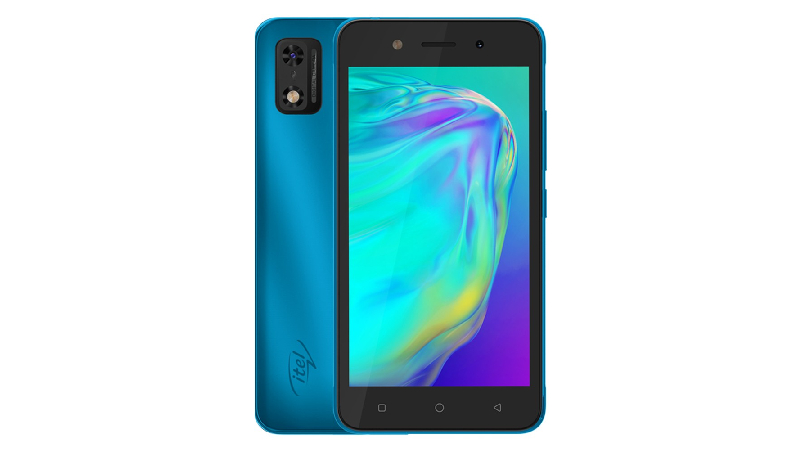
The Itel A23 Pro features a 5.00-inch touchscreen display that offers a resolution of 480×854 pixels at a pixel density of 196 pixels per inch (ppi). The Itel A23 Pro is powered by a quad-core processor. It comes with 1GB of RAM. The Itel A23 Pro runs Android 10 (Go Edition) and is powered by a 2400mAh battery.
In terms of camera, the Itel A23 Pro has a 2-megapixel camera on the back. It has a single front camera setup for selfies, which has a 0.3-megapixel sensor.
The Itel A23 Pro is based on Android 10 (Go Edition) and has 8GB of internal storage that can be expanded via microSD card (up to 32GB). The Itel A23 Pro is a dual-SIM (GSM and GSM) phone that accepts Nano-SIM and Nano-SIM cards. The Itel A23 Pro measures 145.40 x 73.90 x 9.85mm (height x width x thickness). It is available in Lake Blue and Sapphire Blue colors.
Connectivity options on the Itel A23 Pro include Wi-Fi, GPS, Micro-USB, 3G and 4G with 4G active on both SIM cards. Sensors on the phone include an accelerometer and a proximity sensor. The Itel A23 Pro supports face unlock.
Prerequisites & Preparation
- Backup Data: Flashing will completely wipe all data on your device. Back up important files and settings before proceeding.
- Battery Level: Ensure your device has at least 50% battery to prevent shutdown during the flashing process.
- USB Driver & Tools: Install the correct USB drivers for your brand and prepare the flashing tool (Odin for Samsung, SP Flash Tool/QPST for Qualcomm/MTK, etc.).
CAUTION: Flashing official firmware carries a risk of bricking your device. Proceed with caution and at your own risk. addROM is not responsible for any damage caused to your device.
Download Stock ROM & Firmware
Global / General
| File Type | Firmware / Build | Region / Model | OS Version | Download Link |
|---|---|---|---|---|
| Stock ROM | Stock ROM | Global / General | – | Google Drive |
| Stock ROM | Stock ROM | Global / General | – | Google Drive |
| Stock ROM | Stock ROM | Global / General | – | Google Drive |
| Stock ROM | Stock ROM | Global / General | – | Google Drive |
| Stock ROM | Stock ROM | Global / General | – | Google Drive |
| Stock ROM | Stock ROM | Global / General | – | Google Drive |
| Stock ROM | Stock ROM | Global / General | – | Google Drive |
| Stock ROM | Stock ROM | Global / General | – | Google Drive |
| Stock ROM | Stock ROM | Global / General | – | Google Drive |
| Stock ROM | Stock ROM | Global / General | – | Google Drive |
| Stock ROM | Stock ROM | Global / General | – | Google Drive |
| Stock ROM | Stock ROM | Global / General | – | Google Drive |
| Stock ROM | Stock ROM | Global / General | – | Google Drive |
| Stock ROM | Stock ROM | Global / General | – | Google Drive |
| Stock ROM | Stock ROM | Global / General | – | Google Drive |
| Stock ROM | Stock ROM | Global / General | – | Google Drive |
How to Flash Firmware / Stock ROM
To flash the stock firmware on your itel device using SPD Upgrade Tool, follow these steps:
- Download and install the SPD USB Drivers on your computer.
- Download and extract the SPD Upgrade Tool (ResearchDownload).
- Open the tool and click on the Gear (Load Packet) icon to load the
.pacfirmware file. - Click the Play (Start Downloading) button.
- Power off your device completely, hold the Volume Down (or Volume Up) button, and connect it to the computer via USB cable.
- Wait for the flashing process to complete and show the “Passed” status.