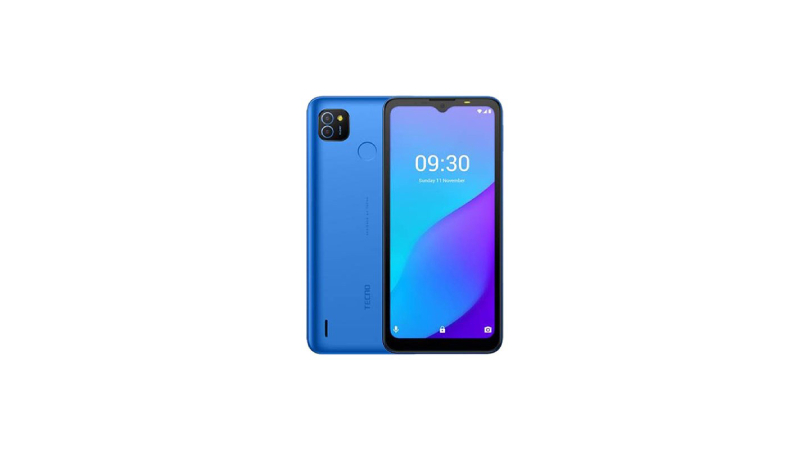
Tecno Pop 4 Air comes with a 6.52″ inch dot-notch display. The HD+ display comes with clear, bright, and detailed colors that makes watching content enjoyable.
Tecno Pop 4 Air comes with a 1.3GHz quad-core MediaTek processor. The processor is powerful enough to handle all tasks with no issues. And to prevent lagging, the processor is supported by a 1GB RAM that ensures you get to open multiple tabs at the same time and multitask. And with 16GB of internal storage which can be extended using a microSD card, you have enough memory to store all your data.
Tecno Pop 4 Air comes with a 5MP + AI dual back camera. The cameras let you take clear, bright, and vivid photos that stand-out. At its price range, Tecno Pop 4 Air cameras make it stand out from the rest of the competition.
Tecno Pop 4 Air comes with a 5MP front camera for selfies. The front camera detects your facial features, skin tone, and lighting to produce the best selfie that reflects your true beauty.
Tecno Pop 4 Air comes with a large 5000mAh battery. With the battery, you get to watch videos the whole day non-stop, you can make calls for 40.5 hours, or listen to music for 4 days.
Prerequisites & Preparation
- Backup Data: Flashing will completely wipe all data on your device. Back up important files and settings before proceeding.
- Battery Level: Ensure your device has at least 50% battery to prevent shutdown during the flashing process.
- USB Driver & Tools: Install the correct USB drivers for your brand and prepare the flashing tool (Odin for Samsung, SP Flash Tool/QPST for Qualcomm/MTK, etc.).
CAUTION: Flashing official firmware carries a risk of bricking your device. Proceed with caution and at your own risk. addROM is not responsible for any damage caused to your device.
Download Stock ROM & Firmware
Global / General
| File Type | Firmware / Build | Region / Model | OS Version | Download Link |
|---|---|---|---|---|
| Stock ROM | Stock ROM | Global / General | – | Google Drive |
| Stock ROM | Stock ROM | Global / General | – | Google Drive |
| Stock ROM | Stock ROM | Global / General | – | Google Drive |
| Stock ROM | Stock ROM | Global / General | – | Google Drive |
| Stock ROM | Stock ROM | Global / General | – | Google Drive |
| Stock ROM | Stock ROM | Global / General | – | Google Drive |
| Stock ROM | Stock ROM | Global / General | – | Google Drive |
| Stock ROM | Stock ROM | Global / General | – | Google Drive |
| Stock ROM | Stock ROM | Global / General | – | Google Drive |
How to Flash Firmware / Stock ROM
To flash the stock firmware on your Tecno device using SP Flash Tool, follow these steps:
- Download and install the MTK USB Drivers on your computer.
- Download and extract the SP Flash Tool.
- Launch
Flash_tool.exeas administrator. - Click on the Scatter-loading button and select the Android scatter file (
.txt) from the extracted firmware folder. - Click the Download button.
- Power off your device completely, hold the Volume Down or Volume Up button, and connect it to the computer via USB cable.
- The flashing process will start automatically. Wait for the green “Download OK” checkmark to appear.