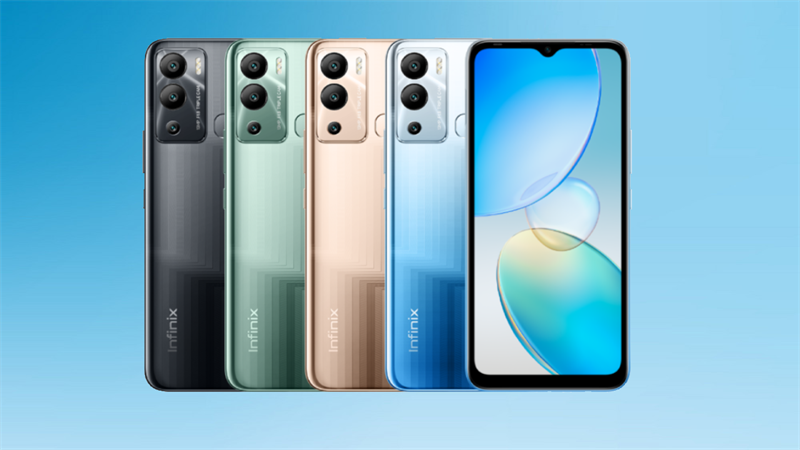
Infinix Hot 12i is a brand new product in the budget segment with basic hardware. The device has a large screen and three rear cameras. Other highlights of the device include a 5,000 mAh battery and a MediaTek Helio processor. Accordingly, the Infinix Hot 12i was launched with a 6.6-inch HD+ TFT screen with a resolution of 720 × 1,612 pixels, a maximum brightness of 480 nits and a waterdrop design.
In terms of hardware, the Hot 12i has a quad-core MediaTek Helio A22 processor with PowerVR GPU, 4 GB of RAM and 64 GB of storage. The device also comes pre-installed with Android 11 with the XOS 7.6 interface.
In terms of camera, the Hot 12i has three rear cameras and an LED flash. The main camera on the device has a resolution of 13 MP with an aperture of f/1.8, the other two cameras have not been revealed yet. For taking selfies and video calling, the device also has an 8 MP front camera.
The Infinix Hot 12i will have two configuration options with 2 GB RAM and 64 GB memory, 3 GB RAM and 64 GB memory.
Prerequisites & Preparation
- Backup Data: Flashing will completely wipe all data on your device. Back up important files and settings before proceeding.
- Battery Level: Ensure your device has at least 50% battery to prevent shutdown during the flashing process.
- USB Driver & Tools: Install the correct USB drivers for your brand and prepare the flashing tool (Odin for Samsung, SP Flash Tool/QPST for Qualcomm/MTK, etc.).
CAUTION: Flashing official firmware carries a risk of bricking your device. Proceed with caution and at your own risk. addROM is not responsible for any damage caused to your device.
Download Stock ROM & Firmware
X665B
| File Type | Firmware / Build | Region / Model | OS Version | Download Link |
|---|---|---|---|---|
| Stock ROM | Infinix-Hot-12i-X665B-H6222K-R-RU-220914V573.zip | X665B | – | Google Drive |
| Stock ROM | Infinix-Hot-12i-X665B-H6222K-R-RU-220507V434.zip | X665B | – | Google Drive |
| Stock ROM | Infinix-Hot-12i-X665B-H6222IJKL-R-OP-230325V674.zip | X665B | – | Google Drive |
| Stock ROM | Infinix-Hot-12i-X665B-H6222IJKL-R-OP-230110V653.zip | X665B | – | Google Drive |
| Stock ROM | Infinix-Hot-12i-X665B-H6222IJKL-R-OP-221114V631.zip | X665B | – | Google Drive |
| Stock ROM | Infinix-Hot-12i-X665B-H6222IJKL-R-OP-220920V592.zip | X665B | – | Google Drive |
| Stock ROM | Infinix-Hot-12i-X665B-H6222IJKL-R-OP-220720V500.zip | X665B | – | Google Drive |
| Stock ROM | Infinix-Hot-12i-X665B-H6222IJKL-R-OP-220607V448.zip | X665B | – | Google Drive |
| Stock ROM | Infinix-Hot-12i-X665B-H6222IJKL-R-OP-220515V441.zip | X665B | – | Google Drive |
| Stock ROM | Infinix-Hot-12i-X665B-H6222IJKL-R-OP-220507V435.zip | X665B | – | Google Drive |
| Stock ROM | Infinix-Hot-12i-X665B-H6222IJKL-R-OP-220330V407.zip | X665B | – | Google Drive |
X665
| File Type | Firmware / Build | Region / Model | OS Version | Download Link |
|---|---|---|---|---|
| Stock ROM | Infinix-Hot-12i-X665-H6126D-RGo-OP-230325V491.zip | X665 | – | Google Drive |
| Stock ROM | Infinix-Hot-12i-X665-H6126D-RGo-OP-230110V475.zip | X665 | – | Google Drive | Download |
| Stock ROM | Infinix-Hot-12i-X665-H6126D-RGo-OP-221114V462.zip | X665 | – | Google Drive |
| Stock ROM | Infinix-Hot-12i-X665-H6126D-RGo-OP-220913V448.zip | X665 | – | Google Drive |
| Stock ROM | Infinix-Hot-12i-X665-H6126D-RGo-OP-220530V388.zip | X665 | – | Google Drive |
| Stock ROM | Infinix-Hot-12i-X665-H6126D-RGo-OP-220507V379.zip | X665 | – | Google Drive |
| Stock ROM | Infinix-Hot-12i-X665-H6126D-RGo-OP-220330V369.zip | X665 | – | Google Drive |
How to Flash Firmware / Stock ROM
To flash the stock firmware on your Infinix device using SP Flash Tool, follow these steps:
- Download and install the MTK USB Drivers on your computer.
- Download and extract the SP Flash Tool.
- Launch
Flash_tool.exeas administrator. - Click on the Scatter-loading button and select the Android scatter file (
.txt) from the extracted firmware folder. - Click the Download button.
- Power off your device completely, hold the Volume Down or Volume Up button, and connect it to the computer via USB cable.
- The flashing process will start automatically. Wait for the green “Download OK” checkmark to appear.