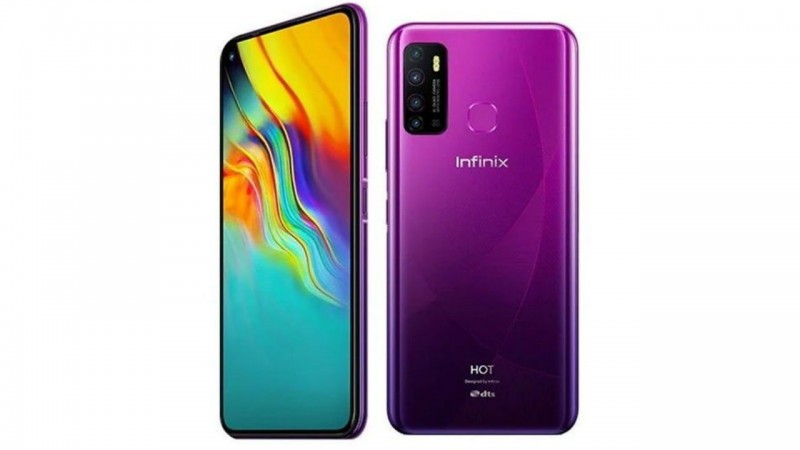
Infinix Hot 9 smartphone which boasts a stunning 16.76 cm (6.6) HD+ punch-hole display. The narrow bezels and 20:9 aspect ratio offer an immersive visual experience. The screen-to-body ratio of about 90.5% makes it a delight to watch videos and play games. Additionally, the 480 nits brightness and rich color reproduction help bring the visuals to life.
This smartphone comes with a triple LED flash and an AI quad rear camera setup, featuring a 13 MP primary lens, 2 MP depth sensor, 2 MP macro lens, and a dedicated low light sensor, which help you click amazing photos that you will cherish for a lifetime. The Auto Scene detection feature can detect about nine different outdoor scenarios, so you can get the best shot at all times. Also, the 3D body shaping feature makes you look good in every photo.
Featuring an 8 MP AI in-display selfie camera, with an aperture of f/2.0, and a dedicated LED flash, this smartphone helps you capture stunning and clear selfies during the day and even in low-light environments. The portrait mode helps you click amazing selfies and the wide-selfie mode is perfect for clicking group selfies. The 3D Face Beauty mode helps enhance your facial features, so you can get perfect selfies, every single time.
You can leave your battery woes behind as this smartphone comes with a 5000 mAh battery. Moreover, the AI smart power saving feature helps extend this smartphone’s battery life as it learns the apps usage and restricts their power consumption. This feature also restricts apps running in the background, thereby extending the battery backup by up to 3 hours.
Powered by a 12 nm Helio P22 2.0 GHz octa-core processor and 4 GB of RAM, this smartphone from Infinix can help execute any task with ease. The internal memory of up to 64 GB lets you store multiple photos, videos, and documents on this phone. For securely unlocking this phone, you can choose to use the face unlock or the fingerprint sensor.
Prerequisites & Preparation
- Backup Data: Flashing will completely wipe all data on your device. Back up important files and settings before proceeding.
- Battery Level: Ensure your device has at least 50% battery to prevent shutdown during the flashing process.
- USB Driver & Tools: Install the correct USB drivers for your brand and prepare the flashing tool (Odin for Samsung, SP Flash Tool/QPST for Qualcomm/MTK, etc.).
CAUTION: Flashing official firmware carries a risk of bricking your device. Proceed with caution and at your own risk. addROM is not responsible for any damage caused to your device.
Download Stock ROM & Firmware
Global / General
| File Type | Firmware / Build | Region / Model | OS Version | Download Link |
|---|---|---|---|---|
| Stock ROM | Stock ROM | Global / General | – | Google Drive |
| Stock ROM | Stock ROM | Global / General | – | Google Drive |
| Stock ROM | Stock ROM | Global / General | – | Google Drive |
| Stock ROM | Stock ROM | Global / General | – | Google Drive |
| Stock ROM | Stock ROM | Global / General | – | Google Drive |
| Stock ROM | Stock ROM | Global / General | – | Google Drive |
| Stock ROM | Stock ROM | Global / General | – | Google Drive |
| Stock ROM | Stock ROM | Global / General | – | Google Drive |
| Stock ROM | Stock ROM | Global / General | – | Google Drive |
| Stock ROM | Stock ROM | Global / General | – | Google Drive |
| Stock ROM | Stock ROM | Global / General | – | Google Drive |
| Stock ROM | Stock ROM | Global / General | – | Google Drive |
| Stock ROM | Stock ROM | Global / General | – | Google Drive |
| Stock ROM | Stock ROM | Global / General | – | Google Drive |
| Stock ROM | Stock ROM | Global / General | – | Google Drive |
| Stock ROM | Stock ROM | Global / General | – | Google Drive |
| Stock ROM | Stock ROM | Global / General | – | Google Drive |
| Stock ROM | Stock ROM | Global / General | – | Google Drive |
| Stock ROM | Stock ROM | Global / General | – | Google Drive |
| Stock ROM | Stock ROM | Global / General | – | Google Drive |
| Stock ROM | Stock ROM | Global / General | – | Google Drive |
| Stock ROM | Stock ROM | Global / General | – | Google Drive |
| Stock ROM | Stock ROM | Global / General | – | Google Drive |
| Stock ROM | Stock ROM | Global / General | – | Google Drive |
| Stock ROM | Stock ROM | Global / General | – | Google Drive |
How to Flash Firmware / Stock ROM
To flash the stock firmware on your Infinix device using SP Flash Tool, follow these steps:
- Download and install the MTK USB Drivers on your computer.
- Download and extract the SP Flash Tool.
- Launch
Flash_tool.exeas administrator. - Click on the Scatter-loading button and select the Android scatter file (
.txt) from the extracted firmware folder. - Click the Download button.
- Power off your device completely, hold the Volume Down or Volume Up button, and connect it to the computer via USB cable.
- The flashing process will start automatically. Wait for the green “Download OK” checkmark to appear.