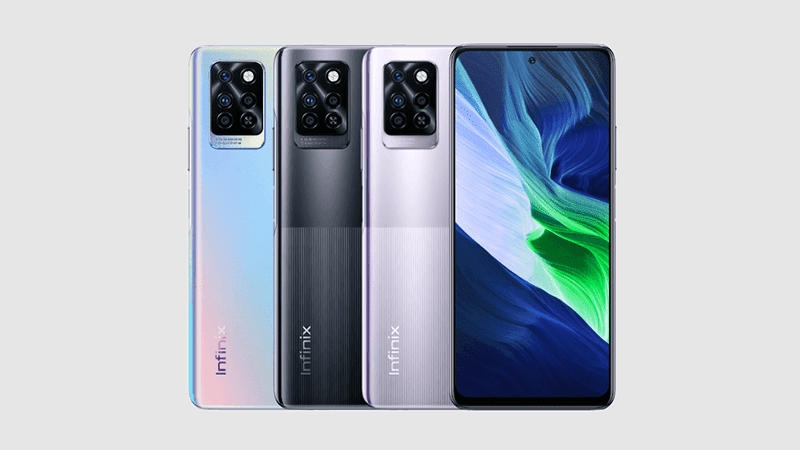
The Infinix Note 10 Pro features an immersive 17.65 cm (6.95) FHD+ Punch Hole display with narrow bezels and an optimal aspect ratio to give you an expansive view of the screen.
This mobile phone is equipped with a 64 MP AI Quad Rear Camera with a 64 MP Primary lens (f1.79 large aperture), 8 MP Ultra Wide Angle (120 degrees) and Macro lens (2.5 cm) + 2 MP Depth Sensor + 2 MP B&W Lens along with Quad-LED Flash. This ensures that you get to take professional-grade photos. It comes with added features, such as 10x digital zoom and eye-tracking, Super Night mode, Time Lapse video, Slow motion video, Professional mode, Ultra steady mode, and 4K Bokeh Video recording and short video.
Thanks to the 5000 mAh battery and 33 W Type-C fast charger and Power Marathon Tech, you can enjoy long-lasting usage, fast charging, and increased battery backup. You can also enjoy long hours of 4G talk-time, music playback, video playback, Web surfing, gaming, and much more.
This mobile phone has a Helio G95 Octa-core processor with 12nm FinFET, 2.05 GHz CPU frequency and Mediatek Hyper EngineGame Technology. Thanks to DAR-LINK Game Boost Technology, you can enjoy powerful gaming that’s free of screen tearing/stuttering. You can enjoy the benefits of its responsive touch panel, enhanced colour reproduction, and no heating issues, even after extended hours of gaming. The 3-in-1 card slot can be used to expand its memory.
Prerequisites & Preparation
- Backup Data: Flashing will completely wipe all data on your device. Back up important files and settings before proceeding.
- Battery Level: Ensure your device has at least 50% battery to prevent shutdown during the flashing process.
- USB Driver & Tools: Install the correct USB drivers for your brand and prepare the flashing tool (Odin for Samsung, SP Flash Tool/QPST for Qualcomm/MTK, etc.).
CAUTION: Flashing official firmware carries a risk of bricking your device. Proceed with caution and at your own risk. addROM is not responsible for any damage caused to your device.
Download Stock ROM & Firmware
X695D
| File Type | Firmware / Build | Region / Model | OS Version | Download Link |
|---|---|---|---|---|
| Stock ROM | Infinix-Note-10-Pro-X695D-H854N-R-OP-220510V248.zip | X695D | – | Google Drive |
| Stock ROM | Infinix-Note-10-Pro-X695D-H854N-R-OP-210813V111.zip | X695D | – | Google Drive |
| Stock ROM | Infinix-Note-10-Pro-X695D-H854N-R-OP-210806V102.zip | X695D | – | Google Drive |
| Stock ROM | Infinix-Note-10-Pro-X695D | X695D | – | Google Drive |
X695C
| File Type | Firmware / Build | Region / Model | OS Version | Download Link |
|---|---|---|---|---|
| Stock ROM | Infinix-Note-10-Pro-X695C-H854JK-R-RU-210813V446.zip | X695C | – | Google Drive |
| Stock ROM | Infinix-Note-10-Pro-X695C-H854JK-R-GL-221114V590.zip | X695C | – | Google Drive |
| Stock ROM | Infinix-Note-10-Pro-X695C-H854JK-R-GL-220823V588.zip | X695C | – | Google Drive |
| Stock ROM | Infinix-Note-10-Pro-X695C-H854JK-R-GL-220510V563.zip | X695C | – | Google Drive |
| Stock ROM | Infinix-Note-10-Pro-X695C-H854JK-R-GL-220219V544.zip | X695C | – | Google Drive |
| Stock ROM | Infinix-Note-10-Pro-X695C-H854JK-R-GL-211019V513.zip | X695C | – | Google Drive |
| Stock ROM | Infinix-Note-10-Pro-X695C-H854JK-R-GL-210927V509.zip | X695C | – | Google Drive |
| Stock ROM | Infinix-Note-10-Pro-X695C-H854JK-R-GL-210816V457.zip | X695C | – | Google Drive |
| Stock ROM | Infinix-Note-10-Pro-X695C-H854JK-R-GL-210705V384.zip | X695C | – | Google Drive |
| Stock ROM | Infinix-Note-10-Pro-X695C-H854JK-R-GL-210430V244.zip | X695C | – | Google Drive |
| Stock ROM | Infinix-Note-10-Pro-X695C | X695C | – | Google Drive |
X695
| File Type | Firmware / Build | Region / Model | OS Version | Download Link |
|---|---|---|---|---|
| Stock ROM | Infinix-Note-10-Pro-X695-H854DEFGHI-R-GL-230110V1242.zip | X695 | – | Google Drive |
| Stock ROM | Infinix-Note-10-Pro-X695-H854DEFGHI-R-GL-221114V1237.zip | X695 | – | Google Drive |
| Stock ROM | Infinix-Note-10-Pro-X695-H854DEFGHI-R-GL-220929V1227.zip | X695 | – | Google Drive |
| Stock ROM | Infinix-Note-10-Pro-X695-H854DEFGHI-R-GL-220823V1220.zip | X695 | – | Google Drive |
| Stock ROM | Infinix-Note-10-Pro-X695-H854DEFGHI-R-GL-220417V1167.zip | X695 | – | Google Drive |
| Stock ROM | Infinix-Note-10-Pro-X695-H854DEFGHI-R-GL-220219V1133.zip | X695 | – | Google Drive |
| Stock ROM | Infinix-Note-10-Pro-X695-H854DEFGHI-R-GL-211217V1072.zip | X695 | – | Google Drive |
| Stock ROM | Infinix-Note-10-Pro-X695-H854DEFGHI-R-GL-210816V937.zip | X695 | – | Google Drive |
| Stock ROM | Infinix-Note-10-Pro-X695-H854DEFGHI-R-GL-210429V692.zip | X695 | – | Google Drive |
| Stock ROM | Infinix-Note-10-Pro-X695-H854DEFGHI-R-GL-210408V562.zip | X695 | – | Google Drive |
| Stock ROM | Infinix-Note-10-Pro-X695-H854DEFGHI-R-GL-210114V202.zip | X695 | – | Google Drive |
How to Flash Firmware / Stock ROM
To flash the stock firmware on your Infinix device using SP Flash Tool, follow these steps:
- Download and install the MTK USB Drivers on your computer.
- Download and extract the SP Flash Tool.
- Launch
Flash_tool.exeas administrator. - Click on the Scatter-loading button and select the Android scatter file (
.txt) from the extracted firmware folder. - Click the Download button.
- Power off your device completely, hold the Volume Down or Volume Up button, and connect it to the computer via USB cable.
- The flashing process will start automatically. Wait for the green “Download OK” checkmark to appear.