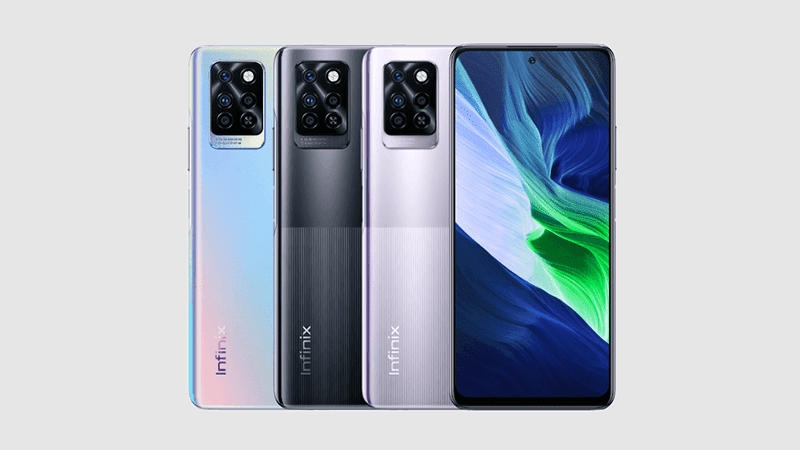
Equipped with an immersive 17.65 cm (6.95) Full HD+ Punch Hole display, this smartphone from Infinix delivers rich and vivid visuals at all times. Be it while playing games, capturing images, or watching movies, this smartphone’s narrow bezel design, screen-to-body ratio of about 90.1%, and 20.5:9 aspect ratio offer a larger viewing area, taking your visual experience to the next level.
The Infinix Note 10 smartphone offers about 180 Hz of touch sampling rate, ensuring smooth and seamless screen response. This feature is a boon to gaming enthusiasts as it helps them perform better and get ahead of their competitors. To top it off, this smartphone is TUV-Rheinland certified for low blue-light emission, minimizing the strain on your eyes even when you view the screen for an extended period of time.
Equipped with a 48 MP AI triple rear camera setup, with a 48 MP primary lens (f1.79 large aperture), 2 MP depth sensor, and 2 MP macro lens (with quad-LED flash), this smartphone helps you capture life’s beautiful moments in all its grandeur. Its 10x digital zoom, eye-tracking feature, Time Lapse video, Slow motion video, and various modes, such as Super Night mode, Professional mode, and more, further make it a delight to capture photos and record videos.
This Infinix smartphone comes with a 16 MP in-display selfie camera, with dual-LED flash and f/2.0 aperture, to help you capture amazing selfies wherever you are. If you want to further enhance and beautify your selfies, you can explore its various modes, such as Video Beauty mode, AI Portrait mode, 3D Face Beauty mode, Super Night mode, WideSeflie, 2K Video Recording, and more.
Battery woes will be the last thing on your mind as this smartphone comes with a massive 5000 mAh battery, an 18 W Type-C Fast charger, and Power Marathon Tech. The Power Marathon Tech helps enhance the battery backup by about 25%.
Prerequisites & Preparation
- Backup Data: Flashing will completely wipe all data on your device. Back up important files and settings before proceeding.
- Battery Level: Ensure your device has at least 50% battery to prevent shutdown during the flashing process.
- USB Driver & Tools: Install the correct USB drivers for your brand and prepare the flashing tool (Odin for Samsung, SP Flash Tool/QPST for Qualcomm/MTK, etc.).
CAUTION: Flashing official firmware carries a risk of bricking your device. Proceed with caution and at your own risk. addROM is not responsible for any damage caused to your device.
Download Stock ROM & Firmware
Global / General
| File Type | Firmware / Build | Region / Model | OS Version | Download Link |
|---|---|---|---|---|
| Stock ROM | Stock ROM | Global / General | – | Google Drive |
| Stock ROM | Stock ROM | Global / General | – | Google Drive |
| Stock ROM | Stock ROM | Global / General | – | Google Drive |
| Stock ROM | Stock ROM | Global / General | – | Google Drive |
| Stock ROM | Stock ROM | Global / General | – | Google Drive |
| Stock ROM | Stock ROM | Global / General | – | Google Drive |
| Stock ROM | Stock ROM | Global / General | – | Google Drive |
| Stock ROM | Stock ROM | Global / General | – | Google Drive |
| Stock ROM | Stock ROM | Global / General | – | Google Drive |
| Stock ROM | Stock ROM | Global / General | – | Google Drive |
| Stock ROM | Stock ROM | Global / General | – | Google Drive |
| Stock ROM | Stock ROM | Global / General | – | Google Drive |
| Stock ROM | Stock ROM | Global / General | – | Google Drive |
How to Flash Firmware / Stock ROM
To flash the stock firmware on your Infinix device using SP Flash Tool, follow these steps:
- Download and install the MTK USB Drivers on your computer.
- Download and extract the SP Flash Tool.
- Launch
Flash_tool.exeas administrator. - Click on the Scatter-loading button and select the Android scatter file (
.txt) from the extracted firmware folder. - Click the Download button.
- Power off your device completely, hold the Volume Down or Volume Up button, and connect it to the computer via USB cable.
- The flashing process will start automatically. Wait for the green “Download OK” checkmark to appear.