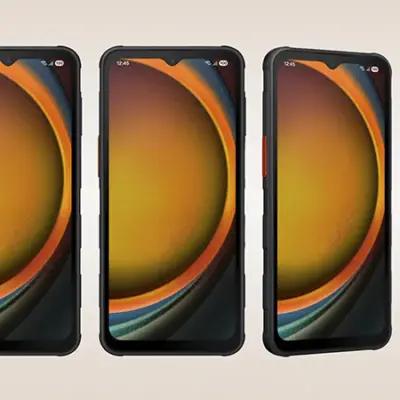
Infinix Note 11 has a 6.7-inch Full HD+ AMOLED display with a waterdrop notch design that houses a 16 MP selfie camera, a maximum brightness of 650 nits, a contrast ratio of 100000:1, 100% DCI-P3 color gamut coverage, and a screen-to-body ratio of up to 91%. Despite having a large 5,000 mAh battery, the phone still maintains a thinness of 7.9 mm.
The standard version of Infinix Note 11 runs on Helio G88 combined with memory options: 4 GB RAM + 64 GB ROM, 6 GB RAM + 128 GB ROM, with a microSD card slot. Moving to the back, Infinix Note 11 has four LED flashes and three cameras: 50 MP main with f/1.6 aperture + 2 MP bokeh + AI lens. Other features of the phone include 33W fast charging, face unlock, and a fingerprint sensor embedded in the power key on the side frame.
Prerequisites & Preparation
- Backup Data: Flashing will completely wipe all data on your device. Back up important files and settings before proceeding.
- Battery Level: Ensure your device has at least 50% battery to prevent shutdown during the flashing process.
- USB Driver & Tools: Install the correct USB drivers for your brand and prepare the flashing tool (Odin for Samsung, SP Flash Tool/QPST for Qualcomm/MTK, etc.).
CAUTION: Flashing official firmware carries a risk of bricking your device. Proceed with caution and at your own risk. addROM is not responsible for any damage caused to your device.
Download Stock ROM & Firmware
Additional Files & Tools
- Infinix-Note-11-Pro-X697_MT6781_V1565_220916.zip
- Infinix-Note-11-Pro-X697_MT6781_V1549_220823.zip
- Infinix-Note-11-Pro-X697_MT6781_V1494_220527.zip
- Infinix-Note-11-Pro-X697_MT6781_V922_211029.zip
- Infinix-Note-11-Pro-X697_MT6781_V686_210927.zip
- Infinix-Note-11-X663B_MT6768_V592_220107.zip
- Infinix-Note-11-X663B_MT6768_V591_220107.zip
- Infinix-Note-11-X663B_MT6768_V481_211125.zip
- Infinix_Note_11_X663B_MT6768_V423_211102.zip
- Infinix-Note-11-X663-H6915ABCEFGHIO-S-GL-221021V299.zip
- Infinix-Note-11-X663-H6915ABCEFGHIO-S-GL-220905V232.zip
- Infinix-Note-11-X663-H6915ABCEFGHIO-R-GL-221027V1189.zip
- Infinix-Note-11-X663-H6915ABCEFGHIO-R-GL-220419V955.zip
- Infinix-Note-11-X663-H6915ABCEFGHIO-R-GL-220331V888.zip
- Infinix-Note-11-X663-H6915ABCEFGHIKL-R-GL-220223V786.zip
- Infinix-Note-11-X663-H6915ABCEFG-R-GL-220107V686.zip
- Infinix-Note-11-X663-H6915ABCEFGHIO-S-GL-230113V402.zip
- Infinix-Note-11-X663-H6915ABCEFGHIO-S-GL-221216V363.zip
- Infinix-Note-11-X663-H6915ABCEFG-R-GL-211217V628.zip
- Infinix-Note-11-X663-H6915ABCEFG-R-GL-211125V565.zip
- Infinix-Note-11-X663-H6915ABCEFG-R-GL-211102V516.zip
How to Flash Firmware / Stock ROM
To flash the stock firmware on your Infinix device using SP Flash Tool, follow these steps:
- Download and install the MTK USB Drivers on your computer.
- Download and extract the SP Flash Tool.
- Launch
Flash_tool.exeas administrator. - Click on the Scatter-loading button and select the Android scatter file (
.txt) from the extracted firmware folder. - Click the Download button.
- Power off your device completely, hold the Volume Down or Volume Up button, and connect it to the computer via USB cable.
- The flashing process will start automatically. Wait for the green “Download OK” checkmark to appear.