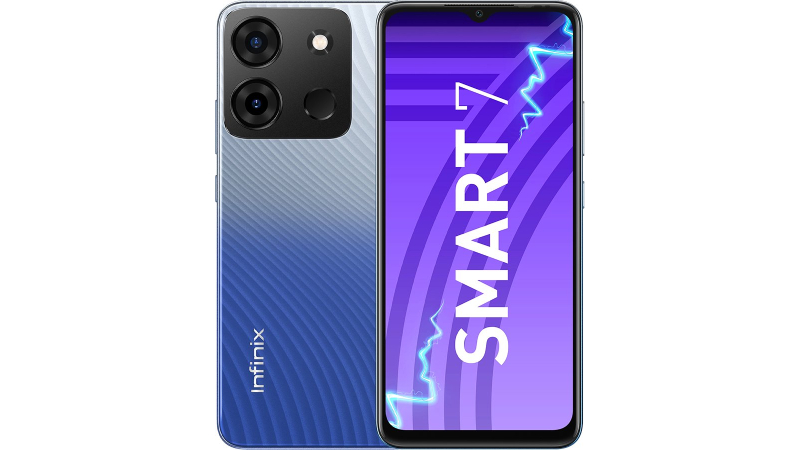
With the amazing 6000 mAh battery on the Infinix SMART 7 smartphone, get through your day and stay productive. Leveraging it, a single charge allows you to enjoy up to 10 movies or listen to over 1200 songs. Also, the Type-C charging capability allows you to quickly recharge your phone.
This phone’s capability for up to 7 GB of RAM and 64 GB of internal storage makes multitasking a pleasure. Thus you can store whatever you need and run quite as many apps as you like without experiencing any hassles.
Your favourite content comes to life on this phone’s large, colourful 16.76 cm (6.6) HD+ Display. You can enjoy content while on the go because the display is vibrant enough to be completely viewable outside.
With SMART 7’s crystal-clear, sharp 13 MP Dual Camera, you can improve your online presence. When it’s dark out, the powerful Dual Flash gives you the ideal lighting to illuminate your subject. With the clear and adaptable 5 MP selfie camera on this phone, you can click mesmerising selfies. With a powerful LED Flash that makes your face stand out in any light, low-light selfies are indeed made simple.
Prerequisites & Preparation
- Backup Data: Flashing will completely wipe all data on your device. Back up important files and settings before proceeding.
- Battery Level: Ensure your device has at least 50% battery to prevent shutdown during the flashing process.
- USB Driver & Tools: Install the correct USB drivers for your brand and prepare the flashing tool (Odin for Samsung, SP Flash Tool/QPST for Qualcomm/MTK, etc.).
CAUTION: Flashing official firmware carries a risk of bricking your device. Proceed with caution and at your own risk. addROM is not responsible for any damage caused to your device.
Download Stock ROM & Firmware
X6517
| File Type | Firmware / Build | Region / Model | OS Version | Download Link |
|---|---|---|---|---|
| Stock ROM | Infinix-Smart-7-X6517-V6500AACD-S-GL-230506V634.zip | X6517 | – | Google Drive |
| Stock ROM | Infinix-Smart-7-X6517-V6500AACD-S-GL-230116V353_user.zip | X6517 | – | Google Drive |
| Stock ROM | Infinix-Smart-7-X6515-H6127IAj-S-KESF-LC-230427V59.zip | X6517 | – | Google Drive |
X6515
| File Type | Firmware / Build | Region / Model | OS Version | Download Link |
|---|---|---|---|---|
| Stock ROM | Infinix-Smart-7-X6515-H6127HIJAiAjAk-S-OP-230518V1052.zip | X6515 | – | Google Drive |
| Stock ROM | Infinix-Smart-7-X6515-H6127HIJAiAjAk-S-OP-230423V994.zip | X6515 | – | Google Drive |
| Stock ROM | Infinix-Smart-7-X6515-H6127HIJAiAjAk-S-OP-230323V876.zip | X6515 | – | Google Drive |
| Stock ROM | Infinix-Smart-7-X6515-H6127HIJAiAjAk-S-OP-230202V702.zip | X6515 | – | Google Drive |
| Stock ROM | Infinix-Smart-7-X6515-H6127HIJAiAjAk-S-OP-221220V534.zip | X6515 | – | Google Drive |
| Stock ROM | Infinix-Smart-7-X6515-H6127EFGHIJ-S-OP-221013V151.zip | X6515 | – | Google Drive |
Additional Files & Tools
How to Flash Firmware / Stock ROM
To flash the stock firmware on your Infinix device using SP Flash Tool, follow these steps:
- Download and install the MTK USB Drivers on your computer.
- Download and extract the SP Flash Tool.
- Launch
Flash_tool.exeas administrator. - Click on the Scatter-loading button and select the Android scatter file (
.txt) from the extracted firmware folder. - Click the Download button.
- Power off your device completely, hold the Volume Down or Volume Up button, and connect it to the computer via USB cable.
- The flashing process will start automatically. Wait for the green “Download OK” checkmark to appear.