
Key Takeaway: Agent Substrate lets you run massive fleets of AI agents on Kubernetes with sub‑second activation, high density, and strong isolation.
What Is Agent Substrate?
Agent Substrate is an open-source system built on top of Kubernetes that manages “agent-like” workloads—think AI agents, long-lived tools, or interactive environments—in a far more efficient and low-latency way than vanilla Kubernetes alone.
Instead of mapping each agent to its own Pod, Agent Substrate multiplexes many stateful “actors” (agents) onto a much smaller pool of “workers” (Pods), achieving 30x or more oversubscription while keeping activation latency in the sub-second range.
Each agent retains its own state, identity, and isolation, but it shares compute capacity with other agents via a dedicated control plane that sits alongside your cluster rather than going through the standard Kubernetes control plane for every tiny tool call.
For a visual overview, you can reference the architecture diagrams in Google Cloud’s “Agent Sandbox on GKE and Agent Substrate” announcement post.
Why Agent Substrate Matters for AI Agents
AI agents are bursty: they sit idle most of the time, then spike CPU and memory during short tool calls. Traditional Kubernetes scaling models are optimized for long-running services, not millions of short-lived, stateful agent sessions.
Agent Substrate is designed for exactly that pattern:
- It keeps a pool of pre-warmed workers ready to host agents, so agents can spin up in milliseconds rather than seconds.
- It snapshots idle agents to storage and evicts them from workers, preserving full RAM and filesystem state so they can resume instantly later.
- It adds an agent-specific control plane that can handle huge amounts of fine-grained scheduling chatter without overwhelming the Kubernetes API server.
In practice, this can translate into dramatically higher hardware utilization and lower cost per agent request for large, agentic applications running on GKE or any other Kubernetes distribution.
How Agent Substrate Fits with GKE Agent Sandbox
Google’s GKE Agent Sandbox focuses on securely running untrusted agent code inside hardened, gVisor-backed sandboxes.
Agent Substrate complements that by handling scale and orchestration:
- Agent Sandbox isolates code execution per agent or tool.
- Agent Substrate is the layer that schedules many such agents, suspends and resumes their state, and multiplexes them onto workers.
You can think of Agent Sandbox as the “high fence” around your agents and Agent Substrate as the “city planner” deciding where and when those agents run. Together, they form a robust runtime stack for production-grade AI agents on Kubernetes.
For more background and diagrams that illustrate this relationship, see the official Google Cloud blog post introducing Agent Substrate.
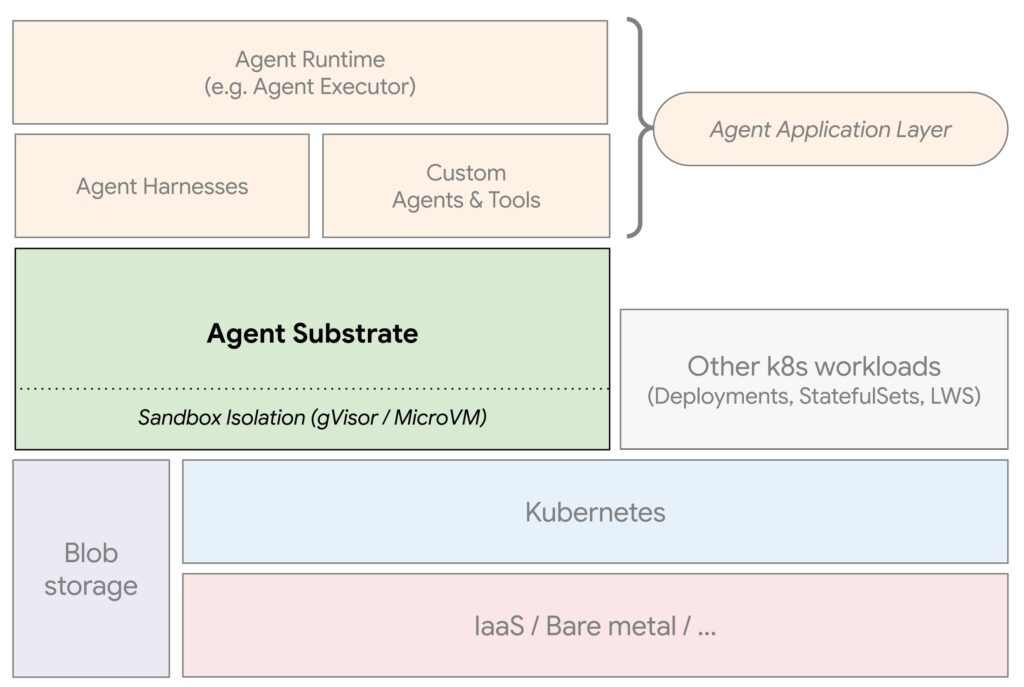
High-Level Architecture in Plain English
At a conceptual level, Agent Substrate introduces a few key primitives on top of Kubernetes:
- Workers: Kubernetes Pods that run a runtime capable of hosting many agents. These are managed in a
WorkerPoolresource and can use standard Kubernetes autoscaling. - Actors (Agents): Logical agent instances that live inside workers. Each actor has its own state and identity and can be suspended/resumed independently.
- Control Plane: A dedicated control plane that handles actor scheduling, state snapshotting, networking, and routing requests (usually via a router service or gateway).
Requests from your clients flow through a router, which looks at the actor ID and routes traffic to the correct worker. If the actor is not currently running, Agent Substrate starts it on a worker; if it is idle and suspended, it restores its snapshot and resumes it before serving the request.
A helpful mental model is “serverless for agents, but on Kubernetes, with durable state and full control over the cluster.”
If you want a more detailed walkthrough complete with diagrams, the Solo.io “Agent Substrate + kagent” installation guide provides a great visual explanation.
Prerequisites for Installing Agent Substrate
Before you install Agent Substrate, you’ll need a few basics in place:
- A working Kubernetes cluster (GKE is a natural fit, but KinD or other distros work too).
kubectlconfigured to talk to that cluster.- Cluster-level permissions to install Custom Resource Definitions (CRDs) and controllers.
- A storage solution (for example, GKE Persistent Disk or another CSI driver) for snapshots and state.
If you’re on GKE, make sure your project has billing enabled and that the GKE API and Artifact Registry are turned on, as you would for other GKE-based workloads.
Step-by-Step: Installing Agent Substrate on Kubernetes
The exact steps may evolve, so always cross-check with the GitHub README, but a typical setup on GKE looks like this:
1. Create or reuse a Kubernetes cluster
On GKE, you might create a cluster with something like:
gcloud container clusters create agent-substrate-cluster \
  --region=us-central1 \
  --machine-type=e2-standard-4
This is just an example; size it based on your expected agent load and enable any additional features you need (like Workload Identity).
2. Install Agent Substrate controller and CRDs
Agent Substrate ships with Kubernetes manifests and Helm charts that install:
- The Substrate controller
- Associated CRDs (
WorkerPool,ActorTemplate,Actor, and related resources) - Networking components such as the router
A typical pattern is:
# Clone the repo
git clone https://github.com/agent-substrate/substrate.git
cd substrate

# Run the helper script or apply Helm chart/manifests
./hack/install-ate.sh
Or, if you’re following a Helm-based flow from a provider like Solo.io:
helm upgrade --install substrate \
  oci://ghcr.io/kagent-dev/substrate/helm/substrate \
  --namespace ate-system --create-namespace
These commands install the control plane into a dedicated namespace (for example, ate-system) and register the CRDs so you can start defining worker pools and actors.
You can verify that everything is running with:
kubectl get pods -n ate-system
kubectl get crds | grep substrate
3. Configure a WorkerPool
Next, define a WorkerPool that describes the Pods which will host your agents.
At a high level, this YAML includes:
- The container image that runs the agent runtime or harness
- Resource requests/limits for CPU and memory
- Minimum and maximum number of workers (often paired with Kubernetes autoscaling)
Once applied with kubectl apply -f workerpool.yaml, you should see workers coming up:
kubectl get workerpool -A
kubectl get pods -n ate-system
The goal is to have a pool of ready workers waiting to host agents, so agent startup remains extremely fast.
4. Create an ActorTemplate and snapshot
An ActorTemplate defines what an actor looks like: its base image, configuration, and initial state.
The usual pattern is:
- Deploy a demo or base actor using a helper script (for example, a counter demo).
- Let Substrate create a “golden snapshot” of that actor’s initialized state.
- Use that snapshot as the basis for all future actors of that type.
From the official demos, a single command like:
./hack/install-ate.sh --deploy-demo-counterwill install a reference WorkerPool, ActorTemplate, and demo Actor into a namespace such as ate-demo-counter.
You can then check that your template is ready:
kubectl wait --for=condition=Ready actortemplate/counter \
  -n ate-demo-counter --timeout=5m
Deploying Your First Agent on Agent Substrate
Once you have a WorkerPool and ActorTemplate, creating an actual agent (Actor) is straightforward.
1. Create an Actor instance
With the CLI tools from the repo, you can create an actor like this:
kubectl ate create actor my-counter-1 \
  --template ate-demo-counter/counter
Immediately after creation, the actor typically starts in a SUSPENDED state—Substrate hasn’t yet allocated it to a worker because there’s no traffic.
You can confirm its status:
kubectl ate get actor my-counter-12. Route traffic to the Actor
Substrate provides a router (often exposed as a Kubernetes service) that forwards requests to the appropriate actor based on hostname or path.
A common pattern is:
- Port-forward the router service:
kubectl port-forward -n ate-system svc/atenet-router 8000:80- Send a request using the actor’s DNS-style ID:
curl -X POST \
-H "Host: my-counter-1.actors.resources.substrate.ate.dev" \
http://localhost:8000
On the first request, Substrate resumes or initializes the actor on a worker and then serves the response.
Subsequent requests hit the same actor, preserving its internal state (for example, incrementing a counter), until it becomes idle and is snapshotted and suspended again.
Integrating Agent Substrate with Higher-Level Agent Frameworks
Agent Substrate is framework‑agnostic: it can host agents built with Google’s Agent Development Kit (ADK), LangChain/LangGraph, Claude Code, or any other framework packaged into an OCI image.
In practice, you’ll often pair Substrate with a higher-level orchestrator such as:
- Agent Executor (AX) for distributed agent workflows and durable execution.
- kagent (from Solo.io) for declaratively defining agents, connecting them to models, and choosing Substrate as the runtime.
For example, in kagent you can create agents that explicitly select Agent Substrate as their sandbox/runtime platform and then let kagent handle prompts, memory, and model routing while Substrate handles scaling and state.
If you prefer a guided, UI-driven experience, the kagent + Agent Substrate setup guide includes screenshots and diagrams that help visualize the interaction between actors, workers, and agent definitions.
Observability, Scaling, and Operational Tips
Running thousands or millions of agents on Kubernetes is powerful, but you need operational hygiene to avoid surprises:
- Monitor WorkerPool utilization: Track CPU/memory usage and the number of active actors per worker to tune oversubscription ratios.
- Configure autoscaling carefully: Combine Kubernetes autoscalers with Substrate’s understanding of actor load to avoid thrashing.
- Instrument requests: Use existing observability stacks (Prometheus, OpenTelemetry) to monitor latency and error rates for actor traffic via the router.
- Secure access: Protect router endpoints with proper authentication and network policies, especially in multi-tenant environments.
Agent Substrate integrates well with existing Kubernetes patterns, so you can piggyback on your current logging, metrics, and security tooling instead of building everything from scratch.
Where to Go Next
If you want to go deeper, start here:
- Core repo and docs: for architecture details, installation scripts, and demos.
- Google Cloud overview: The “Bringing you Agent Sandbox on GKE and Agent Substrate” blog post for context, diagrams, and how this fits with GKE Agent Sandbox.
For a more hands-on, story-driven introduction, you can also check community tutorials like “Agent Substrate: Building Actors and Workers” or Solo.io’s installation walkthrough, which include illustrative screenshots and architecture images to help you visualize the system.








