Quick takeaways
- Langfuse is an open-source LLM observability platform. The official README describes instrumenting applications, ingesting traces, and tracking LLM calls, retrieval, embeddings, and agent actions.
- If your AI app only logs “request failed” or the final model answer, you are debugging in the dark. Langfuse helps expose the chain of decisions behind the answer.
- The official path includes a Docker Compose self-hosting flow and Python SDK usage with
langfuse openai.- The core environment variables are
LANGFUSE_SECRET_KEY,LANGFUSE_PUBLIC_KEY, andLANGFUSE_BASE_URL.- Langfuse does not make a model smarter by itself. It gives you the data needed to improve prompts, retrieval, tools, and workflows.
LLM applications rarely fail like ordinary web apps. The server may be up, the API may return 200, and the user may still receive a bad answer. A prompt change can shift behavior. Retrieval can pull the wrong chunk. An agent can call the right tool in the wrong order. A model can exceed the budget or ignore a critical instruction.
If your logs only show the final response, you do not have enough information to fix the system. That is the gap Langfuse tries to fill: tracing the internal path of an LLM request so teams can understand what happened before they try to optimize it.
What is Langfuse?
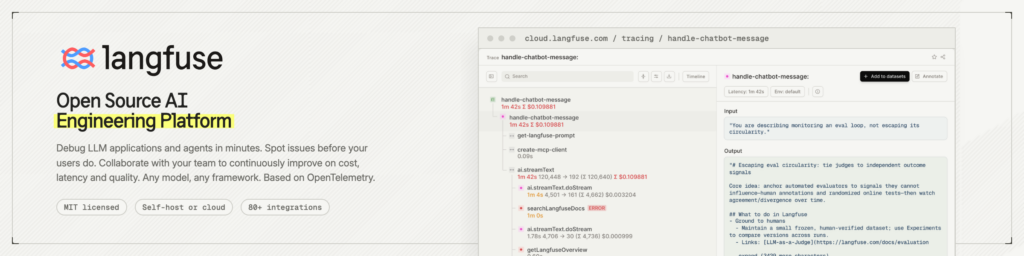
Langfuse is an open-source platform for LLM observability. Its README describes instrumenting applications, ingesting traces, and tracking LLM calls as well as retrieval, embedding, and agent actions.
In practical terms, Langfuse is where you go when the question changes from “How do I call an LLM API?” to “Why did this workflow answer correctly yesterday and fail today?” It gives teams a way to inspect the steps behind the result instead of guessing from the final message.
Why LLM observability is different
Traditional monitoring focuses on CPU, memory, uptime, database latency, and error rate. Those still matter, but LLM apps need another layer.
A request can succeed technically and fail semantically. The model returns a response, but the answer may be grounded in the wrong context, follow the wrong prompt version, or skip an important tool call. Without structured traces, you cannot reliably improve the system.
LLM observability needs to capture prompt, completion, metadata, user/session identifiers where appropriate, retrieved chunks, tool calls, cost, latency, and version information. Langfuse is built around that kind of workflow visibility.
Instrument first, optimize second
A common mistake is changing prompts before collecting data. A few bad answers appear, someone edits the prompt, switches a model, adds more instructions, and waits for the next failure. That loop is expensive and mostly subjective.
A better approach is to instrument a small workflow first. Capture real traces, review failure patterns, then decide whether to fix the prompt, retrieval, tool logic, model selection, or guardrails. Observability should not be an afterthought added only after production breaks.
Prerequisites
The official self-hosting path starts from the GitHub repository and Docker Compose. You need Git, Docker/Docker Compose, and enough resources to run Langfuse and its supporting services.
On the application side, you need a Langfuse project and API credentials. The common SDK configuration uses:
LANGFUSE_SECRET_KEY=...
LANGFUSE_PUBLIC_KEY=...
LANGFUSE_BASE_URL=...
Do not hard-code these values into source code. Use environment variables, a secret manager, or your deployment platform’s secret system.
Self-host Langfuse with Docker Compose
The official source material includes this basic path:
git clone --depth=1 https://github.com/langfuse/langfuse.git
cd langfuse
docker compose up
After the stack starts, inspect container logs for database, migration, worker, or startup errors. For a real team deployment, do not stop at docker compose up. You still need domain configuration, HTTPS, authentication, database backups, trace retention rules, and an update plan.
Start instrumenting Python/OpenAI workflows
The official quickstart mentions installing:
pip install langfuse openaiThen configure the Langfuse keys and base URL for the instance you are using. If Langfuse runs behind a reverse proxy or on a server, LANGFUSE_BASE_URL should point to that real URL, not a local placeholder.
The goal is not just “send logs.” A useful trace should include enough metadata to debug: workflow name, prompt version, model, latency, error state, retrieval details, and tool-call information where relevant.
Practical use cases
For a RAG chatbot, a wrong answer may come from query rewriting, retrieval, or final synthesis. Langfuse helps you inspect the user question, retrieved context, final prompt, and model output.
For AI agents, the hard part is the action chain. A run may search, read files, call APIs, patch data, and self-evaluate. If the result is wrong, you need to know which step caused the drift.
For prompt management, trace metadata helps compare prompt versions, models, and workflows. Change one variable at a time; otherwise, you will not know what actually improved the result.
Verification checklist
After self-hosting Langfuse and adding SDK instrumentation, check that Docker Compose starts cleanly, the dashboard is reachable, project/API credentials are valid, the app can send a test trace, and the trace contains the data needed for debugging.
Also check the negative case: make sure secrets, private prompts, or sensitive user data are not being stored raw by accident. Observability is powerful precisely because it captures more context than ordinary logs.
Common mistakes
The first mistake is logging only the final answer. LLM debugging usually requires the intermediate steps.
The second mistake is sending production traffic before defining retention and access control. Traces can include user content, business data, and internal prompts.
The third mistake is missing version metadata. Without prompt/model/workflow versions, it becomes very hard to explain quality changes over time.
Langfuse helps teams see what their LLM applications are doing. It does not replace evaluations, human review, prompt design, retrieval tuning, or security review, but it gives those processes better data.
If you are building a multi-step LLM app, a RAG system, or an AI agent workflow, add observability early. A small, well-instrumented workflow is much easier to improve than a large system that only logs the final answer.