

Claw3D: How to Install and Use the Open-Source 3D Workspace Built on OpenClaw

Key Takeaways: Claw3D turns OpenClaw from an invisible backend into a navigable 3D workspace you can install locally, connect to a gateway, and use to watch, manage, and collaborate with AI agents in real time.
Why Claw3D Matters
Claw3D is one of the more interesting open-source projects in the AI tooling space because it changes how you experience automation. Instead of treating agents as background processes hidden behind terminals, dashboards, and logs, Claw3D presents them inside a 3D workplace where activity becomes spatial, visible, and easier to monitor. That makes it compelling for teams exploring AI operations, autonomous workflows, and immersive interfaces for software delivery.
At the same time, it is worth being precise about what the project is today. The public repository describes Claw3D as a 3D workspace and visualization layer for OpenClaw, not as a standalone general-purpose game engine in the mold of Unity or Unreal. In practice, it is a web-based 3D operational interface for AI agents, backed by an OpenClaw gateway, with features like live office views, agent chat, standups, GitHub review flows, analytics surfaces, and builder tools.
For readers searching terms like “Claw3D install,” “how to use Claw3D,” “OpenClaw 3D office,” or “open-source AI agent virtual office,” that distinction is important. If you want a visual layer for AI-agent orchestration, Claw3D is highly relevant. If you want a raw 3D rendering engine for building games from scratch, the current repo is not presenting itself that way.
What Claw3D Actually Does
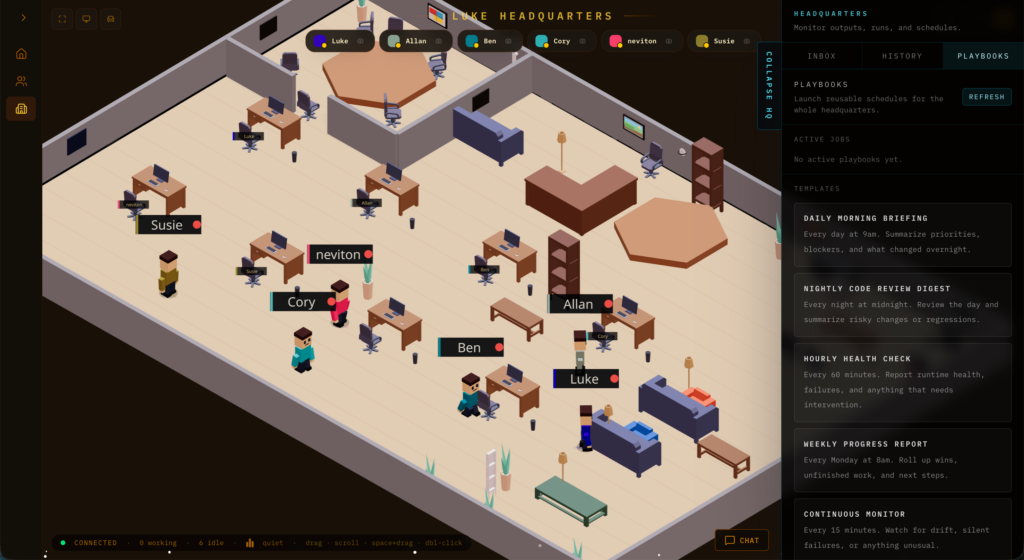
Claw3D’s core idea is simple: make AI work visible. The project turns your OpenClaw deployment into a retro-style 3D office where agents appear as workers moving through desks, rooms, and operational spaces. From there, you can monitor tasks, observe activity cues, manage agents, review pull requests, run standups, and interact through chat-like interfaces layered into the environment.
The official site frames it as a 3D virtual office for AI agents, and that matches the repo well. The homepage highlights real-time code review visibility, standups, task tracking, office navigation, camera lock-on behavior, chat interactions, and workspace customization. In other words, Claw3D is less about abstract 3D rendering for its own sake and more about using 3D space as an operational UI for autonomous systems.
Who Should Use Claw3D
Claw3D is a strong fit for developers, researchers, and technical teams already experimenting with OpenClaw and multi-agent workflows. If your current experience with agents feels opaque, fragmented, or too dependent on logs, Claw3D offers a more intuitive way to understand what is happening.
It is especially interesting for people who want to self-host, customize the interface, or build internal demos around AI agents in action. Because the stack uses familiar web tools such as Next.js, React, TypeScript, Three.js, React Three Fiber, Drei, and Phaser, it is approachable for frontend and full-stack developers who want to extend the product rather than treat it as a black box.
Installing Claw3D: What You Need First
Before you install Claw3D, the biggest thing to understand is that Claw3D does not install or run OpenClaw for you. The repo describes itself as the UI and Studio/proxy layer only. That means you need a working OpenClaw installation with a reachable gateway URL and token before Claw3D becomes useful.
Prerequisites
According to the project documentation, the recommended baseline is Node.js 20+, npm 10+, and an existing OpenClaw gateway you can connect to. If you are running everything locally, the usual upstream gateway URL is ws://localhost:18789.
Local install from source
If you want the fastest path for a self-hosted local setup, use:
git clone https://github.com/iamlukethedev/Claw3D.git
cd Claw3D
npm install
cp .env.example .env
npm run dev
Then open:
http://localhost:3000From there, configure the gateway URL and token inside Studio. For a local OpenClaw gateway on the same machine, start with:
ws://localhost:18789This is the clearest development setup because it keeps Studio and the gateway nearby while you validate the connection flow and explore the office.
How Claw3D Connects to OpenClaw
Claw3D uses a two-hop connection model. The browser talks to Studio over HTTP and a same-origin WebSocket endpoint, and Studio then opens a second WebSocket connection to the upstream OpenClaw gateway. That architecture matters because the gateway URL you enter is resolved from the Studio host, not necessarily from the browser device you are using.
This design is useful in real deployments because it allows the Studio side to persist connection details and proxy traffic more cleanly. It also means Claw3D can support local and remote combinations more flexibly than a pure direct-browser connection model. If you are deploying across machines, read that behavior carefully before assuming a browser-accessible address is enough.
Using Claw3D After Installation
Once Claw3D is running and connected, the best way to think about usage is in layers.
Layer one: enter the office
The first thing you will notice is the 3D office itself. The repo describes a live /office environment with desks, rooms, navigation, animations, and event-driven activity cues. This is where Claw3D delivers its core value: it turns system state into something you can visually inspect rather than merely parse from text output.
Layer two: manage agents and sessions
Claw3D already includes fleet management, agent chat, session controls, approvals, and configuration editing backed by the gateway. That means you are not just looking at a 3D scene; you are using a management layer that reflects runtime updates and lets you work with active agents in context.
Layer three: use operational spaces
The current project surface includes spaces for standups, GitHub review flows, analytics, and monitoring. On the homepage, these are presented as ways to watch code review activity, track tasks, and interact with agents in real time. In a practical workflow, this makes Claw3D useful as an operator console: a place where AI activity is organized, observable, and easier to discuss with teammates.
Layer four: customize the workspace
Claw3D also includes an /office/builder surface for editing and publishing office layouts. The official site further emphasizes draggable furniture and layout customization. This is a meaningful detail because it suggests the product is not only a monitoring dashboard in 3D clothing; it is moving toward a configurable environment where the workspace itself becomes part of how teams model agent responsibilities and collaboration.
Real-World Setup Advice for Self-Hosting
If both Studio and the gateway run locally, your setup is simple: launch Studio, browse to localhost:3000, and point it to ws://localhost:18789. If the gateway is remote, the docs suggest either using a directly reachable gateway URL, Tailscale with an HTTPS serve setup, or SSH port forwarding. Those options make Claw3D far more practical for home labs and distributed internal deployments than a localhost-only project.
If you plan to expose Studio on a broader network, pay attention to environment variables like HOST, PORT, and STUDIO_ACCESS_TOKEN. The docs explicitly recommend access-token protection when Studio binds to a public host. That is the kind of operational detail that separates a fun demo from a setup you can trust in a semi-production environment.
The Tech Stack Behind Claw3D
From a developer perspective, one of Claw3D’s strengths is that its stack is modern and understandable. The repo lists Next.js App Router, React, TypeScript, a custom Node server, Three.js, React Three Fiber, Drei, Phaser, Vitest, and Playwright. That combination gives it a strong foundation for immersive UI, frontend iteration, testing, and extension.
For contributors, that matters a lot. You are not stepping into a mysterious proprietary engine. You are stepping into a web-native open-source codebase that uses recognizable tools and patterns, which makes customization, debugging, and contribution far more accessible.
Final Verdict on Claw3D
Claw3D is best understood as an open-source 3D operational workspace for OpenClaw, not merely a flashy interface layer. It gives AI agents a visible place to exist, and that shift from logs to space is more important than it sounds. Visibility changes trust, debugging, collaboration, and adoption.
If you already run OpenClaw or want a self-hosted way to make AI-agent work observable, Claw3D is well worth trying. The installation flow is straightforward, the architecture is documented, the UI concept is distinctive, and the project feels like a serious foundation for the next wave of immersive AI operations.








