Key Takeaways:
Freqtrade empowers automated cryptocurrency trading by delivering a completely free, self-hosted open-source Python platform that lets developers and traders build, rigorously backtest, machine-learning optimize, and deploy custom strategies across major exchanges with full data ownership and zero recurring fees.
Introduction
Freqtrade is a powerful, free and open-source algorithmic trading software written entirely in Python. It enables users to develop sophisticated trading strategies, backtest them against historical market data, optimize parameters using advanced machine learning techniques, and execute trades on live or simulated markets across more than 100 cryptocurrency exchanges through the CCXT library.
Self-hosted open-source solutions like Freqtrade offer decisive advantages over proprietary cloud platforms. Users retain complete control over their code, data, and infrastructure, eliminating monthly subscription costs that can exceed hundreds of dollars on competing services. Privacy remains absolute because no third party accesses trading history or API keys. Customization knows no limits: every component from pair selection logic to risk management rules can be modified in clean Python code. The project benefits from continuous community contributions and transparent development visible on its public repository.
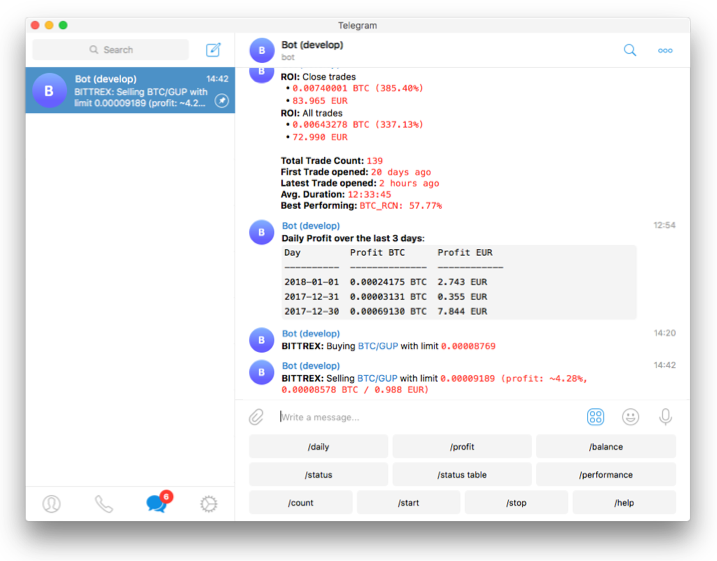
Standout capabilities include industrial-strength backtesting that simulates realistic fees, slippage, and order book dynamics; hyperopt, which employs Bayesian optimization and other machine learning methods to automatically discover optimal buy, sell, stop-loss, and ROI parameters; and dry-run mode that executes strategies with virtual capital to validate performance before any real funds are risked. Additional strengths encompass a responsive web UI for monitoring, Telegram integration for instant alerts, and seamless support for both spot and futures markets.
The project is actively maintained with frequent updates and comprehensive documentation available directly from the developers. Visit the official homepage and explore the full source code on the GitHub repository to stay current with the latest enhancements.
Installation Guide
Docker provides the recommended and most reliable installation path because it encapsulates all dependencies, including TA-Lib and Python libraries, eliminating platform-specific compilation issues. The following steps assume a Linux or macOS environment with Docker and Docker Compose already installed. Windows users should prefer a Linux VPS for production reliability.
Docker Installation (Recommended Method)
- Create a dedicated working directory and enter it:
mkdir ft_userdata && cd ft_userdata- Download the official docker-compose configuration:
curl https://raw.githubusercontent.com/freqtrade/freqtrade/stable/docker-compose.yml -o docker-compose.yml- Pull the latest stable image:
docker compose pull- Initialize the user data directory structure:
docker compose run --rm freqtrade create-userdir --userdir user_data- Generate an interactive base configuration:
docker compose run --rm freqtrade new-config --config user_data/config.jsonAnswer the prompts to select your preferred exchange (Binance, Bybit, OKX, etc.), stake currency (typically USDT), and initial trading pairs. The resulting user_data/config.json file contains all essential settings.
- Review and customize the generated configuration file using any text editor. Key sections to verify include exchange credentials (left empty for dry-run), pairlist, and strategy name.
- Start the container in detached mode:
docker compose up -dUpdates are performed simply by pulling the new image and restarting:
docker compose pull && docker compose up -dAlternative: Python Virtual Environment Setup
For users who prefer a native installation or need deeper customization:
git clone https://github.com/freqtrade/freqtrade.git
cd freqtrade
git checkout stable
python3 -m venv .venv
source .venv/bin/activate
./setup.sh -i
Activate the environment whenever you work with Freqtrade and install optional hyperopt dependencies if required:
python3 -m pip install -e .[hyperopt]Both methods produce an identical runtime experience. Docker remains preferred for most users due to its isolation and simplicity.
Practical Usage Guide
Once installed, Freqtrade follows a logical workflow: configure, acquire data, validate through backtesting, optimize, and finally deploy in dry-run mode.
Step 1: Configuring the Bot
Open user_data/config.json and ensure these critical settings are present for safe initial operation:
{
  "dry_run": true,
  "dry_run_wallet": 1000,
  "stake_currency": "USDT",
  "stake_amount": "unlimited",
  "exchange": {
    "name": "binance",
    "key": "",
    "secret": "",
    "ccxt_config": {
      "enableRateLimit": true
    }
  },
  "pairlist": {
    "method": "StaticPairList",
    "staticpairlist": ["BTC/USDT", "ETH/USDT", "SOL/USDT"]
  },
  "strategy": "SampleStrategy"
}
The SampleStrategy serves as an educational starting point only. Serious traders should develop or download production-grade strategies and place them inside user_data/strategies/.
Step 2: Downloading Historical Data
High-quality data forms the foundation of reliable backtesting. Execute the following command to fetch five days of 1-hour candles for demonstration purposes:
docker compose run --rm freqtrade download-data \
  --exchange binance \
  --pairs BTC/USDT ETH/USDT SOL/USDT \
  --days 5 \
  -t 1h
Data lands in user_data/data/binance/. For live strategies, download months or years of data at multiple timeframes (1m, 5m, 15m, 1h, 4h, 1d) to support robust testing across market regimes.
Step 3: Running a Basic Backtest
Validate strategy logic and expected performance before risking capital:
docker compose run --rm freqtrade backtesting \
  --config user_data/config.json \
  --strategy SampleStrategy \
  --timerange 20250101-20250401 \
  -i 1h \
  --export trades
The command produces a detailed report showing total profit, win rate, maximum drawdown, and trade statistics. Results are saved to user_data/backtest_results/. Analyze equity curves and individual trade markers to identify weaknesses such as excessive whipsaws or poor risk management.
Step 4: Starting the Bot in Dry-Run Mode
Launch the strategy with virtual funds to observe live behavior:
docker compose up -dMonitor progress through container logs:
docker compose logs -fThe web UI becomes available at http://localhost:8080 (enable it during new-config or by editing the compose file). Use the interface to view open positions, daily summaries, and performance metrics in real time. Telegram notifications can be configured for instant alerts on trade execution or profit milestones.
To stop the bot cleanly:
docker compose downAfter sufficient dry-run validation (typically several weeks across varying market conditions), switch to live trading by setting "dry_run": false and supplying valid API keys with appropriate permissions.
Conclusion and Next Steps
Freqtrade transforms algorithmic cryptocurrency trading from an expensive black-box service into a transparent, controllable engineering discipline. Its combination of Python flexibility, professional-grade backtesting, hyperopt-driven optimization, and risk-free dry-run execution delivers capabilities that rival or exceed commercial alternatives at zero ongoing cost.
Begin today by following the Docker installation, running your first backtest, and iterating on a custom strategy. The active community and extensive documentation ensure rapid progress from initial setup to production deployment. With disciplined testing and continuous refinement, Freqtrade provides the foundation for consistent, data-driven cryptocurrency trading success.