

 By
By MoneyPrinterTurbo: Generate HD Short Videos From a Single Keyword With AI
Key Takeaways: MoneyPrinterTurbo is a one-click, self-hosted pipeline that takes a topic and produces a finished HD short video – script, footage, voiceover, subtitles, and music – through a clean web UI or REST API.
What is MoneyPrinterTurbo?
If you have ever tried to bootstrap a TikTok, YouTube Shorts, or Douyin channel, you know the pain. A single 30-second clip takes a script, royalty-free footage, a voiceover, subtitles, background music, and an export pass. MoneyPrinterTurbo collapses that entire pipeline into a single keyword and a button click.
It is an open-source project published on GitHub at harry0703/MoneyPrinterTurbo that uses large language models to write the script, pulls high-definition stock clips from sources like Pexels, generates a voiceover via cloud TTS, builds subtitles automatically, layers background music, and synthesizes a finished 1080p video – in either 9:16 portrait or 16:9 landscape – all from a clean Streamlit web UI or a REST API.
The project ships with a complete MVC architecture, supports batch generation so you can produce several variants at once, and integrates with virtually every major LLM provider: OpenAI, Azure OpenAI, Google Gemini, Moonshot, DeepSeek, Qwen, MiniMax, Ollama (for fully local inference), gpt4free, one-api, ERNIE, Pollinations, and ModelScope.
Why MoneyPrinterTurbo stands out
There are dozens of AI video tools out there. MoneyPrinterTurbo earns its place by being genuinely end-to-end and genuinely free.
- Full pipeline, not just a script generator. Many “AI video” projects stop at the script. MoneyPrinterTurbo writes the copy, sources the footage, narrates it, adds subtitles, and renders the final MP4.
- HD output at both major aspect ratios. It produces clean 1080×1920 portrait videos for TikTok, Reels, and Shorts, plus 1920×1080 landscape for YouTube and Bilibili.
- Batch mode for A/B-style content. Generate multiple videos from the same topic in one run, then pick the best one. Useful for creators who want to test variants quickly.
- Two subtitle backends. Use
edge(fast, cloud-based, low system requirements) for most jobs, or switch towhisper(slower but more reliable) when you want offline transcription and higher accuracy. Both are toggled with a single line inconfig.toml. - Royalty-free footage by default. Footage is pulled from Pexels using your API key, so you avoid copyright issues out of the box. You can also point it at a local folder for your own clips.
- Real API, not just a UI. A FastAPI service is available at port 8080 with OpenAPI docs at
/docsand ReDoc at/redoc, so you can wire it into automation pipelines, Zapier-style workflows, or your own backend.
System requirements
Because the heavy lifting can be offloaded to cloud LLMs and cloud TTS, MoneyPrinterTurbo is surprisingly modest in its requirements.
The minimum is a 4-core CPU and 4 GB of RAM. The recommended setup is 6–8 cores and 8 GB of RAM. Optimal is 8+ cores and 16+ GB. A GPU is not required if you rely on cloud LLMs and cloud TTS, but it helps significantly if you run faster-whisper locally, do batch generation, or want faster encoding. Windows 10+, macOS 11+, and mainstream Linux distributions are all supported.
Installing MoneyPrinterTurbo
There are four supported installation paths. Pick the one that matches your environment.
Option 1: Google Colab (zero setup)
The fastest way to try it is the official Google Colab notebook linked from the GitHub repository. Open it in your browser, plug in your Pexels API key and an LLM key, and run the cells. No local install required.
Option 2: Windows one-click bundle
For Windows users, the project provides a prebuilt v1.2.6 bundle (downloadable via Google Drive from the README). Unzip it, double-click update.bat first to pull the latest code, then double-click start.bat to launch. The web UI opens automatically in your default browser – use Chrome or Edge for the best experience.
Option 3: Docker Compose (recommended for self-hosters)
If you have Docker Desktop installed, deployment is two commands:
git clone https://github.com/harry0703/MoneyPrinterTurbo.git
cd MoneyPrinterTurbo
docker-compose up
# Or on newer Docker:
# docker compose up
Then open the web UI at http://localhost:8501 and the API docs at http://localhost:8080/docs. This path avoids Python environment headaches entirely and is the cleanest option for Linux servers and home labs.
Option 4: Manual install with uv (or venv + pip)
For developers who want full control, use Python 3.11 with the uv package manager:
git clone https://github.com/harry0703/MoneyPrinterTurbo.git
cd MoneyPrinterTurbo
uv python install 3.11
uv sync --frozen
If you do not use uv, the traditional path still works:
python3.11 -m venv .venv
source .venv/bin/activate
pip install -r requirements.txt
You will also need ImageMagick installed for text rendering: brew install imagemagick on macOS, sudo apt-get install imagemagick on Ubuntu, or the static Windows installer from imagemagick.org (set imagemagick_path in config.toml to the install location).
Finally, launch the web UI:
uv run streamlit run ./webui/Main.py --browser.gatherUsageStats=FalseOr start the API service with uv run python main.py.
Configuring MoneyPrinterTurbo
Before your first run, copy config.example.toml to config.toml and fill in two things at minimum.
First, set pexels_api_keys with a free key from pexels.com – this is what powers the footage search.
Second, set llm_provider to your preferred model (OpenAI, DeepSeek, Moonshot, Gemini, Ollama for local, etc.) and add the matching API key. DeepSeek and Moonshot are popular budget-friendly choices; Ollama lets you run everything locally with no recurring cost.
Optional but useful configuration: subtitle_provider toggles between edge and whisper, and ffmpeg_path is only needed if automatic FFmpeg detection fails.
Using MoneyPrinterTurbo day to day
Once the web UI is open, the workflow is intentionally short.
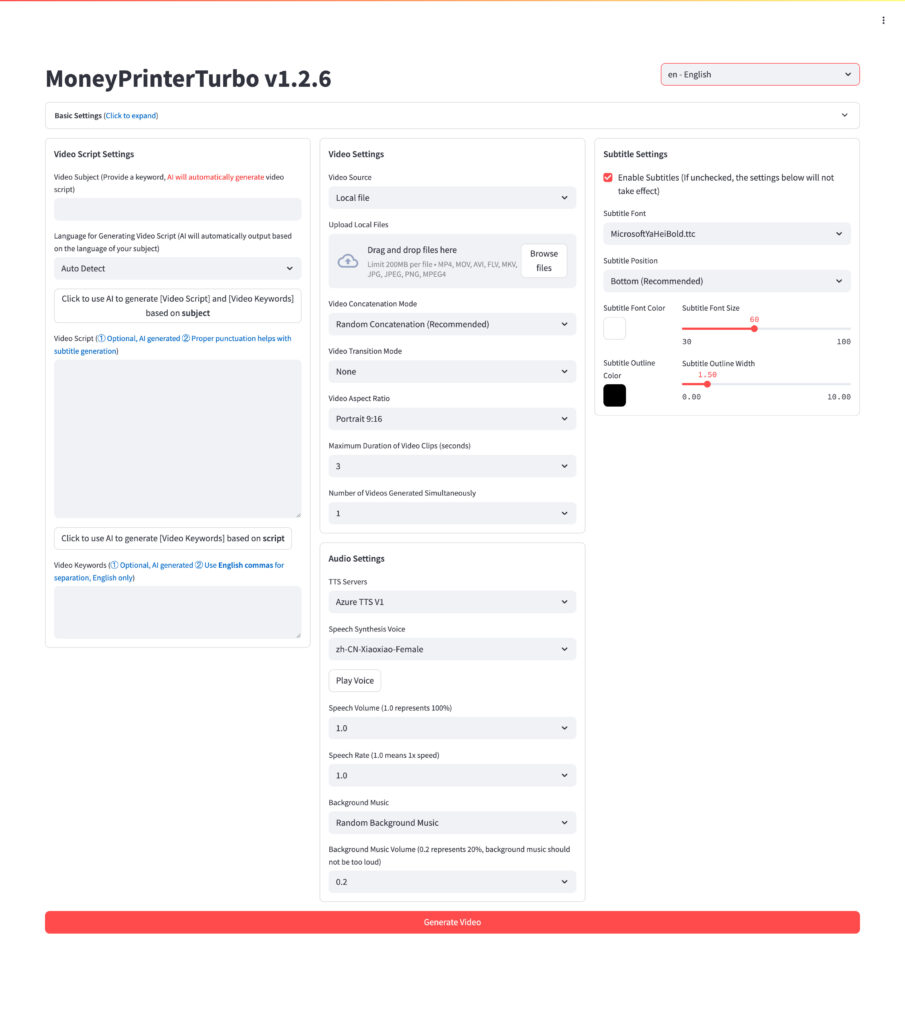
Step 1 – Enter your topic. Type a keyword, phrase, or short prompt – for example, “the science behind good sleep” or “three productivity tips for developers.” You can let the LLM write the entire script, or paste your own copy if you prefer human-written narration.
Step 2 – Pick your format and style. Choose 9:16 portrait (for TikTok, Reels, Shorts) or 16:9 landscape (for YouTube, Bilibili). Set the clip duration, video length, and material switching frequency. Pick your subtitle font, position, color, size, and outline.
Step 3 – Choose a voice. MoneyPrinterTurbo ships with a large list of TTS voices in both Chinese and English. Newer Azure voices (added in v1.1.2) sound markedly more natural and are worth configuring with an API key.
Step 4 – Add background music. Drop your own track into resource/songs, or let the project use one of the default tracks at random. The volume is adjustable per video.
Step 5 – Click generate. The web UI streams progress as the LLM writes the script, footage is downloaded from Pexels, the voiceover is synthesized, subtitles are aligned, and FFmpeg stitches the final MP4. Enable batch mode to generate several variants in a single run and pick the best one afterward.
Step 6 – Use the API for automation. If you want to wire this into a content pipeline, the FastAPI service at http://localhost:8080/docs exposes every UI capability as a REST endpoint. Schedule daily generation with cron, trigger from a Notion database, or hook it into a publishing tool.
Who MoneyPrinterTurbo is for
This project is a strong fit for solo creators bootstrapping a Shorts or TikTok channel, marketers producing high-volume social content, educators creating bite-sized explainers, and developers who want to learn how an end-to-end multimodal pipeline (LLM + TTS + Whisper + FFmpeg + stock APIs) is wired together. It is less suitable if you need character animation, custom B-roll generation from your own footage with strict brand guidelines, or pixel-perfect motion graphics.
Final thoughts
MoneyPrinterTurbo is one of those rare open-source projects where the demo actually matches the marketing: type a keyword, get a finished HD short. Combined with Docker deployment, batch generation, and a real API, it is a legitimate production tool for short-form video at scale – and unlike most paid alternatives, you own the workflow end to end.
Star the GitHub repository, spin up the Docker stack, configure your Pexels and LLM keys, and your next viral short might be one keyword away.








