

Pixel Agents – Bring Claude Code AI Agents to Life in a Customizable Pixel Office

Key Takeaways
Pixel Agents transforms abstract AI coding agents into engaging, animated pixel characters in a virtual office, making multi-agent development more intuitive, observable, and enjoyable directly within VS Code.
In the rapidly evolving landscape of artificial intelligence, tools like Claude Code have empowered developers to delegate complex coding tasks to autonomous agents. Yet, interacting with these agents often feels detached—limited to scrolling through terminal logs and waiting for outputs. Pixel Agents changes this dynamic by providing a visual interface that turns each agent into an animated pixel-art character residing in a shared virtual office. This extension not only makes the process more engaging but also improves oversight, especially when managing multiple agents or sub-agents.
The project, hosted on GitHub under an MIT license, emphasizes accessibility and community involvement. With nearly 2,800 stars and active contributions, it stands out among open-source AI tools for its focus on user experience. Unlike server-based agent platforms, Pixel Agents operates entirely within VS Code, aligning perfectly with self-hosted, local development preferences. It requires no modifications to the underlying Claude Code CLI, relying instead on observational monitoring of transcript files.
Introduction to Pixel Agents and Its Role in Modern AI Workflows
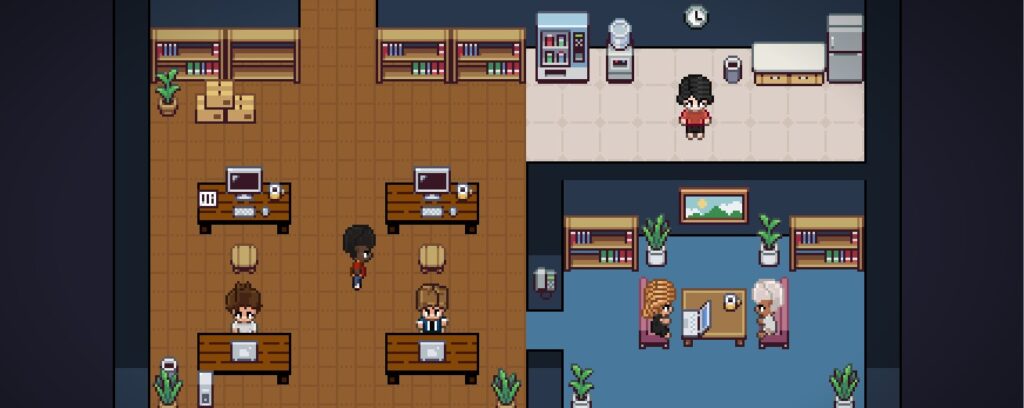
AI coding agents have shifted how software is built, allowing teams to parallelize tasks such as file editing, debugging, and research. However, visibility remains a challenge. Pixel Agents addresses this by creating a digital office environment where agents appear as distinct characters based on free assets from the Metro City pack. When an agent writes code, its character types at a desk; during file searches, it reads from a screen; and when awaiting input, a speech bubble emerges.
This approach draws inspiration from simulation games and earlier experiments like AI Town, bridging IDEs with gamified interfaces. For developers handling multiple Claude Code terminals, the extension visualizes sub-agents spawned via task tools, complete with matrix-style entry animations. Persistent layouts ensure your office design travels across VS Code windows, supporting seamless workflows.
Community feedback, including Reddit discussions and YouTube demonstrations, highlights how this visualization reduces cognitive load. Instead of parsing logs, users glance at the office panel to gauge progress. With optional sound notifications for completed turns, it fosters a sense of collaboration akin to a physical team environment.
Key Features That Set Pixel Agents Apart
Pixel Agents packs several capabilities designed for both casual and power users:
- One-to-One Agent Mapping: Every Claude Code terminal spawns a unique character, maintaining clear associations even in multi-agent setups.
- Live Activity Tracking: Real-time animations reflect actions like typing, reading, or command execution through transcript parsing.
- Built-in Office Layout Editor: Customize floors with HSB color controls, auto-tiling walls, and furniture placement using tools such as paint, erase, eyedropper, and pick. Undo/redo supports up to 50 steps.
- Speech Bubbles and Notifications: Visual and auditory cues signal waiting states or task completion.
- Sub-Agent Support: Task-based sub-agents appear as linked characters that spawn and despawn dynamically.
- Exportable Layouts: Share office designs as JSON files via the settings modal.
- Scalable Grid: Expand up to 64×64 tiles by clicking border areas.
These features work out of the box with default assets, while a $2 optional tileset from itch.io unlocks a full furniture catalog for richer customization. The extension remains fully functional without it, ensuring broad accessibility.
| Feature | Description | Benefit for Users |
|---|---|---|
| Live Animations | Maps tool calls to sprite states (idle, walk, type, read) | Instant insight into agent status without reading logs |
| Layout Editor | HSB floors, auto-walls, furniture placement with undo/redo | Personalized workspace that persists across sessions |
| Sub-Agent Visualization | Separate characters for child tasks | Clear tracking of complex, hierarchical agent workflows |
| Sound & Bubbles | Chimes and speech indicators | Reduced need to monitor terminals constantly |
Prerequisites Before Installation
To begin, ensure VS Code version 1.109.0 or newer is installed. Additionally, set up the Claude Code CLI following Anthropic’s official documentation. No other dependencies are required for basic operation, making it ideal for self-hosted environments. Developers on Windows 11 will find the smoothest experience, though file-watching mechanisms suggest compatibility with macOS and Linux, pending further testing.
Step-by-Step Installation Guide
Installing Pixel Agents is straightforward, with two primary paths.
For most users, open VS Code, navigate to the Extensions view, search for “Pixel Agents,” and click Install. This method includes the complete furniture catalog automatically and requires no additional configuration.
For those interested in development or customization:
1. Clone the repository:
git clone https://github.com/pablodelucca/pixel-agents.git2. Navigate into the directory: cd pixel-agents
cd pixel-agents3. Install root dependencies:
npm install4. Install webview dependencies:
cd webview-ui && npm install && cd ..5. Build the extension:
npm run build6. Press F5 in VS Code to launch the Extension Development Host.
After installation, the Pixel Agents panel appears in the bottom area alongside terminals. For advanced users wanting the full tileset locally, purchase the Office Interior Tileset (16×16) by Donarg and run npm run import-tileset. Note that the import process may need manual adjustments due to asset complexity.
This self-hosted approach ensures data privacy and offline functionality, aligning with open-source principles.
Configuring and Customizing Your Virtual Office
Once installed, click the Layout button to enter the editor. Select floor tools for color customization or wall tools for automatic tiling. Place furniture using the pick tool, then assign agents to desks by selecting a character and clicking a seat. Export layouts as JSON for sharing or backup.
The grid expands dynamically, supporting large-scale offices for teams of agents. Persistent storage means customizations survive restarts, enhancing long-term usability.
Daily Usage: Interacting with Your AI Agents in Real Time
Begin by clicking “+ Agent” in the Pixel Agents panel. This launches a new Claude Code terminal and its corresponding character, which walks to an available desk. As you prompt the agent, observe animations update live: characters type during code generation, read while scanning files, or pause with bubbles when permission is needed.
For multi-agent scenarios, spawn additional instances and reassign via drag or click. Sub-agents appear automatically, linked visually to parents. This setup proves particularly valuable for projects involving parallel tasks, such as one agent researching while another implements changes.
Troubleshooting common issues includes restarting VS Code for sync desyncs or checking transcript paths if animations lag. Heuristic detection, while effective, occasionally misfires on waiting states due to Claude Code’s JSONL format limitations.
Technical Insights: How Pixel Agents Operates Under the Hood
The extension monitors local JSONL transcript files generated by Claude Code, parsing tool calls to trigger corresponding animations. A lightweight canvas-based game loop in the React webview handles rendering, pathfinding via BFS, and state machines for character behaviors. Built with TypeScript, the VS Code Webview API, esbuild, Vite, and Canvas 2D, it maintains low overhead.
No code changes to Claude Code are necessary, preserving compatibility and security. This observational design exemplifies efficient integration in the AI tooling ecosystem.
Limitations and the Roadmap Ahead
Current constraints include heuristic status detection that may briefly show incorrect states, occasional terminal desync during rapid spawning, and primary testing on Windows. The furniture assets rely on a paid tileset, though community contributions for CC0 alternatives are encouraged.
The roadmap includes improved sync mechanisms, desks tied to directories, native agent team support, Git worktree integration, and expansion to frameworks like OpenCode. Contributions via issues or pull requests are welcomed, with detailed guidelines in the repository.
Benefits for Developers and Teams
By making agents visually present, Pixel Agents reduces context-switching and fosters a more immersive coding experience. Teams report higher engagement when monitoring collaborative agent workflows, while individuals appreciate the fun factor that combats terminal fatigue. As an open-source, self-hosted solution with Docker-free deployment, it suits privacy-conscious environments and integrates seamlessly into existing VS Code setups.
In an era where AI agents handle increasing workloads, tools like Pixel Agents provide the observability needed for effective oversight without sacrificing developer enjoyment.
Conclusion: Why Pixel Agents Deserves a Place in Your Toolkit
Pixel Agents delivers a compelling vision for future agentic interfaces—one that feels playful yet practical. Whether you are a solo developer experimenting with Claude Code or part of a larger team orchestrating multi-agent systems, this extension offers immediate value through its intuitive visuals and customization options. Download it today from the VS Code Marketplace, explore the GitHub source, and customize your pixel office to match your workflow.
With ongoing updates and community support, Pixel Agents continues to evolve, potentially setting a new standard for how we interact with AI coding tools.








