
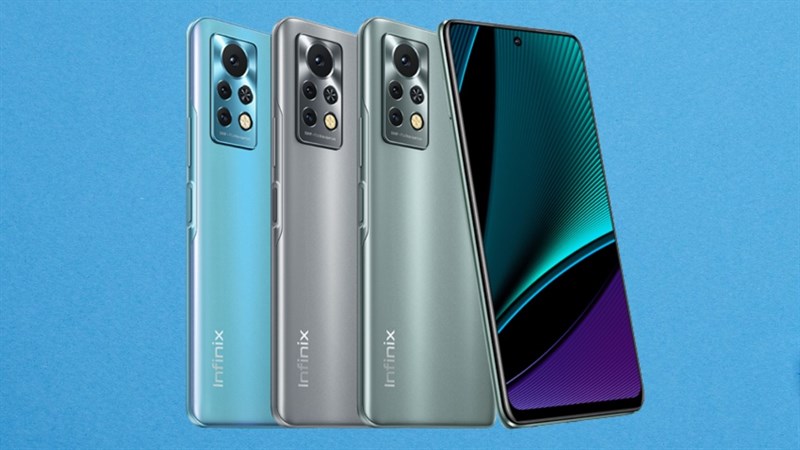
The Infinix Hot 11S features a 17.22 cm (6.78) FHD+ High-resolution Punch Hole display that features a 20.5:9 aspect ratio for a disruption-free viewing experience. Also, the 500 NITS brightness offers crystal-clear images, whereas the NEG Dinorex T2X-1 glass protection ensures durability. The refresh rate of 90 Hz offers a smooth interaction between the screen and your touch. Furthermore, the 180 Hz touch sampling rate ensures fast screen response time. So, for gamers, this smartphone can be quite exciting.
Powered by an Helio G88 Octa-core processor along with 12nm FinFET, 2.0 GHz CPU frequency, this smartphone offers a smooth performance. For an improved gaming experience, it has the Mediatek Hyper Engine 2.0 Game Boost Technology as well as the DAR-LINK Game Boost Technology. Thus, gaming on this smartphone is screen tearing/stuttering free with high-quality colour reproduction, and no heating. It also has a high-responsive touch panel for high-speed gaming and 3-in-1 card slots to expand the memory capacity up to 256 GB.
This Infinix smartphone features a 50MP Wide Aperture AI Triple rear Camera having a 50 MP Primary lens (f1.6 wide aperture), a 2 MP Depth sensor, and an AI lens. Also, it has a Quad-LED Flash. This smartphone camera also has Bokeh Mode, Super Night Mode, Document Mode, Short Video, and more. You can also shoot 2K high-res videos using this phone. The 8 MP in-display selfie camera comes with an f/2.0 aperture and a dedicated Dual LED flash to let you click high-quality selfies. It also has AI portrait, WideSelfie, Super Night Mode, and 3D Face Beauty Mode to enhance the quality of your selfies. You can also capture 2K high-res videos using this selfie camera.
The 5000 mAh battery of this smartphone features a Power Marathon Tech to boost the battery backup by about 25%. As a result, this battery offers up to 27 hours of video playback time, up to 182 hours of music playback time on headsets, 52 hours of 4G talktime, 17 hours of web surfing time, and 64 days of standby time with a single full charge. With this smartphone, you also get an 18W Fast charger and a Type C cable.
Prerequisites & Preparation
- Backup Data: Flashing will completely wipe all data on your device. Back up important files and settings before proceeding.
- Battery Level: Ensure your device has at least 50% battery to prevent shutdown during the flashing process.
- USB Driver & Tools: Install the correct USB drivers for your brand and prepare the flashing tool (Odin for Samsung, SP Flash Tool/QPST for Qualcomm/MTK, etc.).
CAUTION: Flashing official firmware carries a risk of bricking your device. Proceed with caution and at your own risk. addROM is not responsible for any damage caused to your device.
Download Stock ROM & Firmware
Global / General
| File Type | Firmware / Build | Region / Model | OS Version | Download Link |
|---|---|---|---|---|
| Stock ROM | Stock ROM | Global / General | – | Google Drive |
| Stock ROM | Stock ROM | Global / General | – | Google Drive |
| Stock ROM | Stock ROM | Global / General | – | Google Drive |
| Stock ROM | Stock ROM | Global / General | – | Google Drive |
| Stock ROM | Stock ROM | Global / General | – | Google Drive |
| Stock ROM | Stock ROM | Global / General | – | Google Drive |
| Stock ROM | Stock ROM | Global / General | – | Google Drive |
| Stock ROM | Stock ROM | Global / General | – | Google Drive |
| Stock ROM | Stock ROM | Global / General | – | Google Drive |
| Stock ROM | Stock ROM | Global / General | – | Google Drive |
| Stock ROM | Stock ROM | Global / General | – | Google Drive |
| Stock ROM | Stock ROM | Global / General | – | Google Drive |
| Stock ROM | Stock ROM | Global / General | – | Google Drive |
| Stock ROM | Stock ROM | Global / General | – | Google Drive |
| Stock ROM | Stock ROM | Global / General | – | Google Drive |
| Stock ROM | Stock ROM | Global / General | – | Google Drive |
| Stock ROM | Stock ROM | Global / General | – | Google Drive |
| Stock ROM | Stock ROM | Global / General | – | Google Drive |
| Stock ROM | Stock ROM | Global / General | – | Google Drive |
| Stock ROM | Stock ROM | Global / General | – | Google Drive |
| Stock ROM | Stock ROM | Global / General | – | Google Drive |
| Stock ROM | Stock ROM | Global / General | – | Google Drive |
| Stock ROM | Stock ROM | Global / General | – | Google Drive |
How to Flash Firmware / Stock ROM
To flash the stock firmware on your Infinix device using SP Flash Tool, follow these steps:
- Download and install the MTK USB Drivers on your computer.
- Download and extract the SP Flash Tool.
- Launch
Flash_tool.exeas administrator. - Click on the Scatter-loading button and select the Android scatter file (
.txt) from the extracted firmware folder. - Click the Download button.
- Power off your device completely, hold the Volume Down or Volume Up button, and connect it to the computer via USB cable.
- The flashing process will start automatically. Wait for the green “Download OK” checkmark to appear.








