

Understand Anything: Turn Any Codebase Into an Interactive Knowledge Graph You Can Actually Read

Key Takeaways: Understand Anything turns any unfamiliar codebase into a searchable, color-coded knowledge graph with plain-English summaries and guided tours, so onboarding to a 200,000-line project takes minutes instead of months.
What is Understand Anything?
You just joined a new team. The codebase is 200,000 lines of code spread across a dozen services. The README is three years old, the architecture diagram lives on someone’s whiteboard, and the senior engineer who wrote half of it left last quarter. Where do you even start?
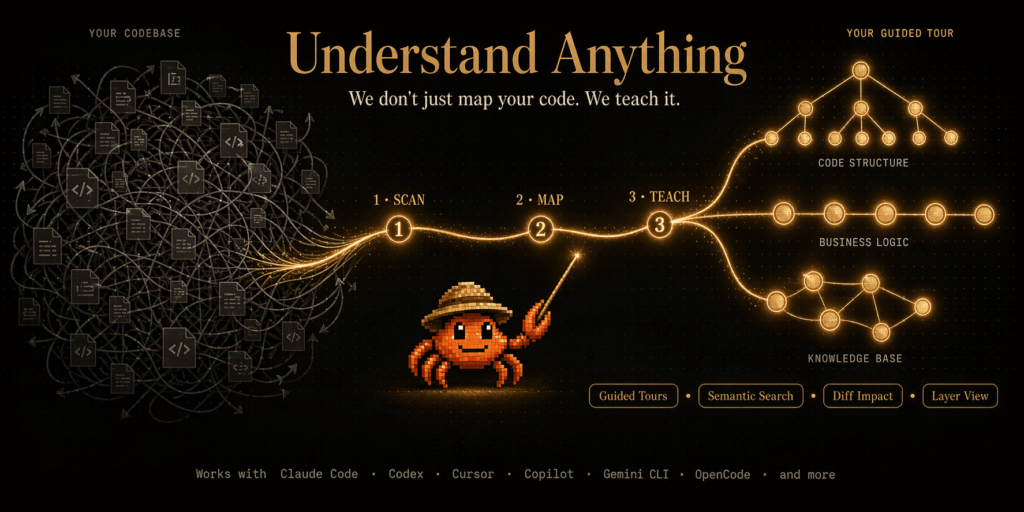
Understand Anything is built for exactly that moment. It is an open-source plugin that analyzes your project with a multi-agent AI pipeline, builds a knowledge graph of every file, function, class, and dependency, and then gives you an interactive dashboard to explore the whole system visually. Each node has a plain-English summary, relationship edges to its neighbors, and a guided tour that teaches you the codebase in the right dependency order.
The project is published on GitHub at Lum1104/Understand-Anything under the MIT license, with a hosted homepage and live demo at understand-anything.com. It started as a native plugin for Claude Code and has since grown into a multi-platform tool that works with Cursor, GitHub Copilot, Codex, Gemini CLI, OpenCode, Trae, Hermes, Cline, and more.
Why Understand Anything stands out
There are plenty of static-analysis tools, plenty of AI chat tools, and plenty of dependency graph generators. Understand Anything earns its name by combining all three in a way that actually teaches you the system.
Deterministic structure plus semantic intent. Tree-sitter parses every file into a concrete syntax tree and extracts the same imports, exports, function definitions, call sites, and inheritance relationships every single run. On top of that, an LLM layer reads the parsed structure alongside the source to produce summaries, architectural layer assignments, business-domain mapping, and guided tours. Same code in, same edges out – but with real intent attached.
A multi-agent pipeline, not a single prompt. The /understand command orchestrates five specialized agents: project-scanner discovers files and detects languages, file-analyzer extracts nodes and edges in parallel batches of 20–30 files, architecture-analyzer identifies layers (API, Service, Data, UI, Utility), tour-builder generates dependency-ordered learning tours, and graph-reviewer validates referential integrity. A sixth domain-analyzer adds business-process mapping.
Real explorability. The dashboard is interactive: pan, zoom, fuzzy search by name, semantic search by meaning (“which parts handle auth?”), and color-coded grouping by architectural layer. A persona-adaptive UI shows different detail levels for junior devs, PMs, or power users.
Diff impact analysis. Before you commit, see which parts of the system your changes ripple through.
Reproducible and shareable. The graph is stored as JSON in .understand-anything/knowledge-graph.json. Commit it to the repo and your teammates skip the analysis pipeline entirely – perfect for onboarding, PR reviews, and docs-as-code.
Knowledge bases, not just code. Point /understand-knowledge at a Karpathy-pattern LLM wiki and it produces a force-directed graph with community clustering, extracted entities, and discovered implicit relationships.
Installing Understand Anything
Installation depends on which AI coding tool you already use. The good news is that every supported platform has a one-line install.
Claude Code (native plugin marketplace)
If you use Claude Code, this is the simplest path. From inside Claude Code, run:
/plugin marketplace add Lum1104/Understand-Anything
/plugin install understand-anything
That registers the plugin and makes all the slash commands available immediately.
Cursor and VS Code + GitHub Copilot (auto-discovery)
Both Cursor and recent versions of VS Code with GitHub Copilot (v1.108+) auto-discover the plugin via .cursor-plugin/plugin.json and .copilot-plugin/plugin.json when the repo is cloned into your workspace. Just clone the repository and open it – nothing else to install. If auto-discovery does not pick it up in Cursor, open Settings → Plugins, paste the repo URL into the search field, and add it manually.
Copilot CLI
copilot plugin install Lum1104/Understand-Anything:understand-anything-pluginEverything else (Codex, OpenCode, Gemini CLI, Hermes, Trae, and more)
There is a single universal installer for the rest of the supported platforms. On macOS or Linux:
curl -fsSL https://raw.githubusercontent.com/Lum1104/Understand-Anything/main/install.sh | bash
# Or skip the prompt by passing the platform directly:
curl -fsSL https://raw.githubusercontent.com/Lum1104/Understand-Anything/main/install.sh | bash -s codex
On Windows PowerShell:
iwr -useb https://raw.githubusercontent.com/Lum1104/Understand-Anything/main/install.ps1 | iexSupported platform values include gemini, codex, opencode, pi, openclaw, antigravity, vibe, vscode, hermes, cline, kimi, and trae. The installer clones the repo to ~/.understand-anything/repo and creates the right symlinks. Restart your CLI or IDE afterwards. Update later with ./install.sh --update and remove with ./install.sh --uninstall <platform>.
Using Understand Anything day to day
Once installed, the workflow is built around a small set of slash commands. Here is the typical first session.
Step 1 – Analyze your codebase
From inside your AI coding tool, run:
/understandThe multi-agent pipeline scans every file, extracts imports and definitions with Tree-sitter, runs file analyzers in parallel (up to 5 concurrent, 20–30 files per batch), assigns architectural layers, and writes the result to .understand-anything/knowledge-graph.json. On large monorepos you can scope the scan: /understand src/frontend. To generate dashboard labels and node summaries in a non-English language, pass --language zh (also supports zh-TW, ja, ko, ru, with en as the default).
Step 2 – Explore the dashboard
/understand-dashboardAn interactive web dashboard opens with your codebase laid out as a graph, color-coded by architectural layer. Click any node to see its source code, its relationships, and a plain-English explanation. Use fuzzy search to find a file by name, or semantic search to ask “which parts handle authentication?” and let the LLM surface relevant nodes across the graph.
Step 3 – Ask questions, generate onboarding material, and explain code
The most useful commands in the day-to-day workflow:
# Ask anything in plain English
/understand-chat How does the payment flow work?

# Deep-dive into a specific file or function
/understand-explain src/auth/login.ts

# Generate an onboarding guide for new team members
/understand-onboard

# Extract business domain knowledge (domains, flows, steps)
/understand-domain

# Analyze a Karpathy-pattern LLM wiki knowledge base
/understand-knowledge ~/path/to/wiki
Step 4 – See the impact of your changes before you commit
/understand-diffThis compares your local diff against the graph and highlights which nodes – services, modules, downstream consumers – are affected. Catching ripple effects before review is one of the most underrated benefits of having a real graph.
Step 5 – Keep the graph fresh
The pipeline is incremental by default. Re-running /understand only re-analyzes files whose Tree-sitter fingerprints have changed since the last run. If you want it fully automated, enable a post-commit hook:
/understand --auto-updateEvery commit then patches the graph incrementally, so each push lands with a matching graph.
Step 6 – Share the graph with your team
Because the knowledge graph is just JSON, you can commit it to the repo and let teammates skip the analysis pipeline entirely. Track everything in .understand-anything/ except the intermediate/ directory and diff-overlay.json (those are local scratch). For large graphs of 10 MB or more, track them with git-lfs:
git lfs install
git lfs track ".understand-anything/*.json"
git add .gitattributes .understand-anything/
A single committed graph turns onboarding from “read this 200K-line repo” into “open the dashboard and follow the guided tour.”
Who Understand Anything is for
This project is a strong fit for several roles. New engineers joining unfamiliar codebases will save days of cold reading. Tech leads will appreciate the diff impact analysis on every PR. Open-source maintainers can commit the graph alongside the code so new contributors orient themselves before opening an issue. Engineering managers and product managers benefit from the persona-adaptive UI and the business-domain view, which maps code to flows and process steps without requiring them to read source. Knowledge workers maintaining LLM wikis or internal docs can use /understand-knowledge to surface implicit relationships in their notes.
Final thoughts
Understand Anything succeeds because it does not try to wow you with how complex your codebase looks. It quietly teaches you how every piece fits together – with a reproducible structural skeleton, a semantic layer that explains intent, and an interactive dashboard that respects who you are and what you are trying to learn.
Star the GitHub repository, try the live demo, pick the install path that matches your AI coding tool, and run /understand on the next repository that intimidates you. By the time the pipeline finishes, you will know that codebase better than half its current contributors.








