
Key Takeaways: VoxCPM2 is a 2B-parameter, tokenizer-free, diffusion autoregressive text-to-speech model from OpenBMB that delivers 48kHz studio-quality audio in 30 languages, supports Voice Design from a text description alone, performs controllable voice cloning from a short reference clip, runs in real time on a single RTX 4090, and is fully Apache-2.0 licensed for commercial use.
Most open-source TTS systems force you to pick two of three: natural prosody, multilingual coverage, or a license you can actually ship. VoxCPM2, the latest release from OpenBMB, is one of the first open models that credibly offers all three at once. It is a 2B-parameter, tokenizer-free TTS engine built on a MiniCPM-4 backbone, trained on over two million hours of multilingual speech, and released under Apache-2.0.
In this guide we will introduce what VoxCPM2 actually is, walk through installation, and show you how to generate speech with Voice Design, controllable cloning, and ultimate cloning, plus how to put it into production with vLLM.
What Is VoxCPM2
VoxCPM2 is a tokenizer-free TTS system that directly generates continuous speech representations through an end-to-end diffusion autoregressive architecture. Instead of discretizing audio into tokens (the dominant approach in modern TTS), it operates entirely in the latent space of AudioVAE V2 through a four-stage pipeline: LocEnc to TSLM to RALM to LocDiT. The payoff is highly natural, expressive synthesis with native 48kHz output.
You can try it instantly without installing anything on the official Hugging Face playground.

Headline Features
- 30-language multilingual support. Arabic, Burmese, Chinese, Danish, Dutch, English, Finnish, French, German, Greek, Hebrew, Hindi, Indonesian, Italian, Japanese, Khmer, Korean, Lao, Malay, Norwegian, Polish, Portuguese, Russian, Spanish, Swahili, Swedish, Tagalog, Thai, Turkish, and Vietnamese. No language tag required.
- Voice Design. Create a brand-new voice from a natural-language description (gender, age, tone, emotion, pace), with no reference audio.
- Controllable cloning. Clone any voice from a short reference clip, with optional style guidance to adjust emotion, pace, and expression while preserving the original timbre.
- Ultimate cloning. Provide the reference audio plus its transcript for the highest possible fidelity, faithfully reproducing timbre, rhythm, emotion, and style.
- 48kHz studio-quality output. AudioVAE V2’s asymmetric encode/decode design accepts 16kHz reference audio and outputs 48kHz audio with built-in super-resolution.
- Real-time streaming. RTF as low as ~0.30 on an RTX 4090 with the reference PyTorch implementation, dropping to ~0.13 when served with Nano-vLLM or the official vLLM-Omni runtime.
- Apache-2.0. Weights and code are free for commercial use.
How VoxCPM2 Compares to Earlier Releases
| VoxCPM2 | VoxCPM1.5 | VoxCPM-0.5B | |
|---|---|---|---|
| Backbone parameters | 2B | 0.6B | 0.5B |
| Sample rate | 48kHz | 44.1kHz | 16kHz |
| Languages | 30 | 2 | 2 |
| Voice Design | Yes | No | No |
| Controllable cloning | Yes | No | No |
| VRAM | ~8 GB | ~6 GB | ~5 GB |
If you have an 8 GB GPU and care about multilingual coverage or controllability, VoxCPM2 is the version to install.
How to Install VoxCPM2
The official package is voxcpm and ships through PyPI.
Prerequisites
- Python 3.10 to 3.12 (3.13 is not supported)
- PyTorch 2.5.0
- CUDA 12.0 (or run on CPU/MPS at reduced speed)
- Roughly 8 GB of VRAM for the 2B model
Step 1: Install the Package
pip install voxcpmThat single command pulls VoxCPM and its dependencies. On the first model load, weights are downloaded automatically from Hugging Face. If you prefer ModelScope (useful in China), pre-download the weights:
pip install modelscopefrom modelscope import snapshot_download
snapshot_download("OpenBMB/VoxCPM2", local_dir="./pretrained_models/VoxCPM2")Step 2: Verify Your Install with the Web Demo
The repo ships a Gradio app. From the cloned repository root:
python app.py --port 8808Open http://localhost:8808 in your browser. Use --device auto to let it select CUDA, MPS (Apple Silicon), or CPU automatically.
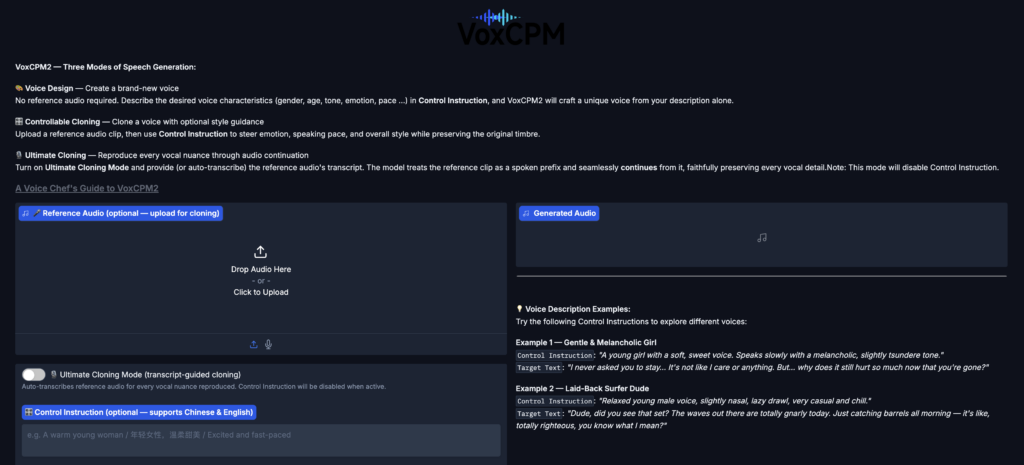
Using VoxCPM2: Four Synthesis Modes
VoxCPM2 exposes the same generator under four usage patterns, each unlocked by which arguments you pass.
Mode 1: Plain Text-to-Speech
The simplest case: hand it text, get a waveform.
from voxcpm import VoxCPM
import soundfile as sf

model = VoxCPM.from_pretrained("openbmb/VoxCPM2", load_denoiser=False)

wav = model.generate(
    text="VoxCPM2 is the current recommended release for realistic multilingual speech synthesis.",
    cfg_value=2.0,
    inference_timesteps=10,
)
sf.write("demo.wav", wav, model.tts_model.sample_rate)
cfg_value controls classifier-free guidance strength; inference_timesteps trades quality for speed (10 is a good default).
Mode 2: Voice Design (No Reference Audio)
To invent a new voice, prepend a natural-language description in parentheses at the start of the text:
wav = model.generate(
    text="(A young woman, gentle and sweet voice)Hello, welcome to VoxCPM2!",
    cfg_value=2.0,
    inference_timesteps=10,
)
sf.write("voice_design.wav", wav, model.tts_model.sample_rate)
You can describe gender, age, tone, emotion, and pace. Each description produces a fresh, consistent speaker.
Mode 3: Controllable Voice Cloning
Supply a short reference clip; optionally steer style through the same parenthesized control prefix:
wav = model.generate(
    text="(slightly faster, cheerful tone)This is a cloned voice with style control.",
    reference_wav_path="your_reference.wav",
    cfg_value=2.0,
    inference_timesteps=10,
)
sf.write("controllable_clone.wav", wav, model.tts_model.sample_rate)
The timbre is preserved while emotion, pace, and expression follow your instructions.
Mode 4: Ultimate Cloning (Reference + Transcript)
For the highest fidelity, give the model both the reference audio and its exact transcript so it can continue from the reference:
wav = model.generate(
    text="This is an ultimate cloning demonstration using VoxCPM2.",
    prompt_wav_path="your_reference.wav",
    prompt_text="The transcript of the reference audio.",
    reference_wav_path="your_reference.wav",  # optional, improves similarity
)
sf.write("hifi_clone.wav", wav, model.tts_model.sample_rate)
Streaming Inference
For real-time UX, iterate over chunks instead of waiting for a full waveform:
import numpy as np

chunks = []
for chunk in model.generate_streaming(text="Streaming text to speech is easy with VoxCPM!"):
    chunks.append(chunk)
wav = np.concatenate(chunks)
Using the CLI
If you prefer the shell, the voxcpm command exposes the same modes:
# Voice design (no reference)
voxcpm design \
  --text "VoxCPM2 brings studio-quality multilingual speech synthesis." \
  --output out.wav

# Voice cloning with a reference audio
voxcpm clone \
  --text "This is a voice cloning demo." \
  --reference-audio your_reference.wav \
  --output out.wav

# Ultimate cloning
voxcpm clone \
  --text "This is a voice cloning demo." \
  --prompt-audio your_reference.wav \
  --prompt-text "reference transcript" \
  --output out.wav

# Batch processing
voxcpm batch --input examples/input.txt --output-dir outs
Production Deployment
The reference PyTorch path is fine for prototyping. For real workloads you have two excellent options.
Option A: Nano-vLLM-VoxCPM
A dedicated inference engine with concurrent requests and an async API, cutting RTF to ~0.13 on an RTX 4090:
pip install nano-vllm-voxcpmfrom nanovllm_voxcpm import VoxCPM
import numpy as np, soundfile as sf
server = VoxCPM.from_pretrained(model="/path/to/VoxCPM2", devices=[0])
chunks = list(server.generate(target_text="Hello from VoxCPM!"))
sf.write("out.wav", np.concatenate(chunks), 48000)
server.stop()Option B: vLLM-Omni (OpenAI-Compatible API)
The official vLLM omni-modal extension supports VoxCPM2 with PagedAttention, continuous batching, and a drop-in /v1/audio/speech endpoint:
vllm serve openbmb/VoxCPM2 --omni --port 8000Then call it from any OpenAI client:
curl http://localhost:8000/v1/audio/speech \
  -H "Content-Type: application/json" \
  -d '{"model":"openbmb/VoxCPM2","input":"Hello from VoxCPM2!","voice":"default"}' \
  --output out.wav
Final Thoughts
VoxCPM2 is one of the most complete open-source TTS releases shipped to date: 30 languages, native 48kHz output, four synthesis modes that cover everything from “invent a voice from a sentence” to “clone every nuance of this clip,” real-time streaming on consumer GPUs, and an Apache-2.0 license that lets you put it straight into production. If your stack still depends on a hosted TTS API for multilingual voiceovers, dubbing, accessibility, or agent voices, VoxCPM2 is the first credible reason in a long time to bring that workload in-house. Install it, run the web demo, and within an afternoon you will have a private, studio-quality speech engine you fully control.








