

Agentic Inbox: Self‑Hosted AI Email Client on Cloudflare Workers for Modern, Serverless Email

Agentic Inbox modernizes self‑hosted email by combining a full‑featured web client with an embedded AI agent, all running on Cloudflare’s global serverless Workers edge—no traditional servers required.
What Is Agentic Inbox?
Agentic Inbox is an open‑source, self‑hosted email client that integrates an AI agent directly into your inbox, allowing automated reading, organization, search, and reply drafting. It runs entirely on your own Cloudflare account using Workers, Durable Objects, R2, Email Routing, and Workers AI, so no third‑party SaaS ever needs access to your messages.
Instead of forwarding mail to an external AI service, each mailbox lives in an isolated Durable Object with its own SQLite database, while attachments are stored in R2 object storage you control. The AI agent uses Cloudflare’s Agents/Workers AI stack to understand threads, surface important messages, and generate safe drafts that you review and send manually.
Why Cloudflare Workers for a Self‑Hosted Inbox?
Cloudflare Workers provides a fully managed, globally distributed runtime where your code runs close to users without provisioning or patching servers. For an email client, this means low‑latency access to your inbox from anywhere, with Cloudflare handling scaling, security patches, and edge distribution.developers.
By building Agentic Inbox on Workers plus Durable Objects, Cloudflare gives each mailbox its own strongly consistent stateful instance while still running inside a serverless model. Because everything—frontend, backend API, storage coordination, and AI inference—runs inside your Cloudflare account, you keep tight control over data locality, retention, and access policies.
Architecture Overview on Cloudflare
Under the hood, Agentic Inbox is delivered as a single Cloudflare Worker that serves both a React SPA frontend and a Hono‑based API, backed by Durable Objects and R2. The deployment flow can auto‑provision required resources: R2 buckets for attachments, Durable Objects for mailboxes and the AI agent, Workers AI bindings for inference, and email bindings for inbound/outbound mail.
Each mailbox Durable Object (MailboxDO) stores metadata and message bodies in a SQLite database, while separate Durable Objects encapsulate the AI agent logic and MCP server used for tool‑driven operations. Inbound mail arrives via Cloudflare Email Routing, is parsed and stored in the mailbox DO, and is then made available to the AI agent and web UI; outbound mail is sent via Cloudflare Email Service bindings with per‑mailbox rate limiting.developers.
┌──────────────┐     ┌──────────────────┐     ┌─────────────────┐
│   Browser    │────>│  Hono Worker     │────>│  MailboxDO      │
│  React SPA   │     │  (API + SSR)     │     │  (SQLite + R2)  │
│  Agent Panel │     │                  │     └─────────────────┘
└──────┬───────┘     │  /agents/* ──────┼────>┌─────────────────┐
       │             │                  │     │  EmailAgent DO  │
       │ WebSocket   │                  │     │  (AIChatAgent)  │
       └─────────────┤                  │     │  9 email tools  │
                     │                  │────>│  Workers AI     │
                     └──────────────────┘     └─────────────────┘
Prerequisites and Cloudflare Setup
Before deploying Agentic Inbox, you should have a baseline Cloudflare setup and tooling in place:
- A Cloudflare account with at least one domain configured.
- Cloudflare Email Routing enabled to receive mail for that domain.
- Cloudflare Email Service (public beta) enabled for sending outbound email.
- Workers AI enabled in your account for the AI agent and sanitizer models.
- Cloudflare Access configured (for production) to restrict who can open the inbox UI.
- Node.js, npm, and the Wrangler CLI installed on your local machine.
In production, every request to the Worker is expected to pass Cloudflare Access JWT validation; the app is designed to fail closed if Access is not configured, so your inbox is never exposed anonymously on the public internet.
Option 1: One‑Click Deploy from GitHub
If you want the fastest path to a running inbox, start from the official GitHub repository at https://github.com/cloudflare/agentic-inbox. The README exposes a “Deploy to Cloudflare” button that spins up a project in your Cloudflare account and provisions core resources for you.
During this flow you can either reuse an existing R2 bucket or let the deploy automatically create a new one; afterward you configure Cloudflare Access, the email bindings, and any environment variables (such as allowed domains and Access audience) inside the Cloudflare dashboard.
Step‑by‑Step Deployment with Wrangler (Developer Workflow)
If you prefer full control and a reproducible developer workflow, deploy Agentic Inbox locally using Wrangler and Git.
Clone the repository and install dependencies
# Clone the official Agentic Inbox repository
git clone https://github.com/cloudflare/agentic-inbox.git
cd agentic-inbox

# Install Node.js dependencies
npm install
At this point you have the React frontend, Hono backend, and Worker code locally, ready to configure and test in development.
Configure local environment variables
Agentic Inbox expects environment variables for:
- Domains you want the inbox to handle.
- Cloudflare Email Routing and Email Service bindings.
- Workers AI model bindings for the agent and sanitizer.
- Cloudflare Access configuration (team domain, audience) used in production.
Create a local environment file (for example .dev.vars or similar, depending on the repo template) and populate it with your values:
# Example: create a dev config file
cp .dev.vars.example .dev.vars

# Then edit .dev.vars with your domain, email routing, AI, and Access settings
nano .dev.vars
Because outbound email and AI calls go through Cloudflare bindings rather than raw secrets baked into code, most sensitive configuration lives in Cloudflare and is referenced by name from Wrangler and the Worker.developers.
Run Agentic Inbox locally with Wrangler
To iterate on UI and workflows, use Workers’ local dev mode via Wrangler:
# Authenticate Wrangler with your Cloudflare account
npx wrangler login

# Start a local dev server with live reload
npx wrangler dev
Wrangler will start a local proxy that simulates the Worker environment and Durable Objects, letting you open a dev URL in your browser to test the inbox and AI agent before pushing anything to production.
Deploy to Cloudflare Workers
When you are satisfied with your configuration and tests, deploy to the edge:
# Build and deploy the Worker + frontend bundle
npx wrangler deploy
The deploy step builds the React SPA, bundles the Worker with Hono routes, and uploads everything to Cloudflare’s global edge network, creating or binding R2 buckets, Durable Objects, and Workers AI models as described in the configuration.
Securing the Inbox with Cloudflare Access
In production, Agentic Inbox is intended to sit behind Cloudflare Access, using JWT validation on every request to ensure only authenticated users can see the UI or call the APIs. After deploying:
- In the Cloudflare dashboard, configure an Access application that points to your Worker’s hostname or custom domain.
- Add a policy that defines which identities (email, IdP groups, etc.) can log in, and note its audience (AUD) and team domain.
- Update your Worker/Account configuration so the Worker validates the Access JWT against this AUD and team domain before serving the inbox.
When you visit the Worker URL, you should first see the Cloudflare Access login page; upon successful authentication, you are redirected into the Agentic Inbox UI.
Navigating the Agentic Inbox UI
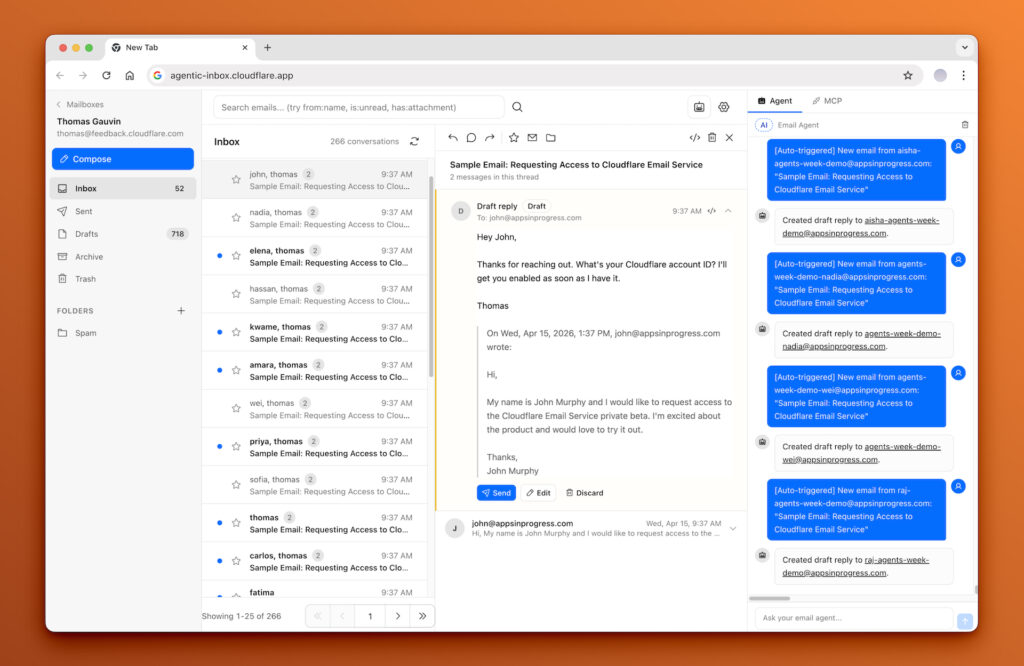
Once deployed, the Agentic Inbox web client feels similar to a modern, Gmail‑style interface but running entirely on your Workers stack.
Main layout and mailbox views
The React frontend uses a split‑panel layout with:
- A sidebar listing mail folders and mailboxes.
- A middle column showing message threads for the selected folder.
- A detail panel displaying the selected thread, including participants, subject, and message bodies.
Because the backend stores threading information (for example, In‑Reply‑To and References headers) per mailbox in SQLite, the UI can present conversations instead of flat message lists. Attachments are fetched from R2 when needed, keeping mailbox Durable Objects focused on metadata and text content.
Talking to the AI agent
On the right‑hand side, Agentic Inbox exposes an agent side panel that lets you chat with the AI about your inbox in real time. Typical interactions include:
- “Summarize this thread in two sentences.”
- “What are the action items across my unread messages today?”
- “Draft a polite follow‑up to the last message in this conversation.”
The AI agent uses Workers AI models via the Cloudflare Agents SDK, with additional guardrails like prompt‑injection detection and draft sanitization to avoid leaking tool traces into user‑visible text.developers.
Practical Email Workflows with the AI Agent
Agentic Inbox is designed so that AI automation accelerates your workflow without taking final actions on your behalf.
- Automated triage: As new emails arrive via Email Routing, the AI agent can scan subject lines and content to highlight what looks urgent or important, letting you focus on high‑value threads first.discuss.
- Conversation search and context: Instead of manually searching, you can ask the agent semantic questions like “Show me all emails about the Q2 migration plan” or “What did we agree on for pricing with customer X?” and it will search across conversations.
- Safe drafting: When you request a reply, the agent creates a draft in the Drafts folder but never sends email directly; you remain in the loop to review, edit, and send.
Before saving a draft, the system runs a verification step using a Workers AI model that strips internal “agent artifacts” such as tool call traces; if more than half the content would be removed, it falls back to the original text to avoid over‑cleaning. This combination of per‑mailbox isolation, prompt‑injection detection, and draft verification gives you a more trustworthy AI‑assisted inbox.
Setting Up Email Routing and Custom Addresses
To receive email, you map addresses on your domain to the Agentic Inbox Worker via Cloudflare Email Routing.developers.
- In Email Routing, create rules that forward messages sent to addresses like
[email protected]into the Worker bound to Agentic Inbox. - When a message arrives, Email Routing hands it to the Worker, which parses it (for example with PostalMime), stores it in the appropriate mailbox Durable Object, and triggers any agent workflows configured for that mailbox.
For sending, the Worker uses Cloudflare Email Service bindings to dispatch outbound messages from your domain, with per‑mailbox rate limits (for example, 20 emails per hour and 100 per day) enforced to prevent abuse. Together, these features let you treat Agentic Inbox as a full replacement for a traditional SaaS mail UI, while still benefiting from Cloudflare’s email infrastructure and your own privacy controls.
Extending Agentic Inbox in Your Stack
Because Agentic Inbox is open source and built on Workers primitives, you can fork the repository and adapt it to your own workflows. Typical extensions include:
- Adding custom MCP tools so the AI agent can trigger internal APIs (for example, create tickets, update CRMs) directly from email context.
- Integrating organization‑specific routing rules that send certain mailboxes to different AI behaviors or models (for instance, support vs. sales).
- Wiring additional analytics or logging into Durable Objects to measure agent effectiveness and triage performance.
For developers, the combination of React, Hono, Durable Objects, R2, and Workers AI in a real production‑grade app also serves as an excellent reference architecture for building other agentic applications on Cloudflare’s serverless platform.
If you want to dive deeper into the code or follow updates, start from the official GitHub repository at https://github.com/cloudflare/agentic-inbox and Cloudflare’s Agents and Email Service docs.








