
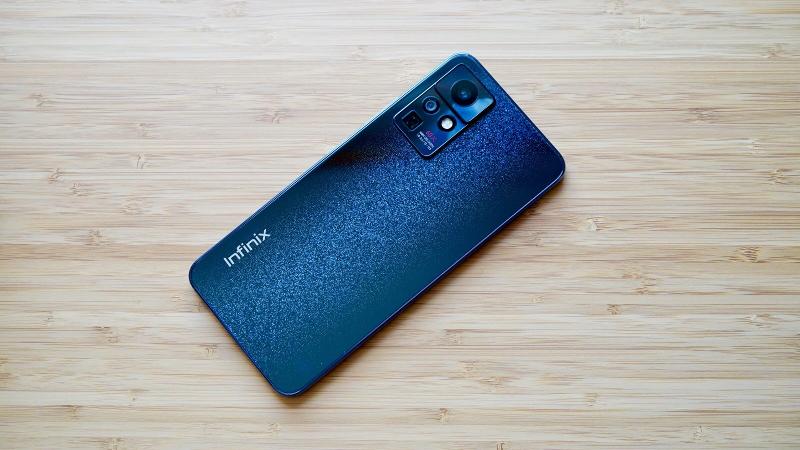
Infinix Zero X Pro – This is a mid-range smartphone packed with impressive features, such as a sleek design, a high-quality 120Hz AMOLED display, and a 108MP camera. It also includes a 5X periscope telephoto lens capable of 60X hybrid zoom. Additionally, the device boasts a large battery capacity and supports 45W fast charging technology.
On the back, the Infinix Zero X Pro features a triple camera setup positioned in the top left corner. This includes a 108MP wide-angle lens with f/1.8 aperture and OIS, a 5X periscope telephoto lens with OIS, and an 8MP ultra-wide-angle lens with f/2.3 aperture and a 120-degree field of view. The design of this camera setup is similar to that of the Xiaomi Redmi Note 11 Pro. The Infinix logo is located at the bottom of the rear panel.
Prerequisites & Preparation
- Backup Data: Flashing will completely wipe all data on your device. Back up important files and settings before proceeding.
- Battery Level: Ensure your device has at least 50% battery to prevent shutdown during the flashing process.
- USB Driver & Tools: Install the correct USB drivers for your brand and prepare the flashing tool (Odin for Samsung, SP Flash Tool/QPST for Qualcomm/MTK, etc.).
CAUTION: Flashing official firmware carries a risk of bricking your device. Proceed with caution and at your own risk. addROM is not responsible for any damage caused to your device.
Download Stock ROM & Firmware
X6811
| File Type | Firmware / Build | Region / Model | OS Version | Download Link |
|---|---|---|---|---|
| Stock ROM | X6811-H857AC-R-GL-230416V1468 | X6811 | – | Google Drive |
| Stock ROM | X6811-H857AC-R-GL-221218V1458 | X6811 | – | Google Drive |
| Stock ROM | X6811-H857AC-R-GL-221021V1447 | X6811 | – | Google Drive |
| Stock ROM | X6811-H857AC-R-GL-220824V1429 | X6811 | – | Google Drive |
| Stock ROM | X6811-H857AC-R-GL-220417V1383 | X6811 | – | Google Drive |
| Stock ROM | X6811-H857AC-R-GL-211217V1307 | X6811 | – | Google Drive |
| Stock ROM | X6811-H857AC-R-GL-211129V1233 | X6811 | – | Google Drive |
| Stock ROM | X6811-H857AC-R-GL-211110V1156 | X6811 | – | Google Drive |
| Stock ROM | X6811-H857AC-R-GL-210927V972 | X6811 | – | Google Drive |
| Stock ROM | X6811-H857AC-R-GL-210818V813 | X6811 | – | Google Drive |
| Stock ROM | X6811-H857A-R-RU-211008V1012 | X6811 | – | Google Drive |
| Stock ROM | X6811 | X6811 | – | Google Drive |
X6811B
| File Type | Firmware / Build | Region / Model | OS Version | Download Link |
|---|---|---|---|---|
| Stock ROM | X6811B | X6811B | – | Google Drive |
| Stock ROM | X6811B | X6811B | – | Google Drive |
| Stock ROM | X6811B | X6811B | – | Google Drive |
| Stock ROM | X6811B | X6811B | – | Google Drive |
| Stock ROM | X6811B | X6811B | – | Google Drive |
| Stock ROM | X6811 | X6811B | – | Google Drive |
X6810
| File Type | Firmware / Build | Region / Model | OS Version | Download Link |
|---|---|---|---|---|
| Stock ROM | X6810-H858AB-R-GL-230416V784 | X6810 | – | Google Drive |
| Stock ROM | X6810 | X6810 | – | Google Drive |
| Stock ROM | X6810 | X6810 | – | Google Drive |
| Stock ROM | X6810 | X6810 | – | Google Drive |
| Stock ROM | X6810 | X6810 | – | Google Drive |
| Stock ROM | X6810 | X6810 | – | Google Drive |
How to Flash Firmware / Stock ROM
To flash the stock firmware on your Infinix device using SP Flash Tool, follow these steps:
- Download and install the MTK USB Drivers on your computer.
- Download and extract the SP Flash Tool.
- Launch
Flash_tool.exeas administrator. - Click on the Scatter-loading button and select the Android scatter file (
.txt) from the extracted firmware folder. - Click the Download button.
- Power off your device completely, hold the Volume Down or Volume Up button, and connect it to the computer via USB cable.
- The flashing process will start automatically. Wait for the green “Download OK” checkmark to appear.








