Strix: AI Hackers That Find And Fix Your Vulnerabilities Autonomously

Strix turns AI security agents into autonomous penetration testers that not only find vulnerabilities but also generate concrete, developer-ready fixes for rapid remediation.
The AI Hacker paradigm for modern AppSec
Traditional SAST and DAST tools are optimized for pattern matching and rules-based detection, not for thinking like an attacker navigating your application’s real runtime behavior. As architectures become more distributed and stateful, static signatures and limited fuzzing often miss chained exploits, business-logic flaws, and misconfigurations that require reasoning over multiple layers of the stack.
The “AI Hacker” paradigm reframes application security as a continuous interaction between autonomous agents and your running systems, where the agent can explore, exploit, validate, and then propose patches in the same loop. Strix embodies this model by shipping autonomous AI agents that behave like real human hackers: they execute your code dynamically, probe your endpoints, and validate findings through actual exploitation instead of simply flagging theoretical issues.
Instead of handing you long lists of potential problems, Strix focuses on high-signal vulnerabilities with proof-of-concept payloads and remediation guidance you can immediately act on. This closes the gap between “scan report” and “merged fix,” turning penetration testing into a repeatable, automated DevSecOps capability rather than a one-off consulting engagement.

What Strix is and why it matters
Strix is an open-source toolkit of AI hackers built for developers and security teams who need fast, accurate security testing with minimal operational overhead. It combines a developer-first CLI, a full hacker toolkit, and teams of collaborating agents that share findings and context while exploring your applications.
These agents run dynamically against your code and infrastructure to find vulnerabilities, then validate them through real exploitation workflows and proof-of-concept generation, dramatically reducing static-analysis false positives. Strix also emphasizes auto-fix and reporting, giving you actionable remediation suggestions and structured reports suitable for both engineers and audit or compliance stakeholders.
At its core, Strix is designed as an AI security agent framework rather than just another vulnerability scanner, which makes it particularly well suited for organizations embracing autonomous penetration testing and automated vulnerability patching. You can explore the project at the Strix GitHub repository.
Inside Strix’s AI security agents
From scanning to exploitation
Strix agents operate like a full-featured hacker workstation wrapped inside automated AI workflows. Out of the box they have access to a full HTTP proxy for manipulating and analyzing requests and responses, enabling deep inspection of web traffic and subtle issues around headers, authentication flows, and parameter handling.
They can drive a browser automation layer with multi-tab support, which allows the AI to test client-side vulnerabilities such as XSS, CSRF, complex authentication flows, and session handling in real user journeys. On the backend side, Strix exposes interactive terminal environments and a Python runtime, giving agents the ability to craft custom exploits, chain commands, and verify complex server-side issues in a controlled sandbox.
In addition, Strix includes reconnaissance and OSINT capabilities, automated attack surface mapping, and both static and dynamic code analysis, letting the AI correlate findings across source code, network exposure, and runtime behavior. This combination enables more realistic exploitation flows than traditional open-source cybersecurity tools that focus on a single layer.
Collaborative graph of AI “hackers”
Strix models its AI security agents as a graph of specialized workers, each optimized for different assets or attack types. Some agents might focus on HTTP and API testing, others on browser-driven workflows, others on infrastructure misconfigurations, while code-analysis agents reason over repositories and configuration files.
These agents run distributed workflows, executing in parallel to cover different parts of your attack surface and share discoveries as they proceed. Dynamic coordination allows the system to, for example, pass a discovered endpoint from a recon agent to an exploitation-focused agent, or route a suspicious behavior observed in the browser to a code-analysis agent that inspects the underlying implementation.
The result is a scalable autonomous penetration testing capability that feels closer to a small, coordinated red team than to a single scanner job.
Security architecture and isolation
Because Strix agents behave like real hackers, isolation and safety are baked into the platform’s design. All testing runs inside sandboxed Docker environments, so dangerous commands, payloads, and exploit attempts are contained away from your host environment. The architecture is built around local processing: scans and exploitation happen in your infrastructure, and data does not need to be sent to third-party services unless you explicitly connect external LLMs.
This model is ideal for organizations with strict data residency or confidentiality requirements. Strix also stresses that you must only test systems you own or have explicit permission to attack, reinforcing the legal and ethical responsibilities that come with operating powerful AI security agents.
Installing Strix
Prerequisites
Strix runs as a Python-based CLI that orchestrates Dockerized sandboxes, so any environment that supports Docker and Python 3.12 or newer is a good fit. Before you start, ensure:
- Docker Engine or compatible container runtime is installed and running.
- Python 3.12+ is available, with
pipxrecommended for isolated CLI installation. - You have an LLM provider key (for example, an OpenAI-compatible endpoint) or access to a local LLM deployment.
The first run will automatically pull the sandbox Docker image used by Strix agents, so your machine must have internet access to the relevant container registry.
Installation via CLI
The recommended way to install Strix is through pipx, which keeps the strix CLI isolated from your global Python environment.
# Install the Strix agent CLI
pipx install strix-agent
Once installed, you can verify the CLI is available by running strix --help. For most users this completes installation; you do not need to manage additional containers manually because Strix will handle pulling and managing its sandbox Docker image on demand.
Containerized setups and automation
In environments where direct installation on hosts is restricted, teams often wrap CLI tools like Strix in a container orchestrated by Docker Compose or similar platforms. A common pattern is to build a lightweight image that includes Python, pipx, and the strix-agent package, then mount application code and configuration into that container at run time.
Because Strix already leverages internal Docker sandboxes, this becomes a “Docker-in-Docker” setup and should be configured carefully with appropriate security controls and resource limits. Treat this pattern as an advanced deployment option for tightly controlled CI or build environments rather than the default path for local experimentation.
Configuring AI and LLM providers
Before running any AI security agent, configure the model and API keys via environment variables so Strix can talk to your chosen LLM. The CLI supports a STRIX_LLM variable to identify the model and an LLM_API_KEY for authentication.
export STRIX_LLM="openai/gpt-5"
export LLM_API_KEY="your-api-key"
For local models (for example, Ollama or LM Studio) you can override the base URL via LLM_API_BASE, and you may optionally provide a PERPLEXITY_API_KEY to enable enhanced search and OSINT capabilities within the agents.
# Optional: local models and search
export LLM_API_BASE="http://localhost:11434/v1"
export PERPLEXITY_API_KEY="your-perplexity-key"
These environment variables turn Strix into a flexible AI security agent framework that can use cloud LLMs, self-hosted models, or a hybrid setup depending on your risk profile.

Operating Strix: your first autonomous penetration test
Selecting targets: URL, repo, or local code
Strix’s CLI is built to support multiple kinds of targets so you can use the same AI hacker workflows across the SDLC. For a local application directory, you can run:
# Local codebase analysis
strix --target ./app-directory
To perform autonomous penetration testing on a remote repository, simply point Strix to the Git URL:
# Repository security review
strix --target https://github.com/org/repo
For live web applications or APIs, you can specify a URL, making Strix behave like an AI-driven DAST and penetration-testing engine:
# Web application assessment
strix --target https://your-app.com
Defining the scope of the AI “attack”
Strix supports an --instruction flag that lets you steer the AI security agents toward specific goals or constraints. For example, to prioritize authentication and authorization issues on an API host:
strix --target api.your-app.com \
  --instruction "Prioritize authentication and authorization testing"
You can also instruct Strix to use specific credentials and focus on privilege escalation and access-control bypass scenarios, which is essential for realistic business-logic testing:
strix --target https://your-app.com \
  --instruction "Test with credentials: testuser/testpass. Focus on privilege escalation and access control bypasses."
By encoding scope, credentials, and emphasis in natural language, you effectively brief an AI red team on how aggressively to probe your environment, turning Strix into a highly customizable AI security agent for different stages of your pipeline.
Execution, validation, and storage of results
When you start a run, Strix orchestrates its graph of agents and spins up the required sandbox Docker environment on first use. Agents coordinate reconnaissance, exploitation attempts, and validation, escalating interesting leads to more specialized agents where needed.
The CLI persists results under agent_runs/<run-name>, giving you a structured directory per engagement with logs, artifacts, and reports you can ingest into other tools or archive for compliance. Because Strix emphasizes real validation via exploitation and proof-of-concept generation, you can expect fewer noisy entries and more concrete, high-confidence findings.
Reviewing vulnerability reports and AI-suggested fixes
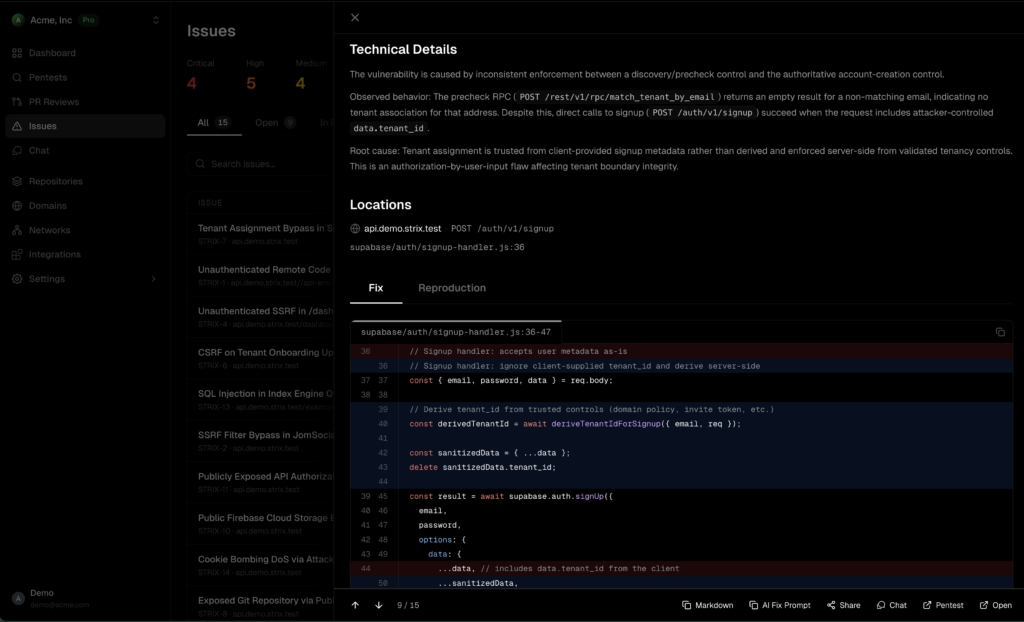
Strix’s developer-first design means that reports are built to be directly actionable: they highlight critical vulnerabilities, show how they were exploited, and include narrative explanations that developers can translate into code changes quickly. Auto-fix capabilities complement these reports by proposing specific remediation steps or patch templates, speeding up the end-to-end vulnerability patching workflow.
Because the system tracks both detection and exploitation, it naturally supports compliance reporting and executive-friendly summaries without diverging from the underlying technical evidence. This tight integration of “Find and Fix” in a single toolchain is what differentiates Strix from legacy scanners and most other open-source cybersecurity tools.
Embedding Strix into DevSecOps workflows
Strix is designed to plug into CI/CD so you can block vulnerabilities before they reach production by running AI-driven scans as part of your build or release pipelines. Typical patterns include running Strix against pull requests, nightly builds, or pre-release candidates, then failing builds when critical issues are discovered.
For organizations that need more scale and governance, the Strix team offers a managed enterprise platform with dashboards, CI/CD integrations, large-scale scanning, custom fine-tuned models, third-party integrations, and enterprise support accessible via their cloud offering at usestrix.com and the main site at strix.ai. This gives you a path from open-source experimentation to fully managed autonomous penetration testing across many applications and teams.
As you roll Strix out, treat each AI security agent run like a structured engagement: define scope, ensure legal authorization, tune instructions for each environment, and wire results into issue trackers so remediation becomes an integrated part of normal development work rather than an ad-hoc security fire drill.
From scanners to AI hackers
The shift from static analysis and traditional scanning to AI hackers is ultimately about compressing the full “Find and Fix” cycle into an automated, repeatable workflow. Strix’s autonomous penetration testing, combined with proof-of-concept exploitation and automated vulnerability patching suggestions, enables teams to treat security testing as a continuous background process rather than a periodic event.
By giving developers a familiar CLI, rich reports, and AI security agents that think like real attackers, Strix helps bridge the gap between engineering and offensive security without requiring every team to become expert penetration testers. Whether you start by running Strix locally on a single repository or by integrating it into a global DevSecOps program, it offers a practical way to bring autonomous AI-driven security testing into your stack today.