TikTokDownloader: Open-Source TikTok & Douyin Data Scraper for Serious Collection

Key takeaway: TikTokDownloader is an open-source, dual-platform ecosystem that unifies high-volume TikTok and Douyin media downloading with professional-grade data collection for posts, comments, live streams, and trends.
Introduction: One Pipeline for TikTok and Douyin
TikTokDownloader (now branded as DouK-Downloader in the upstream repository) targets both the international TikTok ecosystem and the Chinese mainland Douyin platform in a single toolchain. Under one interface it handles posts, likes, favorites, collections, live streams, and account analytics across both platforms, eliminating the need for fragmented scripts and one-off browser extensions.
In the short‑video era, manual saving or ad‑hoc browser-based downloaders simply do not scale for researchers, analysts, or archivists tracking hundreds of creators, campaigns, or trending sounds. TikTokDownloader automates this work, combining batch media downloads with structured outputs (CSV, XLSX, SQLite) that can be fed directly into analytics and archival workflows.
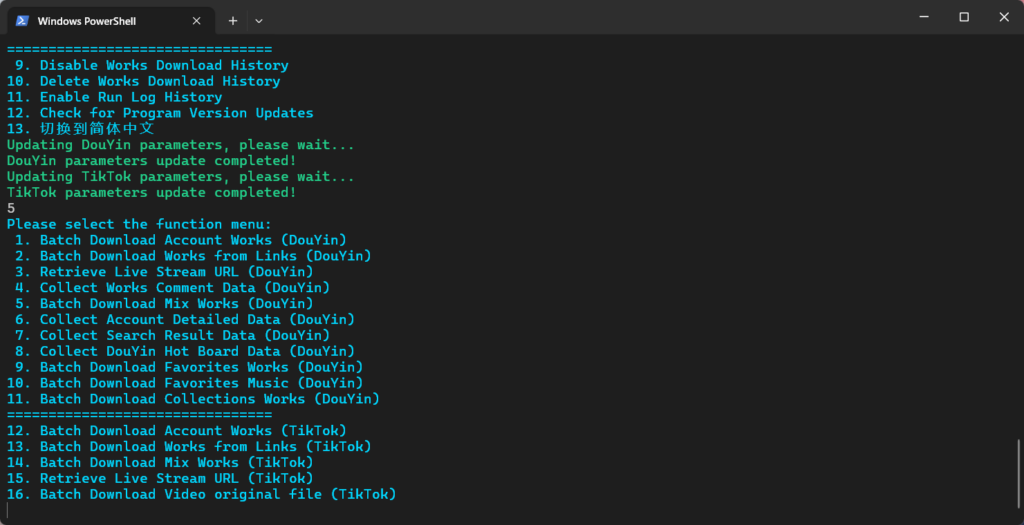
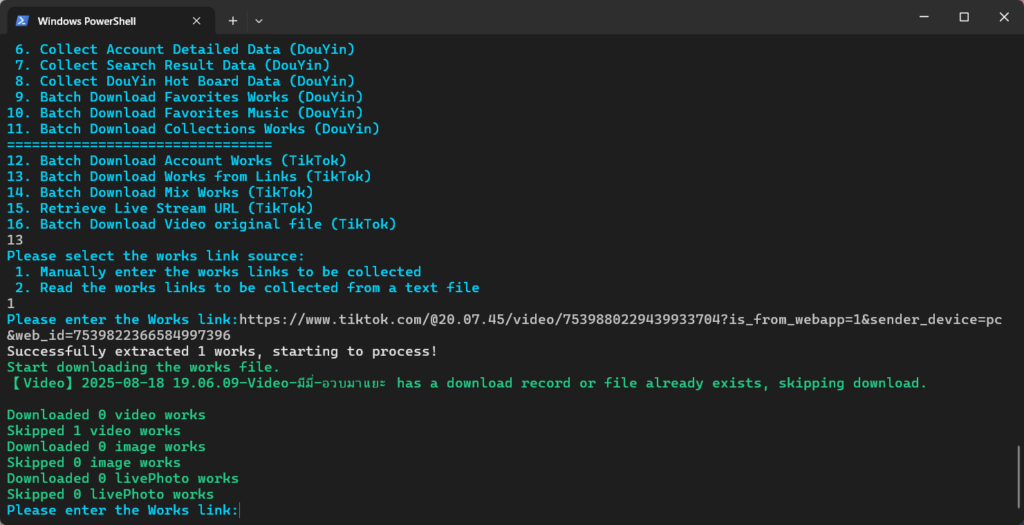
What TikTokDownloader Can Collect
Media acquisition: watermark-free video, images, and music
The core of TikTokDownloader is a high-volume media pipeline covering both TikTok and Douyin assets. On Douyin it can download videos, image galleries, and live photos without watermarks, including both dynamic and static cover images, while on TikTok it supports downloading original video and image files, also without watermarks when possible.
For each piece of content, the tool can also pull the associated background music, giving analysts access to both visual and audio tracks for reuse in creative pipelines or for audio-based analysis such as sound virality, music usage, or audio fingerprinting. Because downloads target the “highest quality video file,” you get archival‑grade assets suitable for long-term storage and reprocessing.
Engagement and profile data extraction
Beyond raw media, TikTokDownloader collects rich metadata from both platforms. It records statistics such as likes and favorites for individual works, and it can persist detailed account-level data for Douyin and TikTok profiles. All collected data can be saved in CSV, XLSX, or SQLite formats, making it straightforward to load into Python, R, or BI tools for downstream analysis.
On the Douyin side, the tool can collect comments for works at scale, giving you text corpora that can be mined for sentiment, topic modeling, or audience behavior studies. It also supports incremental updates and automatic updating of work statistics, so your datasets can reflect longitudinal changes such as evolving like counts or favorites over time.
Live streams, search, and trend signals
TikTokDownloader can obtain live stream push addresses and then use ffmpeg to download full live videos from both TikTok and Douyin. This is critical for researchers interested in real-time commerce, live events, or streamer behavior, where content is often ephemeral and rarely archived by default.
For market and trend research, the tool can collect Douyin search results and “Hot Board” trending lists, exposing what content, topics, or accounts are currently surfacing on the platform. Combined with its ability to scrape user/work/live search results, this makes TikTokDownloader a practical “social media data collection tool” for tracking hashtags, sounds, or creators over time.
Interfaces: Terminal CLI, Web API, and Web UI Status
Terminal interactive mode (CLI)
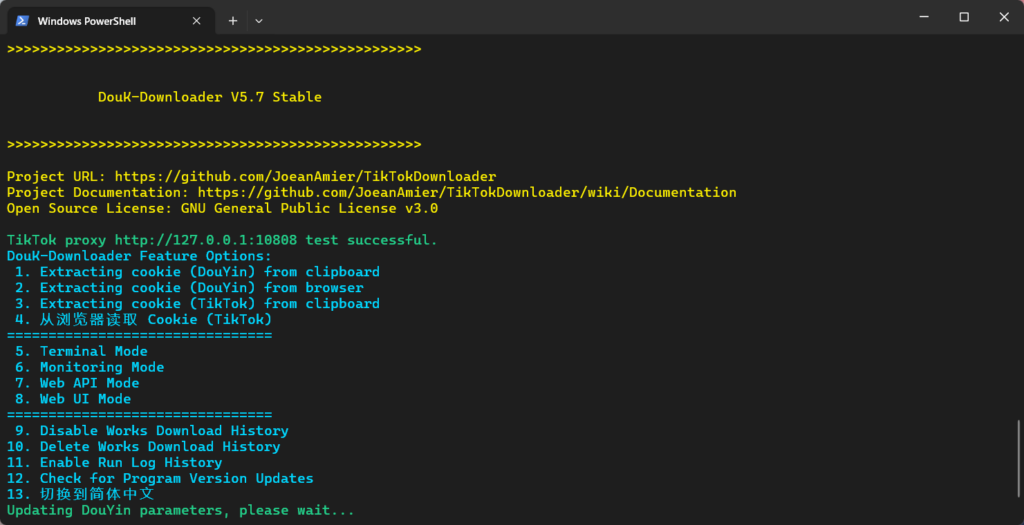
Out of the box, TikTokDownloader ships with a rich terminal interactive mode that guides users through common tasks such as batch downloading link lists, accounts, liked works, and favorites. The author explicitly recommends using Windows Terminal on modern Windows systems, but the program runs wherever Python 3.12 is available.
Within this mode you navigate menus like “Terminal interactive mode” → “Batch download link works (general)” → “Manually enter the link of the works to be collected,” then paste TikTok or Douyin URLs to start downloads. The CLI automatically skips already-downloaded files, maintains an internal record of downloaded IDs, and supports custom rules for filtering works (for example, by publication time or size).
Web API mode (for automation and GUIs)
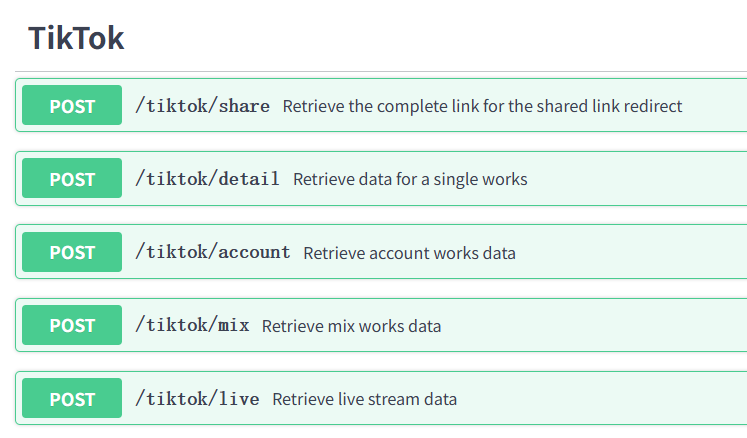
For integrations with analytics pipelines or custom dashboards, TikTokDownloader can run as a Web API service on http://127.0.0.1:5555, exposing auto-generated API docs at /docs and /redoc. The README includes a Python example using httpx.post against the /douyin/comment endpoint to fetch comment data for a specific work across multiple pages.
This API mode is ideal for data engineers who want to orchestrate TikTok data scraping from Airflow, n8n, or custom ETL scripts, and it is also the logical backend for building your own GUI frontends. The project historically offered a Web UI interface, but the code for that mode is under refactor and is not currently updated in the latest builds, so the recommended approach today is terminal/TUI and Web API rather than the legacy Web UI.
Installation and Environment Setup
Prerequisites
To run TikTokDownloader from source you need:
- Python 3.12 (the project specifically targets this interpreter version).
- Git (to clone the repository) or the ability to download and extract source archives.
- A working
ffmpeginstallation if you plan to record live streams (the tooling invokesffmpegto download live video).
The Python dependencies are managed via requirements.txt and installed with pip.
Option 1: Prebuilt executables (Windows/macOS)
For many users the simplest path is to use the precompiled binaries:
- Go to the repository’s Releases or Actions page and download the latest compiled package for your platform.
- Extract the archive.
- Inside the extracted directory, run the
mainexecutable to start the program. - On macOS, the
mainbinary may need to be launched from the terminal due to platform restrictions; the maintainers note that macOS executables are not fully tested and their usability is not guaranteed.
This route is ideal if you primarily want the CLI experience and do not need to modify the source.
Option 2: Run from source with Python (CLI + Web API)
For maximum flexibility and easier updates, run TikTokDownloader directly from source:
- Clone the repository or download the latest source code (either from the main branch or from a source ZIP bundled with a Release).
- In the project root, create a virtual environment (optional but recommended):
python -m venv venv- Activate the virtual environment:
# Windows PowerShell
.\venv\Scripts\activate.ps1

# Windows CMD
venv\Scripts\activate

# Linux/macOS
source venv/bin/activate- Install dependencies:
pip install -r requirements.txtThis brings in HTTPX, Rich, aiosqlite, aiofiles, lxml, and other libraries used for HTTP calls, terminal UI, and persistence.
- Start the program:
python main.pyor
python .\main.pyThis launches the interactive terminal interface; you can then select terminal mode, Web API mode, or other options from the menu.
Option 3: Docker deployment for API-centric usage
If you prefer containerized deployment, the project publishes Docker images:
- Pull an image (choose one):
docker pull joeanamier/tiktok-downloader
docker pull ghcr.io/joeanamier/tiktok-downloader- Create a container mapping a local volume and host port to the app:
docker run --name ttd \
-p 5555:5555 \
-v tiktok_downloader_volume:/app/Volume \
-it joeanamier/tiktok-downloader- Start or restart the container later with
docker start -i ttdordocker restart -i ttd.
In Docker, some host-integrated features (notably “Get Cookie from Browser”) do not work because the container cannot directly access the host’s file system and browser profiles.
Advanced Configuration: Cookies, Proxies, and Rate Limiting
TikTokDownloader uses authenticated Cookies to access higher-quality media and private or semi-private resources, and to improve the stability of data collection. You typically only need to rewrite Cookies into the configuration file when they expire, not every time you run the program, but updating them often resolves issues where high-resolution media or data cannot be fetched.
The tool provides multiple ways to obtain Cookies:
- Read Cookie from clipboard after following the documented cookie extraction tutorial and copying the relevant string.
- Read Cookie directly from supported browsers (Chromium/Chrome/Edge on Windows require administrator privileges).
Cookies are stored in a configuration file and reused across runs, with QR-code login marked as no longer valid in the current version.
To avoid platform rate limiting and manage network behavior, you can:
- Configure an HTTP proxy via the
proxyparameter insettings.json; if this parameter is not set, no proxy is used. - Adjust
max_pagesfor operations like fetching liked or favorite works so that the tool does not have to traverse an unbounded number of pages, which can be both slow and more likely to trigger anti-scraping controls.
The tool also includes mechanisms for resuming downloads from breakpoints, enforcing file size limits, and ensuring file integrity, which are all useful when running long-lived collection jobs.
Practical Workflows for Data Teams
Batch downloading a creator’s archive
A common scenario is archiving all posts from a TikTok or Douyin creator for later analysis:
- Configure a logged-in Cookie for the platform and account you want to use, ensuring it has access to any private accounts you care about.
- Launch the terminal interactive mode and choose the menu option for downloading account posts and, if needed, liked or favorite works; the tool can batch download posts, likes, favorites, and collections for Douyin accounts, and posts and likes for TikTok accounts.
- Provide the target account information as prompted (typically a profile URL or identifier).
- TikTokDownloader will iterate through the account’s works, download videos/images and covers in high quality, and persist metadata and stats such as likes and favorites to CSV/XLSX/SQLite, automatically skipping files it has already downloaded and supporting incremental account downloads.
This gives you a repeatable way to keep a complete, deduplicated mirror of a creator’s catalog that can feed attribution modeling, content performance analysis, or archival storage.
Extracting full comment datasets for sentiment analysis
For NLP or social listening work, you often need large comment corpora:
- Start TikTokDownloader in Web API mode so that it exposes its HTTP endpoints on
http://127.0.0.1:5555. - Identify the
detail_idof the Douyin work you want to analyze and determine how many comment pages you want to collect. - Use the documented
/douyin/commentendpoint, for example with Python and HTTPX:
from httpx import post

headers = {"token": ""}  # fill if you configured an API token
data = {"detail_id": "0123456789", "pages": 5}
api = "http://127.0.0.1:5555/douyin/comment"
response = post(api, json=data, headers=headers)
comments = response.json()- Persist the resulting JSON as raw files or transform it into tabular form (CSV/XLSX/SQLite) using the tool’s built‑in persistence or your own ETL scripts.
Once ingested, this dataset can power sentiment analysis, topic clustering, toxicity detection, or fine‑tuning domain-specific language models around Douyin discourse.
Monitoring Douyin trends and search results
For content strategy or market research, you can use TikTokDownloader to monitor trending topics:
- Configure the tool with stable Cookies and, if needed, a residential proxy via
settings.jsonto reduce the chance of rate limiting. - Use the terminal interface or Web API endpoints that collect Douyin search results and Hot Board data.
- Store each collection run into SQLite or CSV with timestamps; because the tool can be deployed on private servers and supports remote access via LAN, you can run it on a always-on machine or in a container and orchestrate it from cron or a job scheduler.
Over time, this produces a structured time‑series of which hashtags, sounds, or creators are surfacing, which you can correlate with campaign launches, product releases, or external events.
Ethical and Legal Considerations
The project’s GPLv3-licensed code is fully open-source and free to use, but the maintainers emphasize that all usage is at the user’s own risk and must comply with applicable laws and platform rules. The disclaimer explicitly forbids using the tool to infringe intellectual property (for example, downloading or distributing copyrighted content without authorization) and stresses that users must independently ensure compliance with data protection and other regulations.
When deploying TikTokDownloader, you should:
- Respect TikTok and Douyin Terms of Service and robots-like expectations.
- Avoid scraping private or sensitive data without explicit permission.
- Be transparent when using collected data for research or commercial purposes, and properly attribute sources where applicable.
Why TikTokDownloader Stands Out
Several characteristics make TikTokDownloader particularly compelling for data analysts, social media researchers, and archivists:
- True dual-platform coverage: It unifies TikTok and Douyin pipelines, handling posts, likes, favorites, collections, live streams, and comments in a single toolkit, rather than forcing you to maintain separate scrapers.
- High‑granularity, multi-format output: It exports media, engagement stats, comments, and account metadata, with persistent storage in CSV, XLSX, and SQLite, enabling both lightweight spreadsheets and production‑grade analytical databases.
- Robust, automatable interfaces: Between the interactive CLI, Web API mode, multi-threaded downloads, proxy support, and Docker images, it slots cleanly into modern batch video downloader CLI workflows and social media data collection pipelines.
- Self-hostable and extensible: You can deploy it on private or public servers, use GitHub Actions to build your own binaries, and extend or integrate it as needed thanks to its open-source HTTPX-based architecture.
For anyone looking for a TikTok data scraper or Douyin downloader open-source solution that goes far beyond “save this one video,” TikTokDownloader offers a mature, scriptable ecosystem for large-scale, cross-platform media and metadata harvesting.