

Pi Monorepo: unified AI agent toolkit for coding agents, vLLM pods, and Slack bots

Pi Monorepo is a unified, self-hosted AI agent toolkit that combines a coding agent CLI, multi-provider LLM API, UI libraries, Slack bot, and vLLM pod management into one coherent stack.
Why AI agent tooling is so fragmented
Most AI developers today juggle separate tools: one CLI for coding assistance, another SDK for LLM APIs, ad‑hoc scripts for vLLM pods, and yet another stack for Slack automation.
This fragmentation increases operational risk and slows teams down—every new agent workflow multiplies configuration, observability, and integration overhead.
Pi Monorepo (pi-mono) addresses that problem directly by centralizing the essentials for AI agents—unified LLM access, agent runtime, coding agent CLI, TUI and web UI building blocks, Slack bot, and vLLM pod tooling—into a single TypeScript monorepo.
The project is open source, lives at https://github.com/badlogic/pi-mono, and is already used as the base for other popular agent frameworks like OpenClaw.
What pi-mono is and how it is structured
The root README describes pi-mono as “Tools for building AI agents and managing LLM deployments,” with a set of focused packages:lobstersauce+1
@mariozechner/pi-ai– Unified multi‑provider LLM API (OpenAI, Anthropic, Google, and others).@mariozechner/pi-agent-core– Agent runtime with tool calling and state management.@mariozechner/pi-coding-agent– Interactive coding agent CLI (“pi”) for terminal workflows.@mariozechner/pi-mom– Slack bot that delegates messages to the coding agent, with full bash and file access.github+1@mariozechner/pi-tui– Terminal UI framework with differential rendering.@mariozechner/pi-web-ui– Web components for AI chat interfaces and agent frontends.@mariozechner/pi-pods(and related@mariozechner/pi) – CLI for managing vLLM deployments on GPU pods.
Because all of these are developed together in pi-mono, they share conventions, type systems, and composable abstractions—making it straightforward to move from local coding agent experiments to Slack bots backed by your own vLLM pods.
Unified LLM API for multi-provider orchestration
The @mariozechner/pi-ai package is the core unified LLM API.
It abstracts providers like OpenAI, Anthropic, Google, and others behind a single, strongly typed interface with:
- Automatic model discovery and provider configuration. You can address providers and models by name and have the library handle API endpoints and auth.
- Tool calling as a first-class concept. Only tool‑calling‑capable models are included by design, because the toolkit is optimized for agentic workflows.
- Context objects and hand‑off. Conversations live in a serializable
Contextthat can be passed from one model to another mid‑session. - Streaming and complete APIs. Helpers like
stream()andcomplete()wrap text, tool call, and “thinking” events, with token and cost tracking built in.
In practice, this means you can, for example, start a coding session on your own vLLM pod (via OpenAI‑compatible endpoints) and then hand the same context to an Anthropic or Google model for verification without rewriting your glue code.
Coding agent CLI for terminal-centric workflows
The @mariozechner/pi-coding-agent package exposes the “pi” coding agent—a minimal but highly extensible terminal coding harness.
Pi is installed globally:
npm install -g @mariozechner/pi-coding-agentYou then authenticate via environment variables or an interactive login:
export ANTHROPIC_API_KEY=sk-ant-...
pi

# Or:
pi
/login   # then select provider
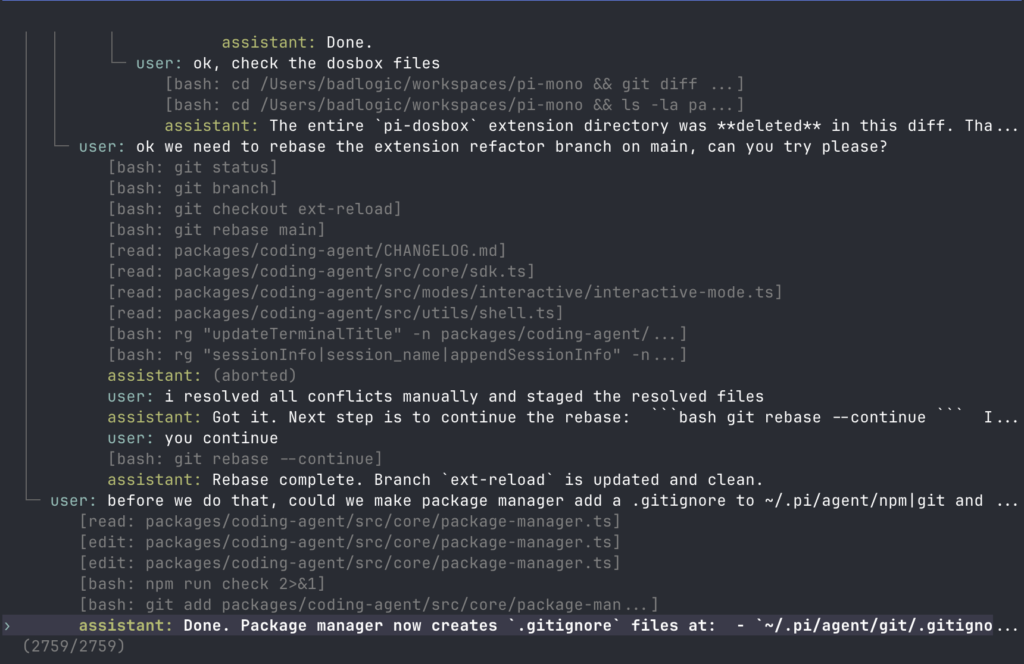
Pi is deliberately “anti‑framework”: instead of shipping a rigid agent with sub‑agents and plan modes, it gives the model four core tools (read, write, edit, bash) and lets you extend behavior through extensions, skills, prompt templates, themes, and Pi packages.
It runs in multiple modes—interactive REPL, print/JSON, RPC for process integration, and an SDK for embedding—that fit well into DevOps and editor workflows.
For AI developers, this becomes a powerful coding agent CLI that can refactor, understand, and generate code inside a shell, while staying fully scriptable and source‑controlled.
TUI and web UI libraries for custom interfaces
Pi-mono also includes libraries for building custom UIs around your agents:
@mariozechner/pi-tui– A minimal terminal UI framework supporting containers, text components, editors, select lists, autocomplete, and markdown rendering with differential rendering for flicker‑free updates.@mariozechner/pi-web-ui– A web UI toolkit providing chat components, message types, event streaming support, and integration points for tools and provider wiring.
With these, you can build consistent terminal dashboards for your coding agent or create browser‑based chat frontends that consume the same unified LLM API and agent runtime.
Local installation from the pi-mono repository
For full control over all packages, you can clone and work directly from the monorepo.
Cloning and bootstrapping
git clone https://github.com/badlogic/pi-mono.git
cd pi-mono

npm install       # Install all dependencies
npm run build     # Build all packages
npm run check     # Lint, format, and type check
./test.sh         # Run tests (skips LLM-dependent tests without API keys)
The root README notes that npm run check depends on a prior npm run build, because the web UI package uses tsc and expects compiled .d.ts files from dependencies.
From here you can run the pi coding agent directly from source with the helper script:
./pi-test.sh # Run pi from sources (can be run from any directory)This is the recommended path if you want to change the unified LLM API, extend the agent runtime, or contribute changes upstream.
Installation via npm packages
If you only need specific capabilities, you can install packages individually instead of cloning the repo:
# Unified LLM API
npm install @mariozechner/pi-ai

# Coding agent CLI (global)
npm install -g @mariozechner/pi-coding-agent

# Slack bot
npm install @mariozechner/pi-mom

# TUI / web UI
npm install @mariozechner/pi-tui @mariozechner/pi-web-ui
This keeps your application dependencies focused while still leveraging pi-mono’s shared abstractions.
Containerizing pi-mono with Docker
Pi-mono is a regular Node/TypeScript monorepo, so Dockerizing it follows standard Node patterns: build once, run minimal.
A simple pattern for a “pi coding agent” container:
FROM node:22-slim AS build

WORKDIR /app
COPY package.json package-lock.json ./
RUN npm install

COPY . .
RUN npm run build

FROM node:22-slim
WORKDIR /app

# Optionally create non-root user here

COPY --from=build /app ./

# Provide your API keys at runtime via env vars
ENV ANTHROPIC_API_KEY=changeme

ENTRYPOINT ["npx", "@mariozechner/pi-coding-agent"]
You can then build and run:
docker build -t pi-coding-agent .
docker run -it --rm \
  -e ANTHROPIC_API_KEY=$ANTHROPIC_API_KEY \
  pi-coding-agent
For production, you’d add non‑root users, read‑only file systems, and volume mounts for workspace directories, but the core idea is that pi-mono has no unusual runtime requirements beyond a recent Node.js and your chosen LLM API keys.
Configuring vLLM pods for private inference with pi-pods
Pi-mono’s vLLM integration is exposed via the @mariozechner/pi / @mariozechner/pi-pods CLI, designed to manage GPU pods with automatic vLLM setup and OpenAI‑compatible endpoints.
Installing the pods CLI
npm install -g @mariozechner/pi
# or
npm install -g @mariozechner/pi-pods
According to the npm documentation, pi can:pt-act-pi-mono.
- Set up vLLM on fresh Ubuntu GPU pods over SSH.
- Configure agent‑friendly models (Qwen, GPT‑OSS, GLM, etc.) with proper tool‑calling support.
- Manage multiple models on a single pod with “smart” GPU allocation and context window settings.
- Expose each model via an OpenAI‑compatible HTTP API.
Setting up a GPU pod
The typical workflow is:
# Configure a new pod reachable via SSH
pi pods setup runpod "ssh root@your-pod-host" --models-path /workspace
# or, with network volume mounts
pi pods setup runpod "ssh [email protected]" --models-path /runpod-volume
You can list and manage pods:
pi pods            # List configured pods
pi pods active gpu-prod   # Set active pod
pi shell gpu-prod         # SSH into pod
Starting vLLM models
Once a pod is configured, you start models with:
pi start meta-llama/Meta-Llama-3-8B-Instruct --name llama8 --memory 50% --context 32k
pi list                      # Show running models
pi logs llama8               # Tail vLLM logs
Predefined model configs include GPU and VRAM checks so that pi warns you if a model will not fit the target pod.
From the unified LLM API perspective, these vLLM instances are just more OpenAI‑compatible endpoints you can address alongside cloud providers.
Integrating the Slack bot with pi-mom
The @mariozechner/pi-mom package provides “mom,” a self‑managing Slack bot that delegates messages to the coding agent and can execute bash commands, read/write files, and install tools.
Installing the bot
npm install @mariozechner/pi-momMom is designed to run in a sandboxed container (strongly recommended) and can manage her own tools and credentials over time.
Slack app setup
The minimal Slack setup flow is:
- Create a new Slack app at https://api.slack.com/apps.
- Enable Socket Mode, and generate an App‑Level Token (
MOM_SLACK_APP_TOKEN) withconnections:write. - Create a Bot Token (
xoxb-…) with scopes likeapp_mentions:read,channels:history,channels:read,chat:write,files:read, andfiles:write. - Install the app to your workspace and copy both tokens.
The slack-bot-minimal-guide.md in the repo demonstrates using only @slack/socket-mode and @slack/web-api to receive events and send messages over WebSockets—no HTTP server required.
You then export the tokens as environment variables (for example MOM_SLACK_APP_TOKEN and MOM_SLACK_BOT_TOKEN) and start mom; she will respond to mentions in channels and DMs, using the pi‑stack under the hood.
Usage scenarios: from refactors to multi-model workflows
Using the coding agent to refactor code
A realistic coding workflow with pi looks like this:
- Start the agent:
piin your project directory. - Ask it to read key files (e.g.
read src/service.ts) and propose a refactor to a cleaner API surface. - Let the model use its
editandwritetools to apply incremental changes, tests, and documentation. - Use pi’s JSON or RPC modes to integrate these steps into CI/CD tasks (for example, automated refactors on branches).
Because pi uses the shared pi-ai backend and pi-agent-core runtime, you can later point it at your own vLLM pods managed via pi pods, without changing the high‑level workflow.
Bridging multiple LLM models with the unified API
The unified LLM API is also well suited to “model routing” scenarios:
- Use an inexpensive model (e.g. an open‑weight model on your pod) for initial code search and summarization.
- Detect when higher‑stakes reasoning is needed (large refactors, security checks) and hand off the same
Contextto a more capable Anthropic or OpenAI model viagetModel(provider, modelName). - Stream partial results for observability (via
stream) while still recording final messages and token/cost usage in the context.
Because tool definitions are shared (TypeBox schemas and Tool objects), both models can call the same tools; you only need to implement them once in your infrastructure layer.
Why pi-mono is a strong choice for AI and DevOps teams
Pi Monorepo is not just another coding agent: it is a cohesive AI agent toolkit that spans from unified multi‑provider LLM access to vLLM pod management and Slack automation, all living in a single, well‑structured TypeScript monorepo.
For AI developers and DevOps engineers who want a self‑hosted, extensible foundation rather than a black‑box SaaS, pi-mono’s combination of coding agent CLI, unified API, TUI/web UI libraries, Slack bot, and vLLM pods offers a practical, architecture‑driven path to building and operating modern AI agents.








